Flowchart to find the average of numbers (rogue value)
This flowchart shows an algorithm that keeps reading numbers until the user enters the rogue value −1, then prints their average. It also checks for the case where no numbers were entered. It is written for GCSE, A-level and AP Computer Science Principles students and teachers who need to read, trace or write iteration and selection algorithms.
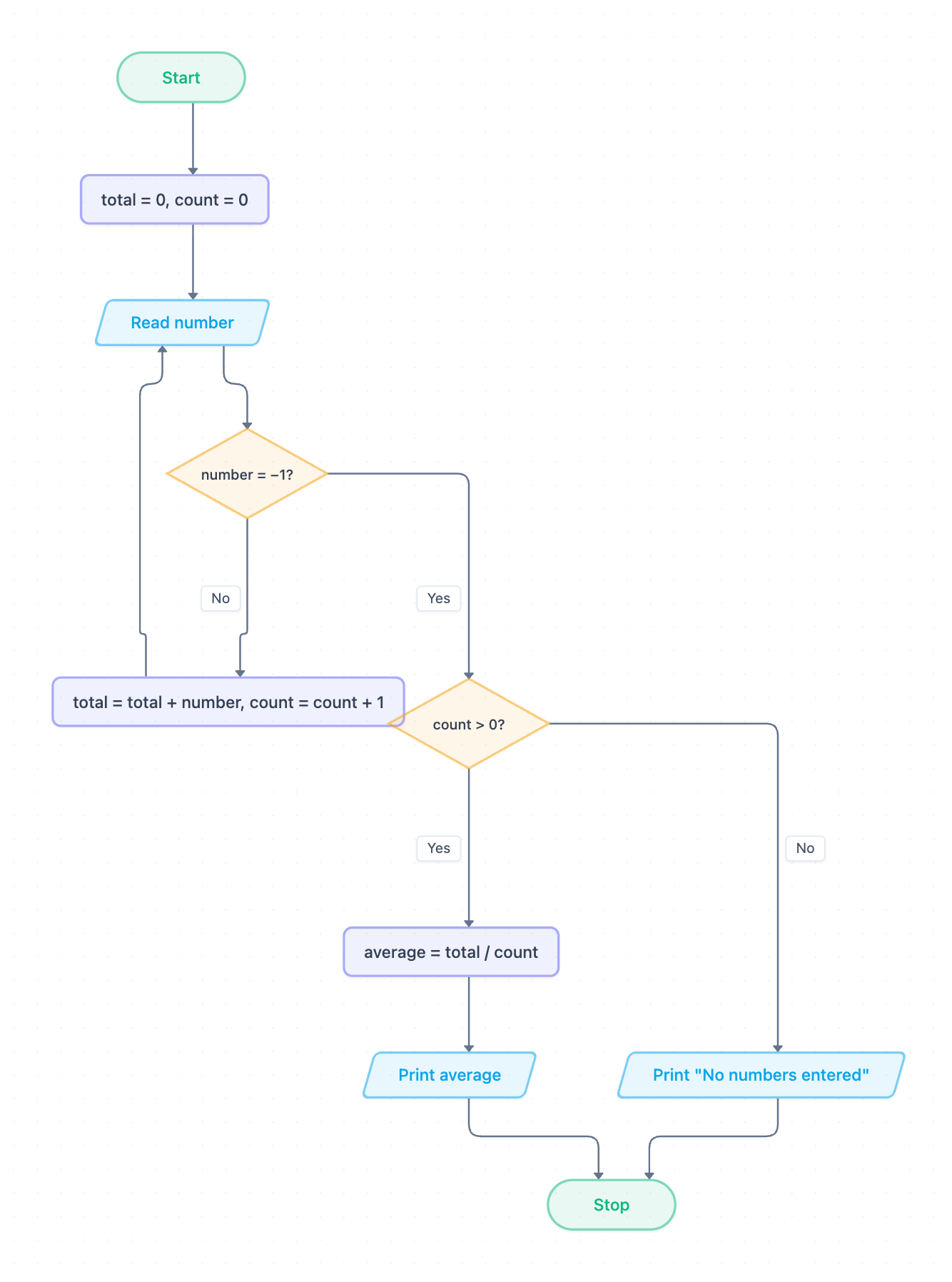
Example: Flowchart for the average of numbers with a rogue value: click to open it in the editor and change it.
How the algorithm works, step by step
- Start, then initialise two variables: total = 0, count = 0.
- Read number. This is an input step, drawn as a parallelogram.
- Decision number = −1? If No, the number is real data. Go to step 4. If Yes, the rogue value has been entered, so leave the loop and go to step 5.
- total = total + number, count = count + 1, then return to Read number. This loop is the iteration.
- Decision count > 0? This is selection that guards against dividing by zero.
- If Yes: average = total / count, then Print average.
- If No: Print "No numbers entered".
- Stop.
The rogue value (also called a sentinel) is a value that cannot be real data. It only signals "stop reading". The rogue value is checked straight after each input, so it is never added to total or counted.
Pseudocode (OCR Exam Reference Language style)
total = 0
count = 0
number = int(input("Enter a number (-1 to stop): "))
while number != -1
    total = total + number
    count = count + 1
    number = int(input("Enter a number (-1 to stop): "))
endwhile
if count > 0 then
    average = total / count
    print(average)
else
    print("No numbers entered")
endif
The flowchart has a single Read number box, which you reach both before the loop and after each pass. In pseudocode this becomes two input lines: one before the while loop and one at the end of its body.
Trace table
Input: 4, 7, 10, −1
| Pass | number | total | count | average | Output |
|---|---|---|---|---|---|
| Initialise | 0 | 0 | |||
| 1 | 4 | 4 | 1 | ||
| 2 | 7 | 11 | 2 | ||
| 3 | 10 | 21 | 3 | ||
| Exit loop | −1 | 21 | 3 | 7 | 7 |
When −1 is read, number = −1? is Yes and count > 0? is Yes. The algorithm then calculates 21 / 3 = 7 and prints it. If −1 were the very first input, count would stay 0 and the output would be "No numbers entered".
How to adapt it for your project
- Change the rogue value (for example to 0 or 999) in the number = −1? decision. Choose a value that can never be valid data.
- Add validation after Read number, such as rejecting marks outside 0–100, using an extra decision that loops back to the input.
- Track a maximum or minimum by adding a variable and a comparison inside the loop.
- Round the result before Print average, for example to 2 decimal places.
- Replace the rogue value with a count-controlled loop if the user enters how many numbers there are first.
Tip: Common exam mistake: adding the number to total before checking for the rogue value. With the input above, this wrongly includes −1 and gives total 20 and count 4, so average 5 instead of 7. Always test for the rogue value before processing the number. Also keep the count > 0 check so the algorithm never divides by zero.
Frequently asked questions
What is a rogue value in a flowchart?
A rogue value (or sentinel) is a special input that signals the end of the data, such as −1 in this flowchart. It is checked for but never included in the calculation.
Why does the flowchart check count > 0 before calculating the average?
If the first input is the rogue value, count is still 0, and total / count would cause a division-by-zero error. The check prints "No numbers entered" instead.
Is this algorithm an example of iteration or selection?
It uses both. The loop back to Read number is iteration (a condition-controlled loop). The decisions number = −1? and count > 0? are selection.
Make your own flowchart with AI →