Binary search flowchart, pseudocode and trace table
This flowchart shows binary search. The algorithm finds a target value in a sorted list by checking the middle item and throwing away half of the list on each pass. It is written for GCSE, A-level and AP CSP students and teachers who need to read, write and trace the algorithm in exam style.
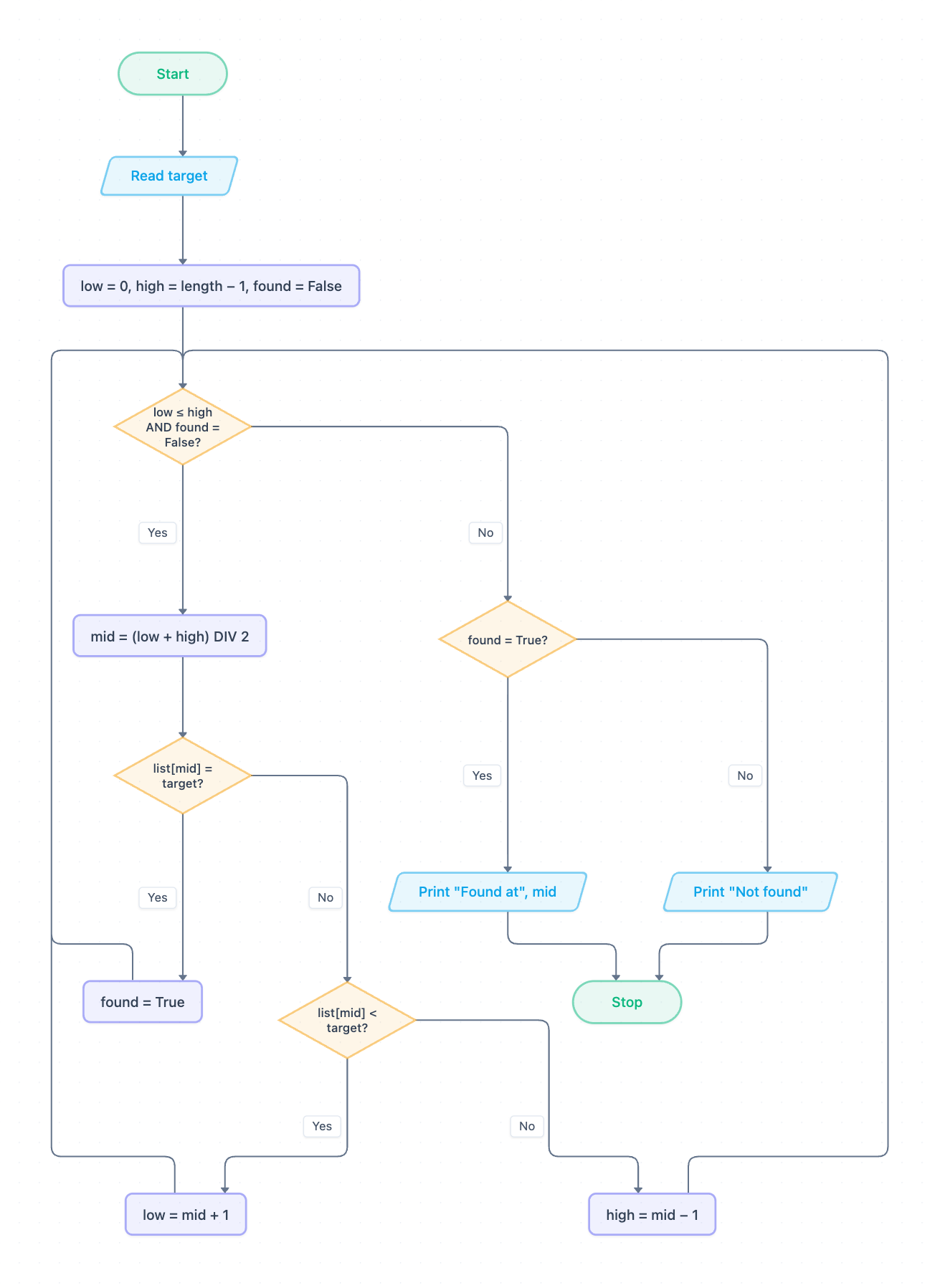
Example: Flowchart for binary search: click to open it in the editor and change it.
How the flowchart works, step by step
- Start, then Read target: the value to search for is input.
- Initialise the variables: low = 0, high = length − 1, found = False.
- Decision low ≤ high AND found = False? This controls the loop (iteration). If Yes, carry on. If No, go to step 8.
- Calculate mid = (low + high) DIV 2. DIV is integer division, so the result is always a whole number.
- Decision list[mid] = target? If Yes, set found = True and return to the loop condition.
- If No, decision list[mid] < target? If Yes, the target must be in the upper half, so low = mid + 1. If No, it must be in the lower half, so high = mid − 1. Both branches return to the loop condition.
- The loop repeats until the target is found or low passes high, which means the search area is empty.
- Decision found = True? If Yes, Print "Found at", mid. If No, Print "Not found". Then Stop.
The three diamonds after the loop condition show selection inside iteration. This nesting is exactly what exam questions ask you to identify.
Pseudocode (OCR Exam Reference Language)
This assumes list is already stored and sorted in ascending order.
target = int(input("Enter target"))
low = 0
high = list.length - 1
found = False
while low <= high AND found == False
    mid = (low + high) DIV 2
    if list[mid] == target then
        found = True
    elseif list[mid] < target then
        low = mid + 1
    else
        high = mid - 1
    endif
endwhile
if found == True then
    print("Found at " + str(mid))
else
    print("Not found")
endif
Trace table
Input: list = [3, 8, 12, 19, 25, 31, 40] (length 7), target = 25. Each row shows the values at the end of that pass. The output is printed after the loop ends.
| Pass | low | high | mid | list[mid] | found | Output |
|---|---|---|---|---|---|---|
| Start | 0 | 6 | False | |||
| 1 | 4 | 6 | 3 | 19 | False | |
| 2 | 4 | 4 | 5 | 31 | False | |
| 3 | 4 | 4 | 4 | 25 | True | Found at 4 |
Pass 1: 19 < 25, so low becomes 4. Pass 2: 31 is not less than 25, so high becomes 4. Pass 3: list[4] = 25, so found becomes True. The loop condition is now false and the algorithm prints Found at 4. It took only three comparisons, where a linear search would have taken five.
How to adapt it for your project
- Add validation after Read target, for example checking that the input is a whole number.
- Search a list of strings, such as names, instead of numbers. The comparisons still work as long as the list is in alphabetical order.
- Count the passes with a comparisons variable to compare binary search with linear search.
- Replace the loop with a recursive version for A-level, passing low and high as parameters.
Tip: Common exam mistake: writing low = mid or high = mid instead of mid + 1 and mid − 1. The middle item has already been checked, so it must be excluded. If it isn't, the search area can stop shrinking and the loop never ends. Also remember that binary search only works on a sorted list.
Frequently asked questions
Why does binary search need a sorted list?
The algorithm decides which half to discard by comparing list[mid] with the target. That only works if every item to the left is smaller and every item to the right is larger.
What does DIV mean in the binary search flowchart?
DIV is integer division: it divides and drops any remainder. For example, (0 + 6) DIV 2 = 3 and (4 + 5) DIV 2 = 4, so mid is always a valid index.
When does the binary search loop stop?
It stops when found becomes True or when low becomes greater than high. The second case means there are no items left to check, so the flowchart prints "Not found".
Make your own flowchart with AI →