Linear search flowchart, pseudocode and trace table
This flowchart shows a linear search. The algorithm checks each item in a list in order until it finds the target or runs out of items. It is written for GCSE, A-level and AP Computer Science Principles students and teachers who need to read, write and trace search algorithms.
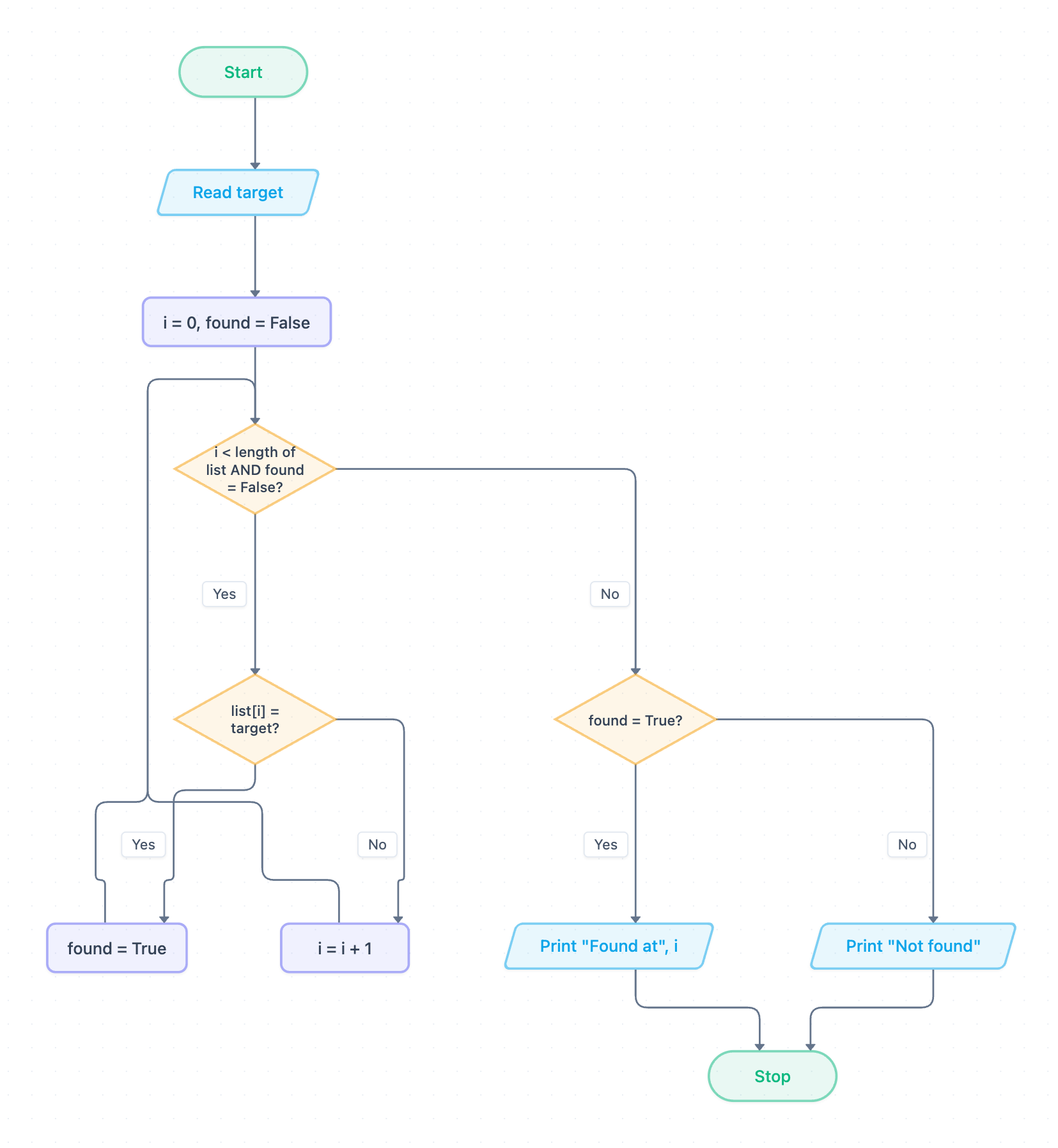
Example: Flowchart for linear search: click to open it in the editor and change it.
How the flowchart works, step by step
- Start, then Read target. This is the input: the value you are looking for. The list is assumed to already hold the data.
- i = 0, found = False. These are the starting values. i is the index of the current item and found is a Boolean flag.
- Decision i < length of list AND found = False? This is the loop condition. If both parts are true, the loop runs again (iteration). If either part is false, the loop ends.
- Decision list[i] = target? This is selection. If Yes, set found = True. If No, do i = i + 1 to move to the next item. Both branches go back to the loop condition.
- When the loop ends, decision found = True? chooses the output. Yes leads to Print "Found at", i and No leads to Print "Not found". Both paths then reach Stop.
When a match is found, i is not increased, so it still holds the position of the match. Indexes start at 0.
Exam-style pseudocode (OCR Exam Reference Language)
// list already holds the data
target = int(input("Enter target: "))
i = 0
found = False
while i < list.length AND found == False
    if list[i] == target then
        found = True
    else
        i = i + 1
    endif
endwhile
if found == True then
    print("Found at", i)
else
    print("Not found")
endif
Trace table
Input: list = [7, 3, 9, 4] (length 4), target = 9. Each row shows the values at the end of that pass through the loop.
| Pass | target | i | found | list[i] compared | Output |
|---|---|---|---|---|---|
| Start | 9 | 0 | False | – | |
| 1 | 9 | 1 | False | 7 | |
| 2 | 9 | 2 | False | 3 | |
| 3 | 9 | 2 | True | 9 | |
| Loop ends | 9 | 2 | True | – | Found at 2 |
After pass 3, found is True, so the loop condition is false and the loop stops. The output decision then prints the index, 2.
How to adapt it for your project
- Add validation after Read target, for example rejecting empty input or values of the wrong type.
- To search for several targets, wrap the whole algorithm in an outer loop that stops when the user enters a rogue value such as -1.
- To count every match instead of stopping at the first, remove found from the loop condition and add a counter variable.
- If your exam board uses 1-based indexing, start i at 1 and change the condition to i ≤ length.
Tip: A common exam mistake is putting i = i + 1 outside the if…else, so it runs on every pass. The loop still stops, but i has already moved past the match. With the input above, the program would wrongly print "Found at 3" instead of "Found at 2".
Frequently asked questions
What is a linear search in GCSE computer science?
A linear search checks each item in a list one at a time, from the first, until it finds the target or reaches the end. It works on unsorted lists, unlike a binary search.
Why does the linear search flowchart use a found variable?
The Boolean flag found lets the loop stop as soon as the target is matched, and the final decision uses it to choose between "Found at" and "Not found".
How many comparisons does a linear search make?
In the worst case it makes one comparison per item, so a list of n items needs n comparisons. In the trace above, 9 was found after 3 comparisons.
Make your own flowchart with AI →