Password check flowchart with 3 attempts
This flowchart shows an algorithm that asks for a password and allows up to three wrong tries before the account is locked. It uses a counter variable, two decisions (selection) and a loop back to the input (iteration). It is designed for GCSE, A-level and AP Computer Science Principles students and teachers practising flowcharts, pseudocode and trace tables.
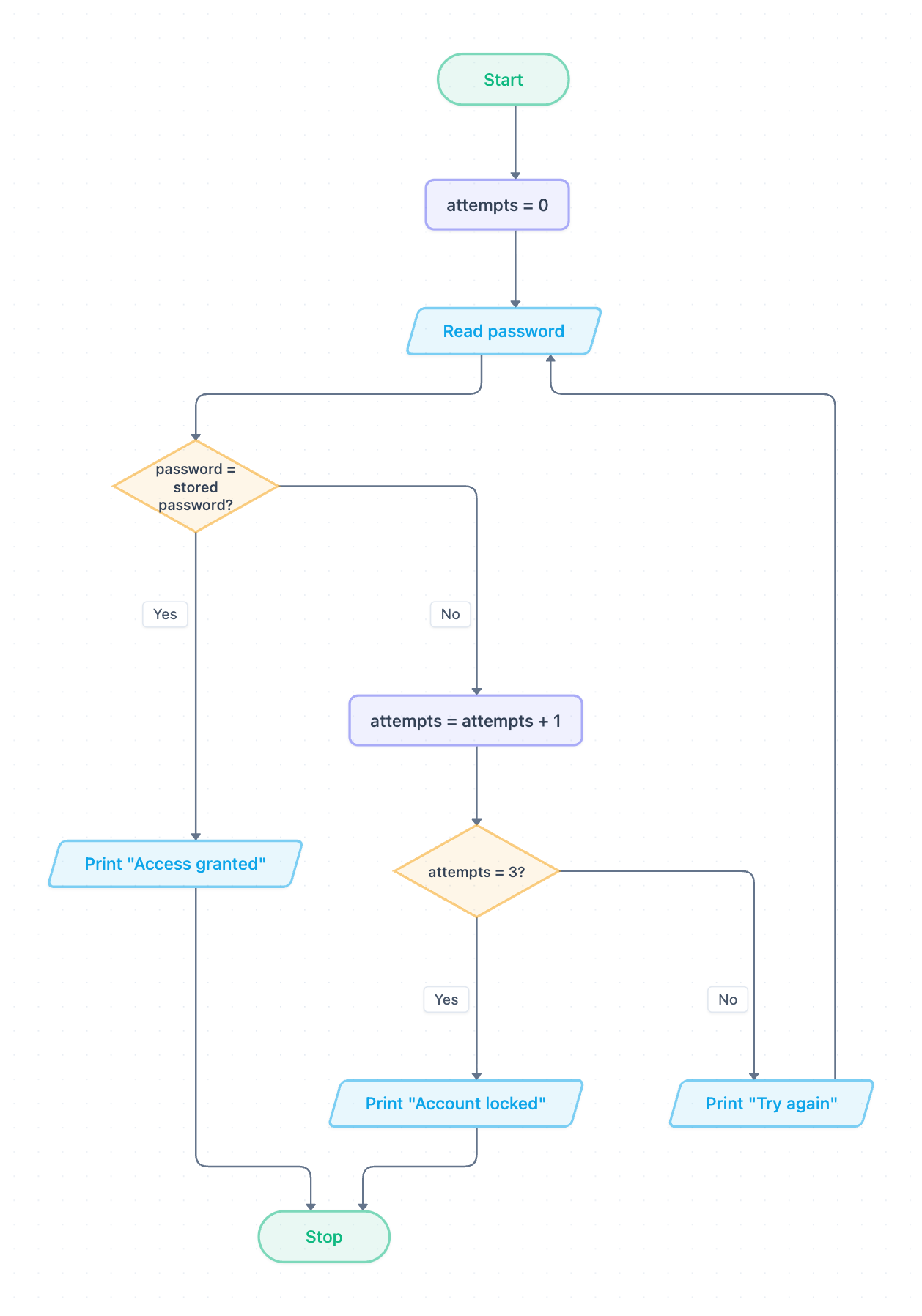
Example: Flowchart for a password check with 3 attempts: click to open it in the editor and change it.
How the algorithm works, step by step
- Start, then set the counter attempts = 0.
- Read password: the user types a guess (input).
- Decision password = stored password? If Yes, output Print "Access granted" and go to Stop.
- If No, increment the counter: attempts = attempts + 1.
- Decision attempts = 3? If Yes, output Print "Account locked" and go to Stop.
- If No, output Print "Try again" and loop back to Read password. The counter is not reset.
There are two ways to reach Stop: a correct password or a third wrong one. The variable attempts only goes up after a wrong guess, so it counts failures, not total guesses.
Pseudocode (OCR Exam Reference Language style)
OCR pseudocode has no break statement, so a Boolean flag finished controls the while loop. The flowchart shows this with its two arrows into Stop. storedPassword is assumed to be set already.
attempts = 0
finished = false
while finished == false
    password = input("Enter password")
    if password == storedPassword then
        print("Access granted")
        finished = true
    else
        attempts = attempts + 1
        if attempts == 3 then
            print("Account locked")
            finished = true
        else
            print("Try again")
        endif
    endif
endwhile
Trace table
Test data: stored password is cat. The user enters dog, then fish, then cat. attempts starts at 0. Each row shows the values at the end of one pass through the loop.
| Pass | password | password = stored? | attempts | Output |
|---|---|---|---|---|
| 1 | dog | No | 1 | Try again |
| 2 | fish | No | 2 | Try again |
| 3 | cat | Yes | 2 | Access granted |
Note that attempts stays at 2 on pass 3. The correct guess skips the increment, so a right answer on the third try still gets in. With dog, fish, bird, pass 3 would set attempts to 3 and output Account locked instead.
How to adapt it for your project
- Change the limit by editing the attempts = 3? decision. A constant such as MAX_ATTEMPTS makes this easier to maintain.
- Show the remaining tries by changing Print "Try again" to print 3 − attempts.
- Add validation before the comparison, for example a length check that rejects an empty input without using up an attempt.
- For a username and password login, add a second input and combine both checks in the first decision using AND.
Tip: Common exam mistake: drawing the "Try again" arrow back to attempts = 0 instead of Read password. This resets the counter on every pass, so the account never locks and the loop can run forever. Always loop back to the input, below the initialisation.
Frequently asked questions
How do you make a password flowchart with 3 attempts?
Set a counter to 0, read the password and compare it with the stored one. If it is wrong, add 1 to the counter and check whether it equals 3. Lock the account if it does, otherwise loop back to the input.
Is this algorithm an example of iteration or selection?
It uses both. The two diamonds are selection, and the arrow from "Try again" back to "Read password" is iteration. In pseudocode this becomes a while loop containing nested if statements.
Why does the pseudocode use a variable that is not in the flowchart?
The flowchart can jump straight to Stop from two places, but exam-style pseudocode has no break statement. A Boolean flag such as finished does the same job by ending the while loop.
Make your own flowchart with AI →