Number guessing game flowchart and pseudocode
This flowchart shows a classic number guessing game. The computer picks a secret number from 1 to 100, and the player keeps guessing until they get it right, with a hint after each wrong guess. It is written for GCSE, A-level and AP Computer Science Principles students and teachers who want to practise iteration, selection, counters and trace tables.
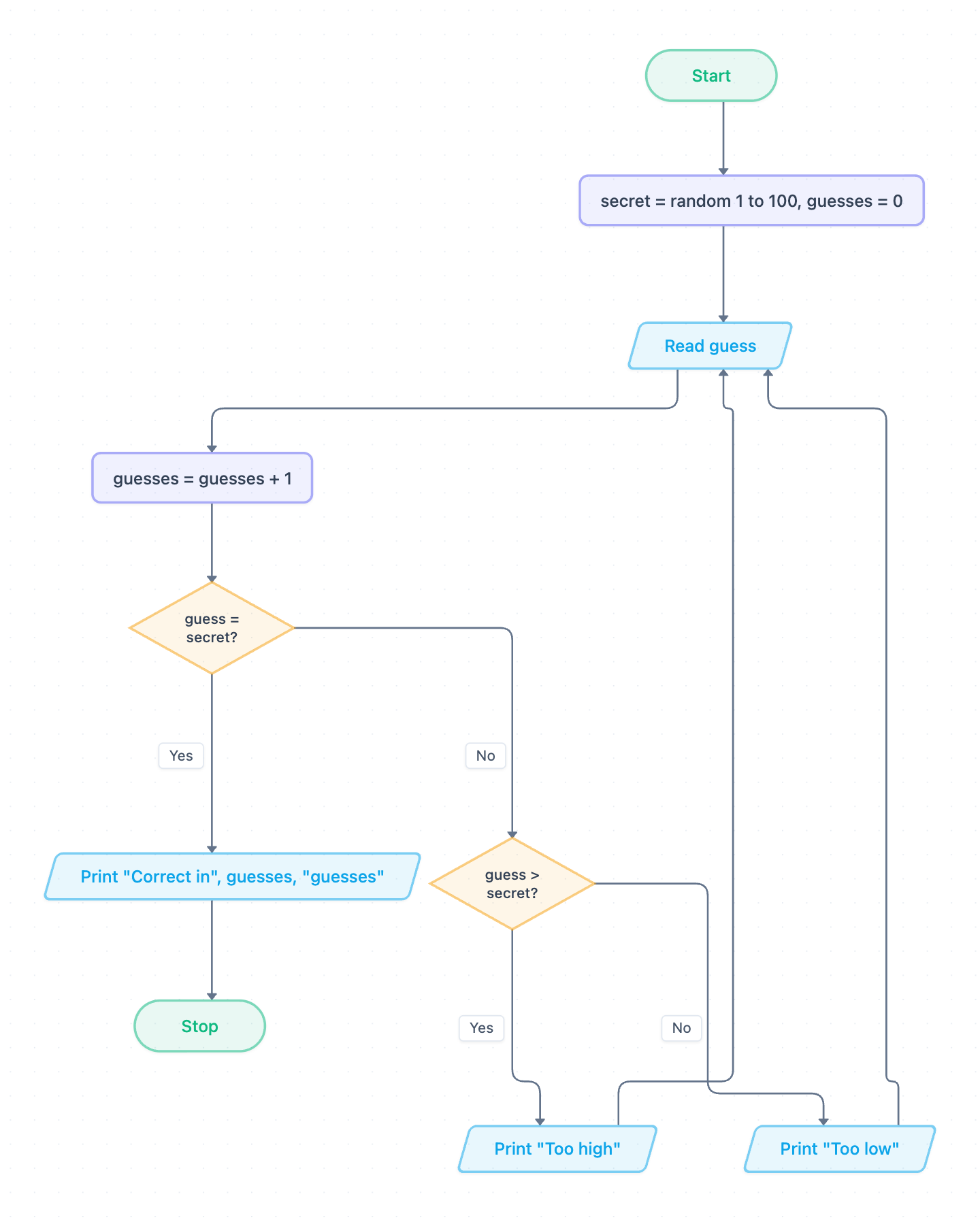
Example: Flowchart for a number guessing game: click to open it in the editor and change it.
How the algorithm works, step by step
- Start, then initialise two variables: secret = random 1 to 100 and guesses = 0.
- Read guess: input the player's number.
- guesses = guesses + 1: the counter goes up on every guess, right or wrong.
- Decision guess = secret? If Yes, Print "Correct in", guesses, "guesses" and go to Stop.
- If No, decision guess > secret? If Yes, Print "Too high". If No, Print "Too low".
- Both hint outputs loop back to Read guess. This is the iteration.
The two diamonds are selection. The arrows from the hint outputs back to Read guess make a condition-controlled loop. The loop only ends when guess = secret? is true.
Pseudocode (OCR Exam Reference Language style)
The flowchart reads a guess before it tests anything. To match that with a while loop, this version reads the first guess before the loop starts (a priming read). It then reads again at the end of each pass. The while condition is the guess = secret? diamond reversed.
secret = random(1, 100)
guesses = 0
guess = int(input("Enter your guess: "))
guesses = guesses + 1
while guess != secret
    if guess > secret then
        print("Too high")
    else
        print("Too low")
    endif
    guess = int(input("Enter your guess: "))
    guesses = guesses + 1
endwhile
print("Correct in", guesses, "guesses")
Trace table
Assume secret = 42. The player enters 50, then 25, then 42.
| Pass | secret | guess | guesses | guess = secret? | guess > secret? | Output |
|---|---|---|---|---|---|---|
| Init | 42 | – | 0 | – | – | |
| 1 | 42 | 50 | 1 | No | Yes | Too high |
| 2 | 42 | 25 | 2 | No | No | Too low |
| 3 | 42 | 42 | 3 | Yes | – | Correct in 3 guesses |
How to adapt it for your project
- Validation: after Read guess, add a decision such as "guess < 1 or guess > 100?". If it is true, print an error and read again without adding to the counter.
- Rogue value: let the player enter 0 to give up. Add a decision straight after the read that goes to Stop.
- Guess limit: add a decision "guesses = 10?" so the game ends with "Out of guesses". The loop then has two exit conditions.
- Difficulty: replace 100 with a variable called max, entered at the start.
- Open and edit the diagram to add these shapes, then update your pseudocode and trace table to match.
Tip: Common exam mistake: putting guesses = guesses + 1 only in the "Too high" and "Too low" branches. The correct guess then never gets counted, and the program prints "Correct in 2 guesses" for the trace above. Increment once per input, straight after the read, as the flowchart does. Also never reset guesses to 0 inside the loop.
Frequently asked questions
Is a number guessing game an example of iteration or selection?
It uses both. The loop back to Read guess is iteration (condition-controlled). The guess = secret? and guess > secret? diamonds are selection.
Why does the pseudocode read the guess twice?
The flowchart reads a guess before it checks it, but a while loop tests its condition first. A priming read before the loop and another read at the end of each pass give exactly the same behaviour. A do…until loop would also work.
How do you write a trace table for a random number?
State a fixed value for the random number before you start, such as secret = 42. Then fill one row per pass of the loop using a set list of inputs.
Make your own flowchart with AI →