ER diagram for a blog (database design)
This ER diagram models a simple blog database with five tables: users, posts, comments, tags and the post_tags join table. It shows each table's primary and foreign keys and how authors, articles, comments and tags connect. It suits students learning database design and developers starting a blog or CMS schema.
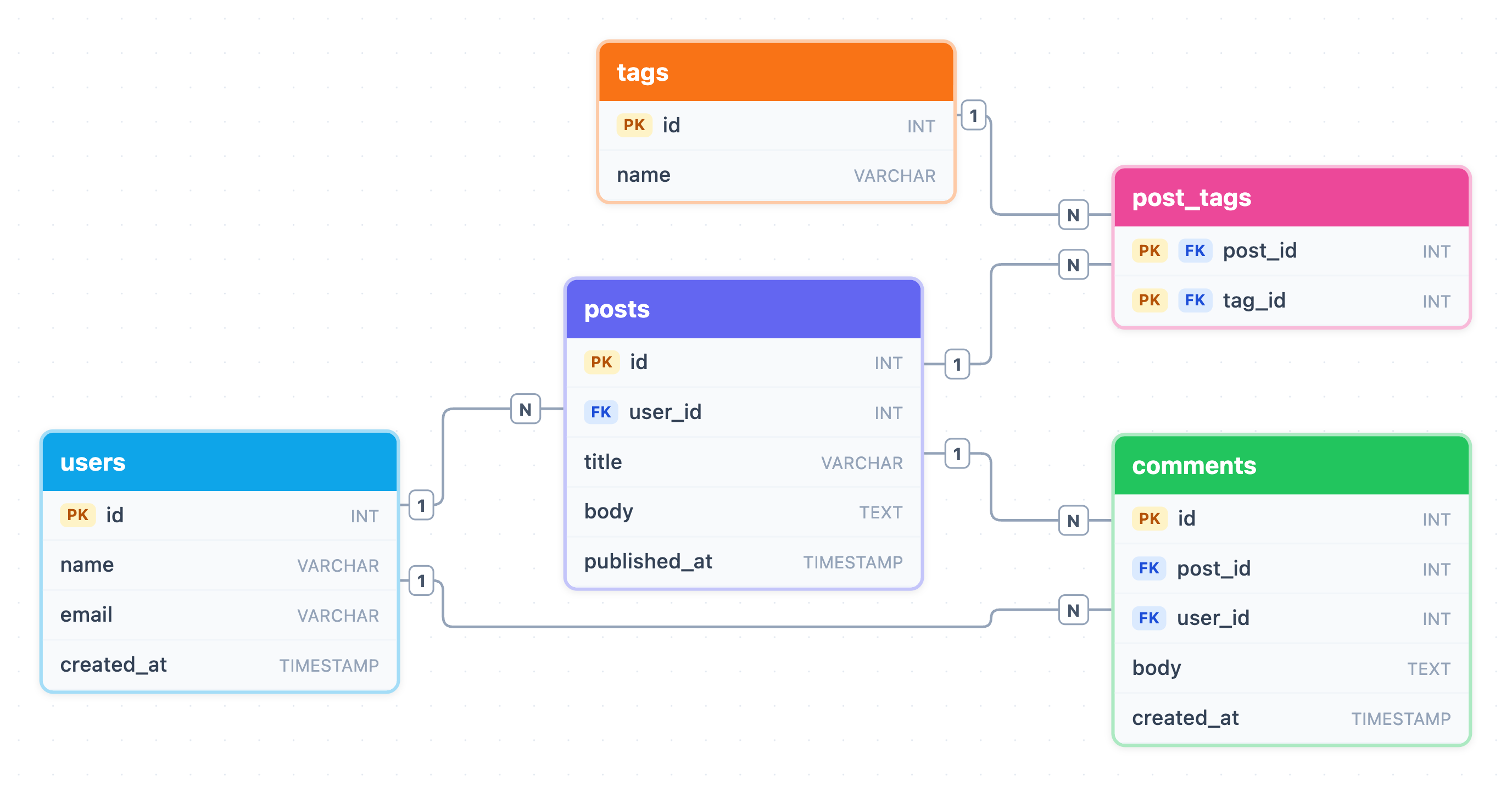
Example: ER diagram for blog: click to open it in the editor and change it.
Entities and key attributes
| Entity | Primary key | Other attributes |
|---|---|---|
| users | id (INT) | name, email, created_at |
| posts | id (INT) | user_id (FK), title, body, published_at |
| comments | id (INT) | post_id (FK), user_id (FK), body, created_at |
| tags | id (INT) | name |
| post_tags | post_id + tag_id (composite) | both columns are also foreign keys |
Relationships and cardinality
- users → posts (1:N): one user writes many posts, and each post has one author through posts.user_id.
- posts → comments (1:N): one post can have many comments, linked by comments.post_id.
- users → comments (1:N): one user can write many comments, linked by comments.user_id.
- posts ↔ tags (M:N): a post can have many tags and a tag can label many posts. The post_tags table resolves this into two 1:N links, one to posts and one to tags.
The composite primary key on post_tags (post_id, tag_id) stops the same tag from being attached to the same post twice.
How to adapt it for your project
- Add a categories table if posts belong to one section. Give posts a category_id foreign key for a 1:N link.
- Support threaded replies by adding a nullable parent_id to comments that points back to comments.id.
- Add a status or draft flag to posts. Right now a NULL published_at is the only way to mark a draft.
- Add a unique slug to posts and tags for clean URLs, and make users.email unique.
- Open and edit the diagram to rename columns, change types, or add new tables.
Tip: When you build the real database, index the foreign keys (posts.user_id, comments.post_id, comments.user_id, post_tags.tag_id). The common blog queries, like "posts by author" or "posts with tag X", depend on them.
Frequently asked questions
What are the entities in an ER diagram for a blog?
This diagram has five entities: users, posts, comments, tags and post_tags. The post_tags entity is a join table that links posts and tags.
How do you show tags on blog posts in an ER diagram?
Posts and tags have a many-to-many relationship, so you add a join table. Here, post_tags holds post_id and tag_id, and each one is a foreign key to its own table.
Why does the comments table have two foreign keys?
Each comment belongs to one post (post_id) and is written by one user (user_id). Both relationships are 1:N, so the comments table stores a foreign key for each.
Make your own ER diagram with AI →