Input validation flowchart (range check)
This flowchart shows a validation algorithm that keeps asking for an age until the value is between 0 and 120 inclusive. It is aimed at GCSE, A-level and AP Computer Science Principles students and teachers who need to draw, trace or write pseudocode for a range check.
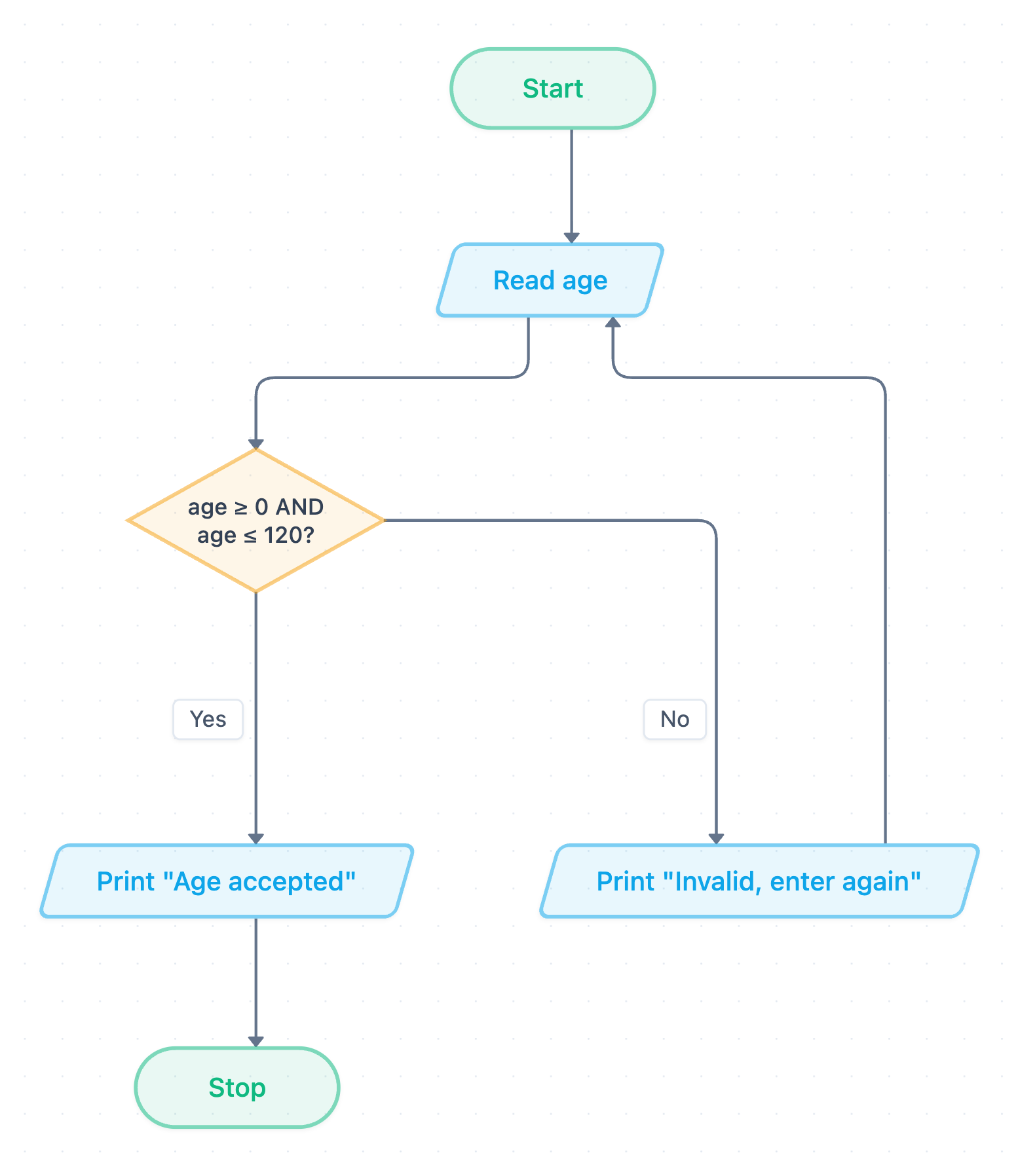
Example: Flowchart for input validation with a range check: click to open it in the editor and change it.
How the flowchart works
The algorithm uses selection (the decision diamond) and iteration (the loop back to the input). It repeats until the input passes the check.
- Start: the algorithm begins.
- Read age: an input step (parallelogram) stores the user's value in the variable age.
- age ≥ 0 AND age ≤ 120?: a decision that checks both ends of the range. AND means both conditions must be true.
- If No: Print "Invalid, enter again" is output, and the flow returns to Read age. This loop is what makes it validation and not just a single check.
- If Yes: Print "Age accepted" is output.
- Stop: the algorithm ends.
Pseudocode (OCR Exam Reference Language)
This version follows the flowchart step for step. The first input happens before the loop. The while condition is the flowchart's test with NOT in front, because the loop runs while the age is invalid.
age = int(input("Enter age"))
while NOT (age >= 0 AND age <= 120)
    print("Invalid, enter again")
    age = int(input("Enter age"))
endwhile
print("Age accepted")
By De Morgan's law, you could also write the condition as while age < 0 OR age > 120. It behaves exactly the same.
Trace table
Test inputs, entered in order: -5, then 130, then 34.
| Pass | age | age ≥ 0 AND age ≤ 120? | Output |
|---|---|---|---|
| 1 | -5 | False | Invalid, enter again |
| 2 | 130 | False | Invalid, enter again |
| 3 | 34 | True | Age accepted |
-5 fails the lower bound, 130 fails the upper bound, and 34 is in range. The algorithm stops after the third pass.
How to adapt it for your project
- Change the variable and limits, for example a mark from 0 to 100 or a month from 1 to 12.
- Keep ≥ and ≤ if the boundary values are allowed. Test the boundaries (0 and 120) and the values just outside them (-1 and 121) as boundary data.
- Add a type check before the range check if the user might type text instead of a number.
- Make the error message say what is allowed, for example "Enter an age from 0 to 120".
- Open and edit the diagram to rename the nodes so they match your exam question.
Tip: Common exam mistake: forgetting to ask for the input again inside the loop. If the second input line is missing, an invalid value never changes and the loop runs forever. In the flowchart, check that the No arrow goes back to Read age, not straight back to the decision.
Frequently asked questions
What is a range check in an input validation flowchart?
A range check tests whether a value lies between a lower and an upper limit. Here, the decision **age ≥ 0 AND age ≤ 120?** accepts only ages from 0 to 120 inclusive.
Why does the validation flowchart use a loop?
The loop sends the user back to **Read age** after an invalid entry. It keeps repeating until valid data is entered, so the rest of the program only ever receives an acceptable age.
Should a range check use AND or OR?
Use AND when testing that a value is valid (age ≥ 0 AND age ≤ 120). Use OR when testing that it is invalid (age < 0 OR age > 120). Using OR in the valid test would let every number through.
Make your own flowchart with AI →