See What a Pull Request Changes, as a Diagram
Reviewing a big pull request usually means scrolling through dozens of files and rebuilding the architecture in your head. We built a GitHub App that does that part for you: it draws what the PR changes, before and after, and posts it as a comment on the PR.
Developers · 2026-11-02 · 5 min read
The problem with file-by-file diffs
GitHub shows you every changed line, in file order. That is perfect for checking code, and terrible for answering the first question a reviewer has: what does this PR actually change in the system? A new service, a new database table, a route that now talks to a payment provider, a module nobody calls any more. Those are spread across many files, and the diff never puts them side by side.
So reviewers either skim, or spend the first ten minutes building a mental map. On a large PR, both lead to the same thing: changes that touch more than anyone noticed.
A diagram on every pull request
Install the AI Flowchart GitHub App on a repository and open a pull request. Within about a minute, aiflowchart[bot] comments with a diagram of the parts of your system the PR touches:
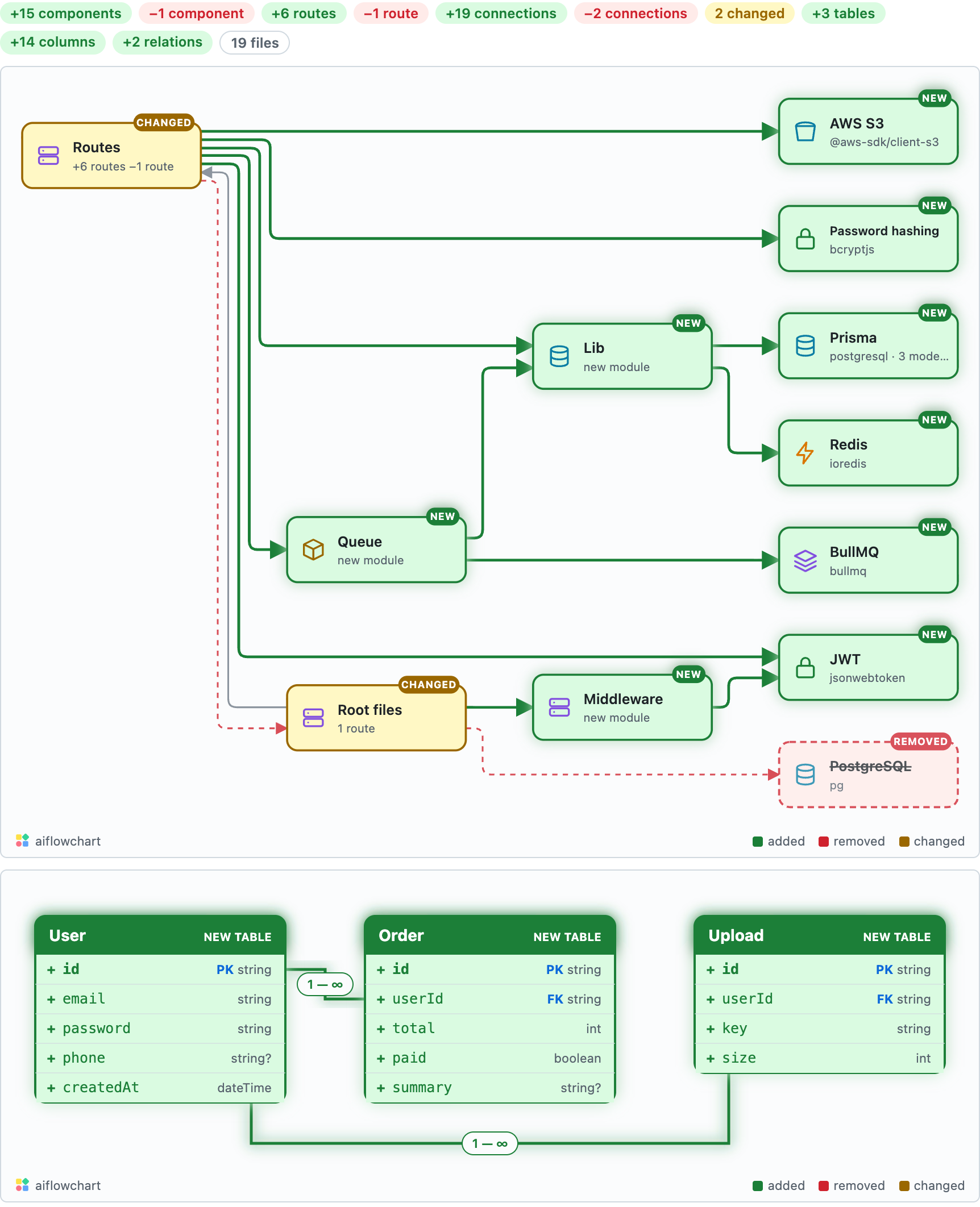
The diagram from a pull request in our test repository. Added parts are green, changed parts are amber, removed parts are red and struck through.
- Added parts glow green, changed parts get an amber tag, and removed parts are red and dashed.
- Count chips at the top say how many parts were added, changed and removed.
- A one-line summary names what changed, and a warning box points out anything to watch, such as a database migration or other code that depends on a removed part.
- The comment is updated in place on every push, so the PR never fills up with bot comments.
The diagram is not drawn by AI. It comes from reading the code at the base and at the head of the PR and comparing the two: modules, routes, databases, queues, caches and external services, and the connections between them. AI only writes the one-line summary and the warning.
Open it, play it, compare it
The Open interactive diagram button opens the full diagram in your browser. Switch between Before, After and Diff, or press Play to watch a dot travel along the new connections, so you can see the new request flow end to end.
Languages and frameworks
The scanner reads JavaScript, TypeScript, Python, Go, Java, Kotlin, C#, PHP and Ruby. It understands common frameworks such as Express, Next.js, NestJS, FastAPI, Flask, Django, Spring, ASP.NET, Laravel and Rails, plus config such as package.json, docker-compose, serverless.yml and Prisma schemas.
If a pull request only changes docs, styles or other files the scanner does not read, the app stays quiet and posts nothing.
What it can and cannot see
- The app asks for read access to code and permission to comment on pull requests. It cannot push code or change settings.
- It downloads the repository to draw the map, then deletes it. Your code is never stored; only the diagram is kept, so the interactive link keeps working.
- Dynamic wiring (routes built at runtime, dependency injection by string name) may not show up. The diagram shows what can be read from the code.
Tip: Big PRs benefit most. The bigger the file list, the more the one-picture view saves you, and the diagram stays small: it keeps the parts that matter most and the lines between them.
Price
The app is free for 20 pull requests a month per installation. If you have AI Flowchart Pro, link the installation to your account and it is unlimited.
Add AI Flowchart to your GitHub repos →
Frequently asked questions
How do I visualize the changes in a GitHub pull request?
Install the AI Flowchart GitHub App on the repository. On every new pull request and every push, it comments a before/after architecture diagram of the parts the PR adds, changes or removes.
Does the GitHub App store my code?
No. It downloads the repository to draw the diagram and deletes it straight after. Only the diagram is saved so the interactive link keeps working.
Does it work with private repositories?
Yes. You choose which repositories the app can access when you install it, public or private.
Is it free?
Yes, for 20 pull requests a month per installation. AI Flowchart Pro makes it unlimited.