Activity diagram for ATM withdrawal
This activity diagram shows how an ATM handles a cash withdrawal, from inserting the card to ejecting it at the end. It covers two decision points, PIN check and balance check, and a shared error path. It suits students learning UML activity diagrams and developers sketching ATM or banking workflows.
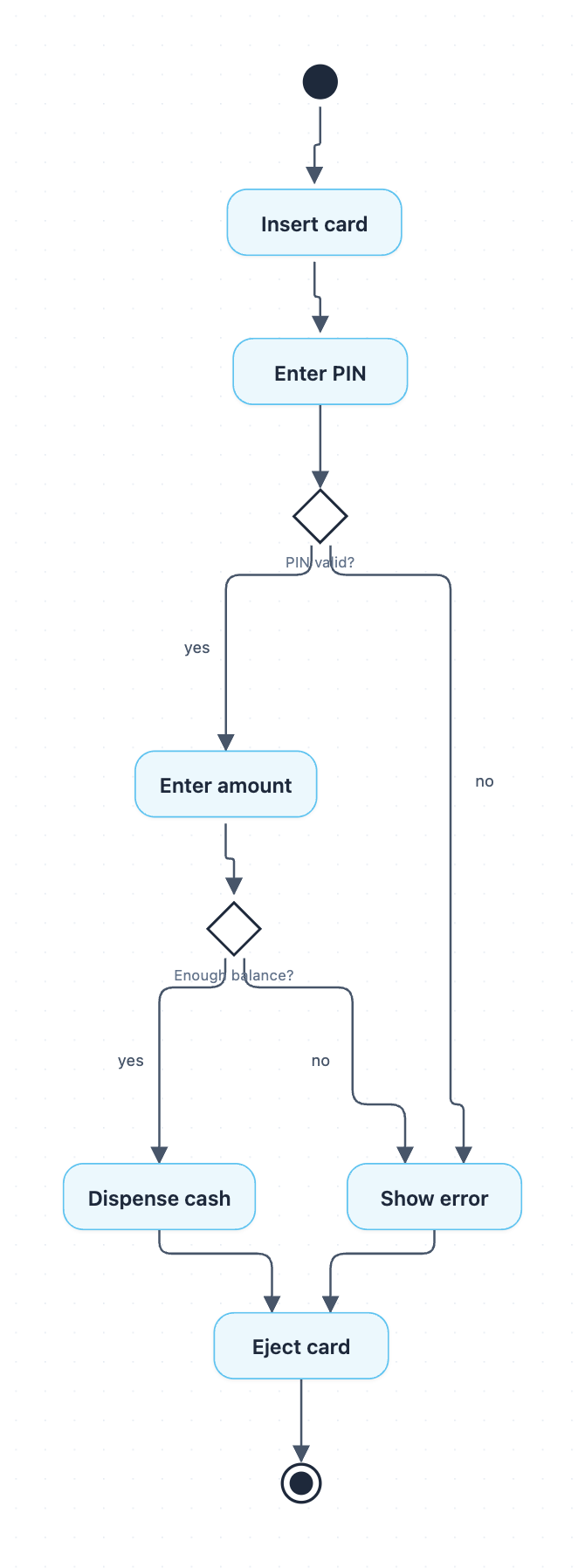
Example: Activity diagram for ATM withdrawal: click to open it in the editor and change it.
Steps of the ATM withdrawal flow
The flow begins at the start node and runs through these actions and decisions in order:
- Insert card: the customer puts their card into the ATM.
- Enter PIN: the customer types their PIN.
- PIN valid?: a decision node. If yes, the flow continues to Enter amount. If no, it goes to Show error.
- Enter amount: the customer chooses how much cash to withdraw.
- Enough balance?: a second decision. If yes, the ATM moves to Dispense cash. If no, it goes to Show error.
- Dispense cash or Show error: one of these two actions runs, depending on the earlier decisions.
- Eject card: both paths meet here, so the card is always returned.
- The flow then reaches the end node.
Key ideas in this diagram
- Decision nodes (PIN valid?, Enough balance?) split the flow using guard labels yes and no.
- Show error is reused by both failed checks. This keeps the diagram small and avoids duplicate actions.
- Every path ends at Eject card, so no customer leaves without their card.
How to adapt it for your project
- Add a retry loop from PIN valid? back to Enter PIN, with a decision that limits attempts (for example, retain the card after three failures).
- Split Show error into separate messages, such as "Wrong PIN" and "Insufficient funds", if your users need clearer feedback.
- Insert actions like Update account balance or Print receipt after Dispense cash.
- Use swimlanes to separate the Customer, ATM, and Bank Server if you want to show who performs each step.
- Open and edit it to rename labels or add steps for deposits or balance enquiries.
Tip: Check that every decision has a labelled outgoing edge for each outcome. Unlabelled branches are a common mistake in exam answers.
Frequently asked questions
What are the main activities in an ATM activity diagram?
This diagram has six actions: Insert card, Enter PIN, Enter amount, Dispense cash, Show error, and Eject card. They are connected by a start node, an end node, and two decisions.
What decisions are used in the ATM withdrawal activity diagram?
There are two decision nodes: PIN valid? and Enough balance? Each has a yes branch that continues the withdrawal and a no branch that leads to Show error.
Why does the card get ejected on both success and failure?
Both Dispense cash and Show error lead to Eject card, so the customer always gets their card back before the flow ends. This merge point makes the diagram simpler and reflects real ATM behaviour.
Make your own activity diagram with AI →