Bug triage process flowchart
This bug triage process flowchart follows a defect from **Bug reported** to **Deploy**. It passes through two decision points that decide whether the bug gets a hotfix or waits for a sprint. It is for support, IT and engineering managers who need to document, hand off and improve how incoming bugs are handled.
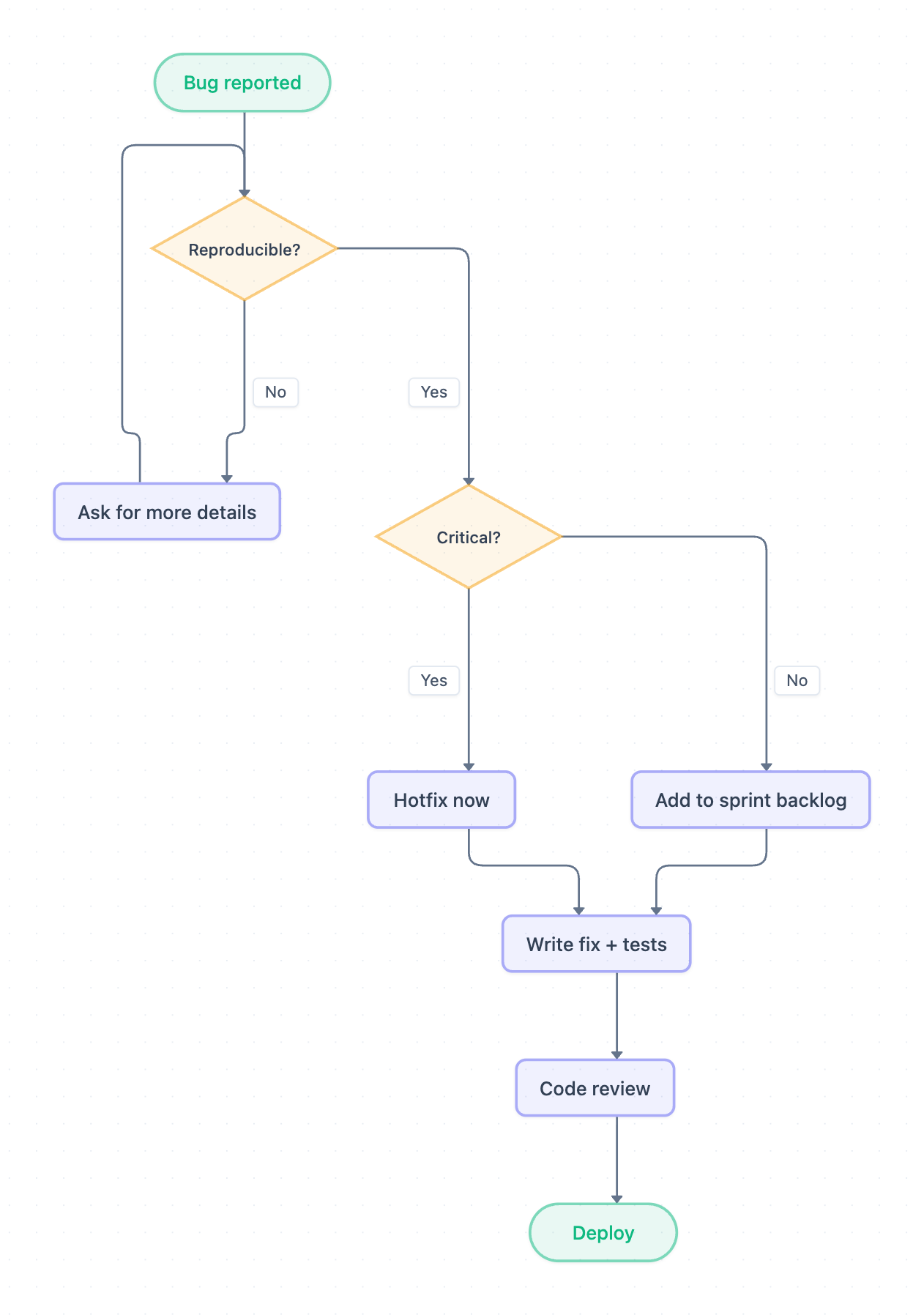
Example: Flowchart for bug triage: click to open it in the editor and change it.
Steps and decisions in order
- Bug reported: the process starts when a bug comes in.
- Reproducible?: first decision. If No, the flow goes to Ask for more details and then loops back to Reproducible? until the bug can be reproduced.
- Critical?: second decision, reached only when the bug is reproducible. Yes leads to Hotfix now. No leads to Add to sprint backlog.
- Write fix + tests: both paths merge here. Even a hotfix still requires tests.
- Code review: the fix is reviewed before release.
- Deploy: the end point.
The diagram does not use swimlanes, so no step names an owner. The main hand-offs are implied at Ask for more details (back to the reporter), at Critical? (a severity call), and between Write fix + tests and Code review (developer to reviewer).
Where this process usually slows down
- The Ask for more details loop: it has no exit or time limit, so unclear reports can cycle for days.
- Critical?: if no one clearly owns the severity decision, bugs wait here or get escalated inconsistently.
- Add to sprint backlog: non-critical bugs can sit untouched with no SLA.
- Code review: both paths funnel into one review step. Hotfixes can queue behind routine work and become a bottleneck.
How to adapt it for your project
- Add swimlanes for your own roles, such as Support (intake), Triage lead (both decisions), Developer (fix and tests) and Reviewer or Release manager (review and deploy).
- Define what counts as critical, and who can approve a Hotfix now. For example, on-call lead approval only, or manager sign-off outside business hours.
- Add an exception path from the Ask for more details loop, such as closing the report after a set number of attempts or days.
- Attach SLA targets to Critical? outcomes so the backlog path has a response-time commitment too.
Tip: Write the owner's role and the SLA directly on each step label, for example "Code review – Senior dev, 4h for hotfixes". That turns the flowchart into a working runbook rather than just a picture.
Frequently asked questions
What are the steps in a bug triage process?
In this flowchart, a bug is reported and checked for reproducibility, then judged for criticality. It then gets either a hotfix or a place in the sprint backlog. Both paths continue through writing the fix and tests, code review, and deploy.
What happens if a bug can't be reproduced?
The flow goes to **Ask for more details** and loops back to the **Reproducible?** decision. Many teams add a time limit or a close-out exception so this loop doesn't run indefinitely.
Do hotfixes skip code review in this flowchart?
No. **Hotfix now** leads to **Write fix + tests** and then **Code review**, the same as backlog bugs. Only the scheduling differs, not the quality checks.
Make your own flowchart with AI →