Employee onboarding process flowchart
This employee onboarding process flowchart follows a new hire from **Offer accepted** through document collection, a background check decision, IT setup, orientation and buddy assignment, ending at a **30-day check-in**. It is for HR, IT and operations managers and team leads who want to map hand-offs, owners and bottlenecks in their own onboarding.
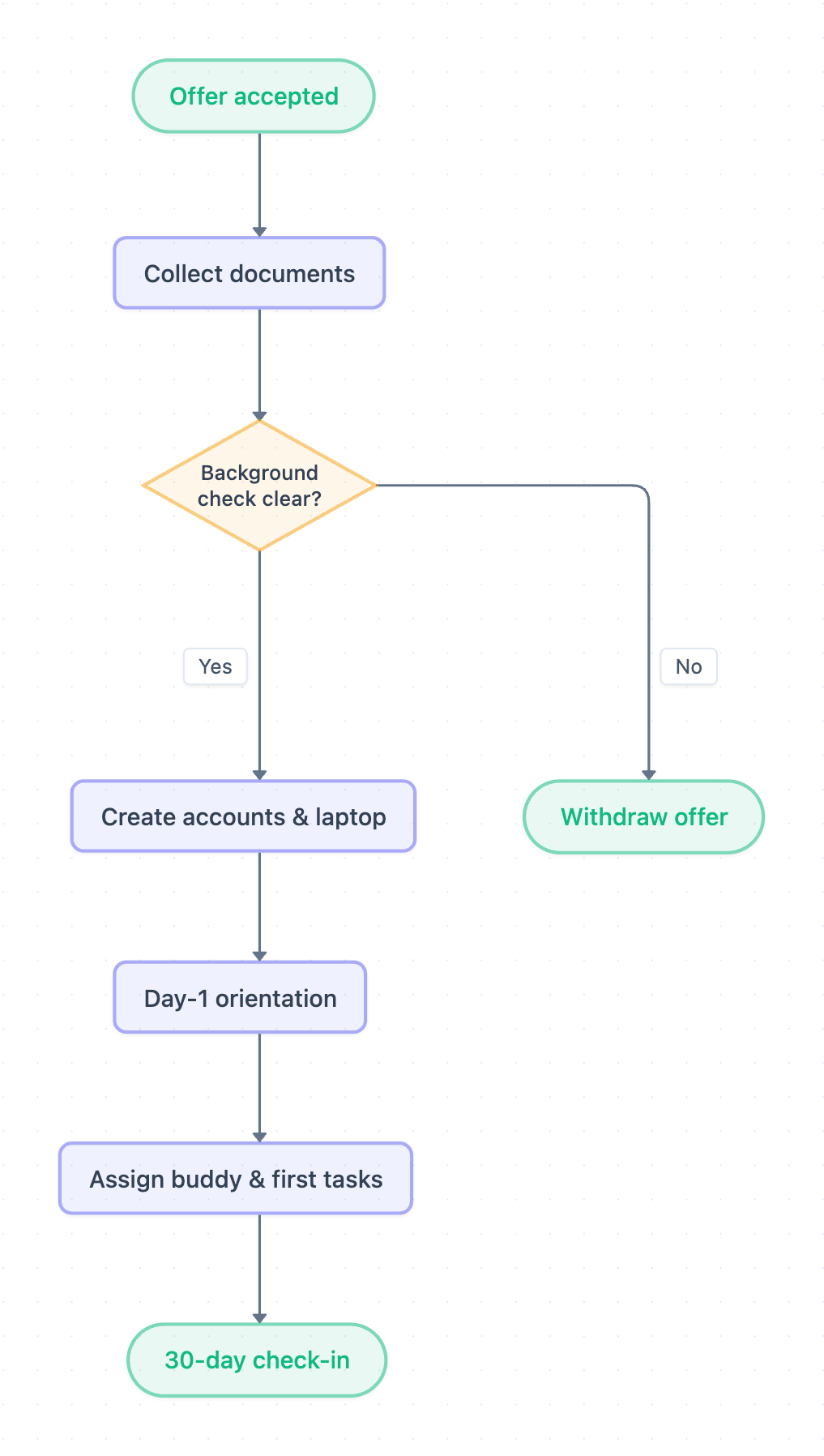
Example: Flowchart for employee onboarding: click to open it in the editor and change it.
Steps and decisions in order
The diagram has eight shapes and no swimlanes, so the owners below are typical assignments. Confirm them for your company before you add lanes.
| Step | Shape | Typical owner |
|---|---|---|
| Offer accepted | Start | Recruiting / HR |
| Collect documents | Task | HR |
| Background check clear? | Decision | HR with screening vendor |
| Create accounts & laptop | Task | IT |
| Day-1 orientation | Task | HR |
| Assign buddy & first tasks | Task | Hiring manager |
| 30-day check-in | End | Hiring manager and HR |
| Withdraw offer | End (exception) | HR / Recruiting |
Decision point and hand-offs
- Background check clear? is the only decision. Yes continues to Create accounts & laptop. No ends at Withdraw offer.
- HR to IT: after the check clears, IT needs the start date, role and access list.
- IT to HR: accounts and laptop must be ready before Day-1 orientation.
- HR to hiring manager: after orientation, the manager owns Assign buddy & first tasks and the 30-day check-in.
Where this process usually slows down
- Collect documents: missing or incorrect forms hold up the background check.
- Background check clear?: vendor turnaround is outside your control, and the diagram has no "pending" path, so the process simply waits. Set an SLA and an escalation owner.
- Create accounts & laptop: IT only starts after Yes, so hardware lead time can collide with the start date. This is the most common bottleneck.
- Assign buddy & first tasks: if no one owns it in advance, the buddy is often picked on day 1.
How to adapt it for your project
- Add swimlanes for your real roles, such as Recruiting, HR, IT, Facilities, Payroll/Finance and the hiring manager.
- Insert approval steps that match your approval limits. For example, equipment above a spending threshold needs finance approval, and access to sensitive systems needs data-owner sign-off.
- Replace the direct No to Withdraw offer path with a review step if your policy or local law requires one before withdrawing.
- Add a "Check pending" loop and write SLA targets on each step.
- Add missing steps such as payroll setup or a policy acknowledgment.
Tip: Open and edit it, then label every arrow that crosses roles with what is handed over (for example, "start date + access list"). Unlabeled hand-offs are where onboarding tasks get dropped.
Frequently asked questions
What are the main steps in an employee onboarding process flowchart?
This one runs **Offer accepted**, **Collect documents**, **Background check clear?**, **Create accounts & laptop**, **Day-1 orientation**, **Assign buddy & first tasks** and **30-day check-in**. A failed check ends at **Withdraw offer**.
What decision points are in the onboarding flowchart?
There is one decision, **Background check clear?**. **Yes** leads to IT setup, and **No** leads to **Withdraw offer**. You can add more, such as approvals for equipment or system access.
Who owns each step of employee onboarding?
The diagram doesn't assign lanes. Typically HR owns documents, the background check and orientation, IT owns accounts and the laptop, and the hiring manager owns the buddy, first tasks and the 30-day check-in.
Make your own flowchart with AI →