E-commerce checkout process flowchart
This checkout process flowchart shows how an online store takes a shopper from reviewing the cart to a placed or cancelled order. Its key feature is a payment retry loop, so a failed payment does not end the checkout right away. It suits students learning flowchart notation and developers planning checkout logic.
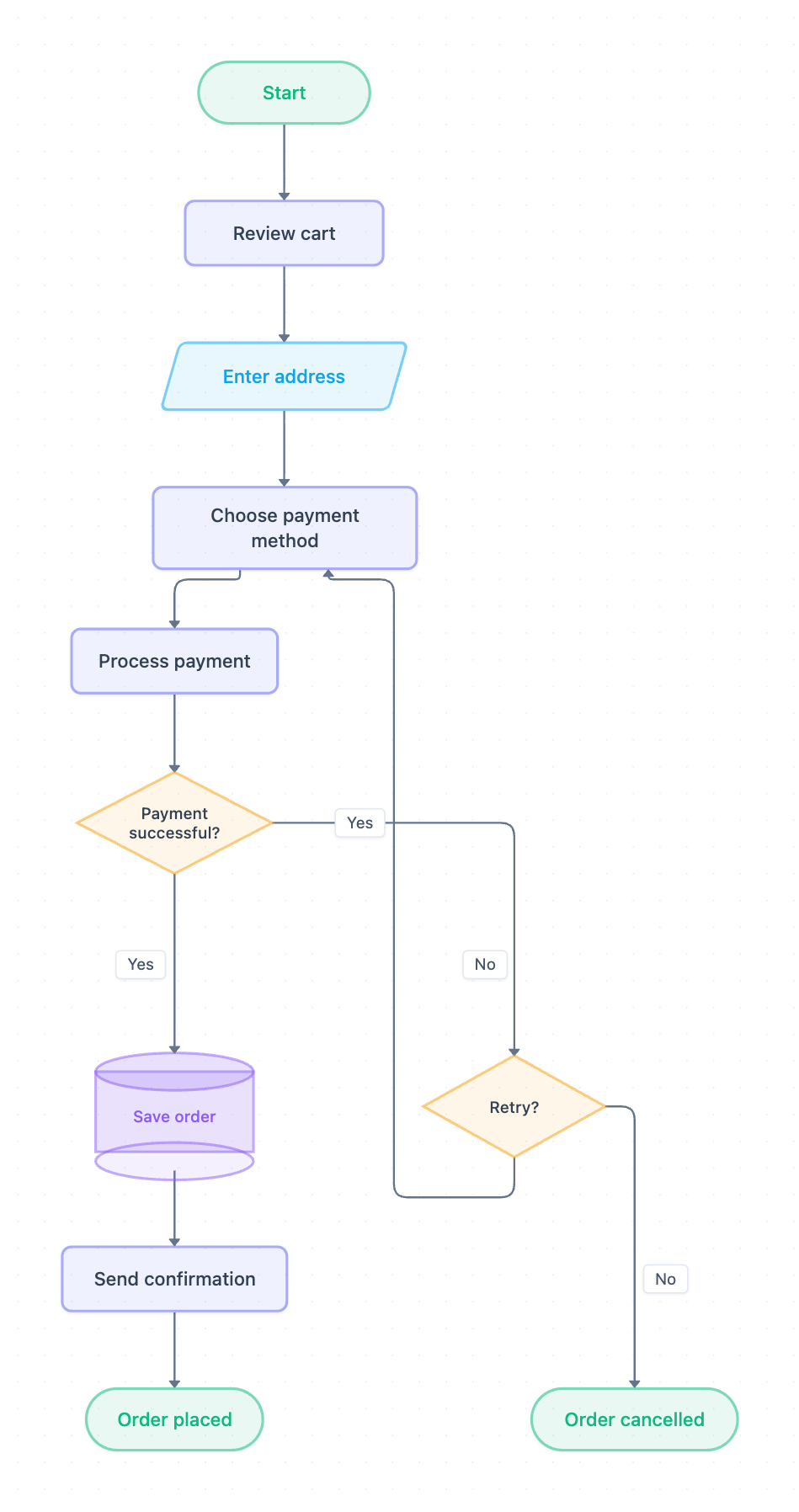
Example: Flowchart for an e-commerce checkout with payment retry: click to open it in the editor and change it.
Steps in order
- Start: the shopper begins checkout.
- Review cart: the shopper checks the items before continuing.
- Enter address: drawn as a parallelogram because it is user input.
- Choose payment method: the shopper picks how to pay.
- Process payment: the system attempts the charge.
- Payment successful?: the first decision diamond.
- On Yes, the flow goes to Save order, drawn as a cylinder because it writes to storage. Then it goes to Send confirmation and ends at Order placed.
The retry decision
When Payment successful? is No, the flow reaches a second diamond, Retry?. On Yes, it loops back to Choose payment method, not straight to Process payment. This lets the shopper switch to another card or method instead of repeating a charge that is likely to fail again. On No, the flow ends at Order cancelled.
| Shape | Meaning | Nodes |
|---|---|---|
| Oval | Start or end point | Start, Order placed, Order cancelled |
| Rectangle | Process step | Review cart, Choose payment method, Process payment, Send confirmation |
| Parallelogram | Input | Enter address |
| Diamond | Decision | Payment successful?, Retry? |
| Cylinder | Data store | Save order |
How to adapt it for your project
- Add a retry counter so that Retry? automatically answers No after a set number of attempts.
- Insert a shipping-options step between Enter address and Choose payment method if your store offers several delivery speeds.
- Add a stock check after Review cart so that sold-out items stop checkout early.
- Split Send confirmation into email and SMS steps if you notify customers through both channels.
- Open and edit the diagram to rename the steps so they match your own system's functions.
Tip: Always label both exits of every decision diamond, as this diagram does with Yes and No. Unlabeled branches are the most common reason a flowchart gets misread.
Frequently asked questions
What are the main steps in a checkout process flowchart?
This one runs Review cart, Enter address, Choose payment method, Process payment, then a Payment successful? check. Successful payments lead to Save order, Send confirmation and Order placed.
How do you show a payment retry in a flowchart?
Use a decision diamond such as Retry? after a failed payment. Its Yes branch loops back to an earlier step, here Choose payment method, and its No branch leads to an end state like Order cancelled.
Why is Save order drawn as a cylinder?
In flowcharts, a cylinder represents a database or other stored data. It shows that the order is written to storage before the confirmation is sent.
Make your own flowchart with AI →