Library book issue and return flowchart
This flowchart shows how a library desk handles a member who wants to borrow or return a book, from scanning the member ID to saving the transaction. It is aimed at students working on library management system projects and at developers who need a clear picture of the issue and return logic before writing code.
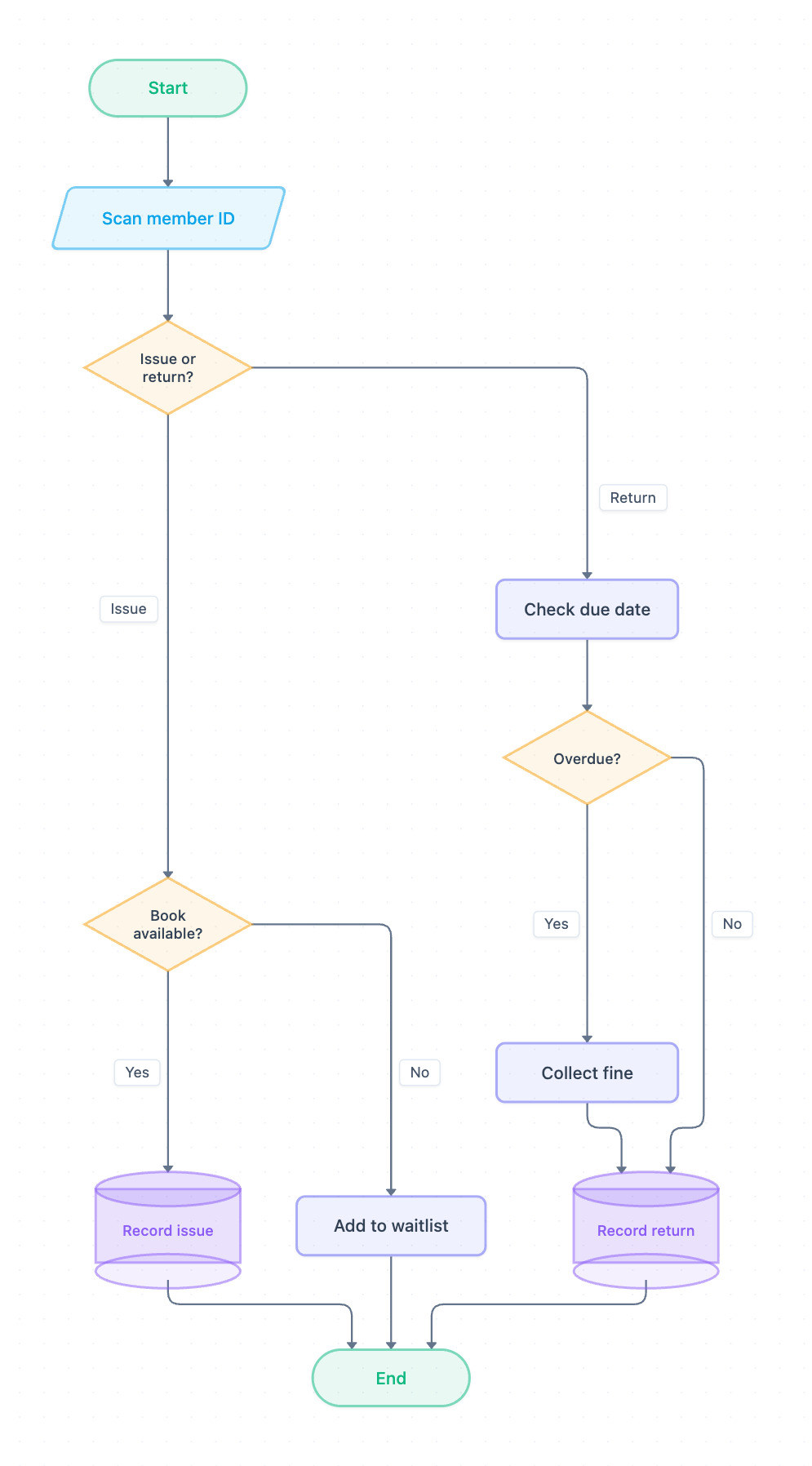
Example: Flowchart for library book issue and return: click to open it in the editor and change it.
How the flow starts
The process begins at Start and moves to Scan member ID, an input step drawn as a parallelogram. The first decision, Issue or return?, splits the flowchart into two branches.
Issue branch
- Book available? checks whether the requested book is on the shelf.
- If Yes, the system goes to Record issue, drawn as a cylinder because it writes to the database.
- If No, the member goes to Add to waitlist so they can get the book later.
- Both paths finish at End.
Return branch
- Check due date compares the return date with the loan's due date.
- Overdue? decides whether a penalty applies.
- If Yes, the librarian does Collect fine, then moves on to Record return.
- If No, the flow goes straight to Record return, which saves the return in the database.
- The branch ends at End.
Shapes used
| Shape | Meaning | Example |
|---|---|---|
| Oval | Start or end | Start, End |
| Parallelogram | Input | Scan member ID |
| Diamond | Decision | Issue or return?, Book available?, Overdue? |
| Rectangle | Process step | Check due date, Collect fine, Add to waitlist |
| Cylinder | Database write | Record issue, Record return |
How to adapt it for your project
- Add a Member valid? decision after Scan member ID to reject expired or blocked cards.
- Put a borrowing limit check before Record issue, such as a maximum of 5 books per member.
- Split Collect fine into separate pay and waive steps if your library allows waivers.
- Add a notification step after Record return that alerts the next person on the waitlist.
Tip: Label every arrow that leaves a diamond, such as Yes/No or Issue/Return. Examiners and reviewers look for unlabeled decision branches first.
Frequently asked questions
What are the main decisions in a library management system flowchart?
This flowchart has three decisions: **Issue or return?**, **Book available?** and **Overdue?**. Together they route each member to issuing, waitlisting, fining or recording a return.
What happens if a book is not available in the library flowchart?
When **Book available?** is answered No, the member goes to **Add to waitlist**, and the flow then ends without recording an issue.
How is the overdue fine shown in the book return flowchart?
After **Check due date**, the **Overdue?** decision sends late returns to **Collect fine** before **Record return**. On-time returns skip the fine and are recorded directly.
Make your own flowchart with AI →