Context diagram (DFD level 0) for an online food ordering system
This level 0 data flow diagram (DFD) shows an online food ordering system as one process, with the four outside parties that exchange data with it. It suits students learning DFDs and developers who need to scope a food delivery app before designing its internals.
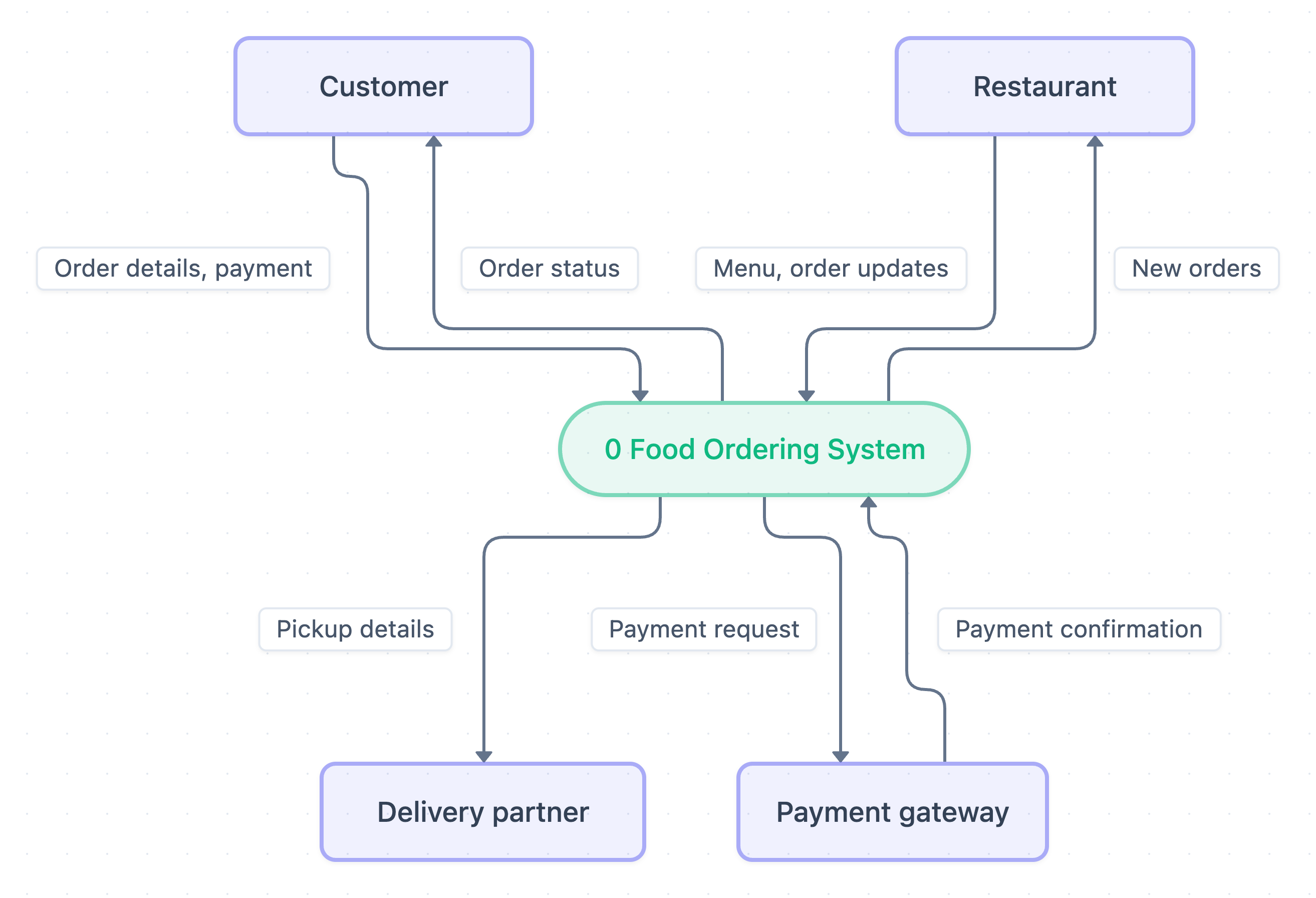
Example: DFD for an online food ordering system (level 0 context diagram): click to open it in the editor and change it.
The single process
At the centre is 0 Food Ordering System, drawn as one oval. A context diagram never shows internal steps or data stores. The whole system is treated as a black box, and only the data crossing its boundary is shown.
External entities and data flows
Four rectangles are the external entities. Each arrow is labelled with the data that moves between an entity and the system.
| External entity | Sends to system | Receives from system |
|---|---|---|
| Customer | Order details, payment | Order status |
| Restaurant | Menu, order updates | New orders |
| Delivery partner | (none shown) | Pickup details |
| Payment gateway | Payment confirmation | Payment request |
How the data moves, in order
- The Restaurant supplies its Menu to the system.
- The Customer submits Order details, payment.
- The system sends a Payment request to the Payment gateway, which replies with a Payment confirmation.
- The system passes New orders to the Restaurant, which sends back order updates.
- The system sends Pickup details to the Delivery partner.
- The system keeps the Customer informed with Order status.
A context diagram does not show sequence. This order is only a reading aid.
How to adapt it for your project
- Add a return flow from Delivery partner, such as delivery status or location, if your app tracks riders.
- Add an Admin entity if staff manage restaurants, refunds or reports.
- Split Order details, payment into two separate flows if you want each data item labelled clearly.
- Keep exactly one process here. Put the detail, such as login, browse menu and place order, into a level 1 DFD.
Tip: Check balancing. Every flow in this context diagram must appear again in your level 1 DFD, entering or leaving the same external entities.
Frequently asked questions
What are the external entities in a context diagram for an online food ordering system?
This diagram has four: Customer, Restaurant, Delivery partner and Payment gateway. Each one exchanges data with the single Food Ordering System process.
Is a context diagram the same as a level 0 DFD?
Yes, here the two terms mean the same thing. The diagram shows the whole system as one process, numbered 0, with no data stores or internal processes.
Why are there no data stores in this diagram?
Data stores belong inside the system boundary, so they first appear in a level 1 DFD. The context diagram only shows data flowing between the system and outside entities.