Level 2 DFD example: the payment process
This level 2 data flow diagram breaks the payment process (process 3) into four numbered sub-processes. It shows how payment data moves between the Customer, an external Payment gateway and the D2 Orders data store. It is written for students learning DFD levels and for developers mapping a checkout flow.
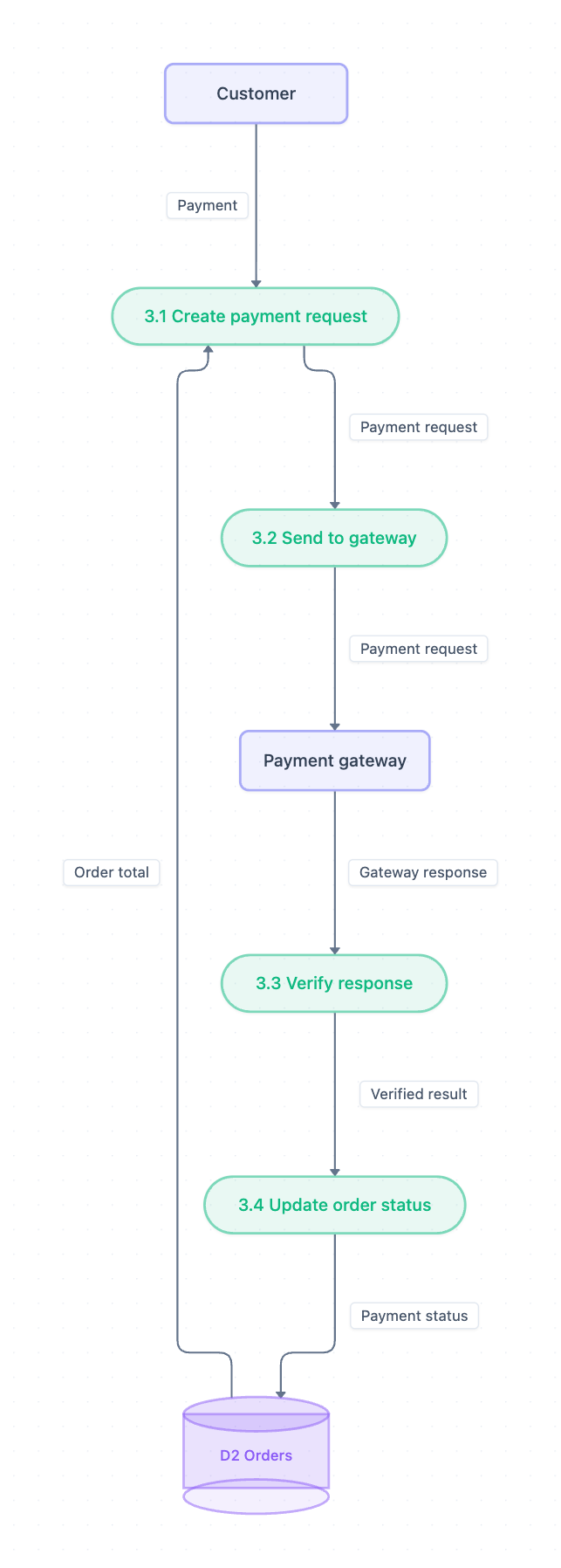
Example: DFD for the payment process (level 2): click to open it in the editor and change it.
What this level 2 DFD shows
A level 2 DFD zooms into one process from the level 1 diagram. Here that process is payment, so every sub-process is numbered 3.x. The diagram has two external entities, four processes and one data store.
| Element | Type | Role |
|---|---|---|
| Customer | External entity | Provides the payment |
| Payment gateway | External entity | Processes the request and returns a response |
| 3.1 Create payment request | Process | Combines the payment with the order total |
| 3.2 Send to gateway | Process | Passes the request to the gateway |
| 3.3 Verify response | Process | Checks the gateway response |
| 3.4 Update order status | Process | Records the payment outcome |
| D2 Orders | Data store | Supplies the order total and stores the payment status |
The data flows in order
- Customer sends Payment to 3.1 Create payment request.
- D2 Orders supplies the Order total to 3.1.
- 3.1 passes a Payment request to 3.2 Send to gateway.
- 3.2 forwards the Payment request to the Payment gateway.
- The Payment gateway returns a Gateway response to 3.3 Verify response.
- 3.3 sends the Verified result to 3.4 Update order status.
- 3.4 writes the Payment status back to D2 Orders.
Every flow is labeled with the data it carries, and each process has at least one input and one output. These are two basic DFD rules.
How to adapt it for your project
- Renumber the processes to match your parent process, for example 4.1–4.4 if payment is process 4 in your level 1 DFD.
- Rename D2 Orders to the store your system actually uses, such as Invoices or Bookings.
- If your system sends a receipt or confirmation to the Customer, add that as an outgoing flow.
- Split a process further, such as 3.3 Verify response, if your system has separate fraud or signature checks.
Tip: Keep the diagram balanced. The flows entering and leaving these four sub-processes should match the flows into and out of process 3 on your level 1 DFD.
Frequently asked questions
What is a level 2 DFD?
A level 2 DFD breaks down one process from the level 1 diagram into smaller sub-processes. In this example, the payment process becomes steps 3.1 to 3.4.
What are the external entities in this payment DFD?
There are two: the Customer, who provides the payment, and the Payment gateway, which receives the payment request and returns a gateway response.
Why are the processes numbered 3.1, 3.2 and so on?
The numbers show that they are sub-processes of process 3 in the level 1 DFD. This makes it easy to trace each detailed step back to its parent process.