Customer onboarding process flow with KYC (BPMN)
This BPMN diagram shows a customer onboarding process flow with KYC across three lanes: Customer, KYC Service and Operations. It traces the path from sign-up through identity verification, an exception route for manual review, and parallel account setup. It is useful for operations, compliance and IT leads who need to document hand-offs, owners and SLAs.
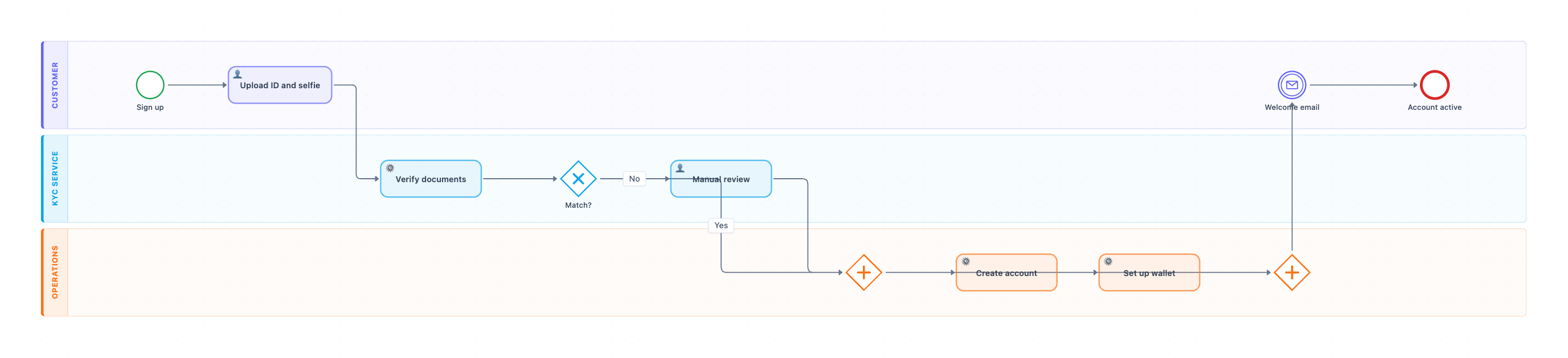
Example: BPMN diagram for customer onboarding with KYC: click to open it in the editor and change it.
Steps, owners and hand-offs
- Sign up (Customer lane): the start event.
- Upload ID and selfie (Customer, user task). Hand-off 1: the documents pass to the KYC Service lane.
- Verify documents (KYC Service, service task): an automated identity check.
- Match? (KYC Service, exclusive gateway). Yes goes straight to Operations. No sends the case to Manual review, a user task done by a KYC analyst.
- Hand-off 2: both paths meet at a parallel split in the Operations lane.
- Create account and Set up wallet (Operations, service tasks) run at the same time. A parallel join waits until both are done.
- Hand-off 3: the Welcome email message event goes back to the Customer lane, and the flow ends at Account active.
Where this process usually slows down
- Manual review is the main bottleneck. It is the only human step after upload, so it needs an owner, a queue and an SLA.
- Upload ID and selfie depends on the customer. Blurry photos or abandoned uploads stall the flow before KYC starts.
- The parallel join waits for the slower of Create account and Set up wallet. One failing system blocks the welcome email.
- The diagram has no reject or resubmit path. Every manual review flows on to account creation, so real exceptions such as a failed check have nowhere to go.
How to adapt it for your project
- Rename the lanes to match your org, for example Compliance instead of KYC Service, or split Operations into Finance and IT.
- Add a reject outcome after Manual review, such as "Request new documents" or "Decline", with an end event for each.
- Add a gateway that sends high-risk or high-value customers to a senior approver, based on your own approval limits.
- Attach timer events to Manual review to escalate when the SLA is breached.
- Add steps your company needs, such as sanctions screening or a contract signature.
Tip: Write the owner and target SLA next to each user task, such as Manual review: KYC analyst, 4 business hours. It makes bottlenecks visible in process reviews.
Frequently asked questions
What are the main steps in a customer onboarding process flow with KYC?
In this diagram the steps are sign up, upload ID and selfie, automated document verification, and a match decision with optional manual review. After that come parallel account and wallet creation, then a welcome email.
Who is responsible for each part of the onboarding process?
The Customer lane covers sign-up and document upload. The KYC Service lane handles verification and manual review, and the Operations lane creates the account and sets up the wallet.
Why does the diagram use a parallel gateway?
The parallel gateway lets Create account and Set up wallet run at the same time instead of one after the other. The join gateway waits until both finish before the welcome email is sent.
Make your own BPMN diagram with AI →