Order fulfillment process flowchart
This swimlane diagram maps order fulfillment across three lanes: **Customer**, **Sales** and **Warehouse**. It shows who owns each step, where work changes hands, and what happens when an item is out of stock. It is a starting point for operations, support and IT leads who document an order-to-delivery process or look for bottlenecks.
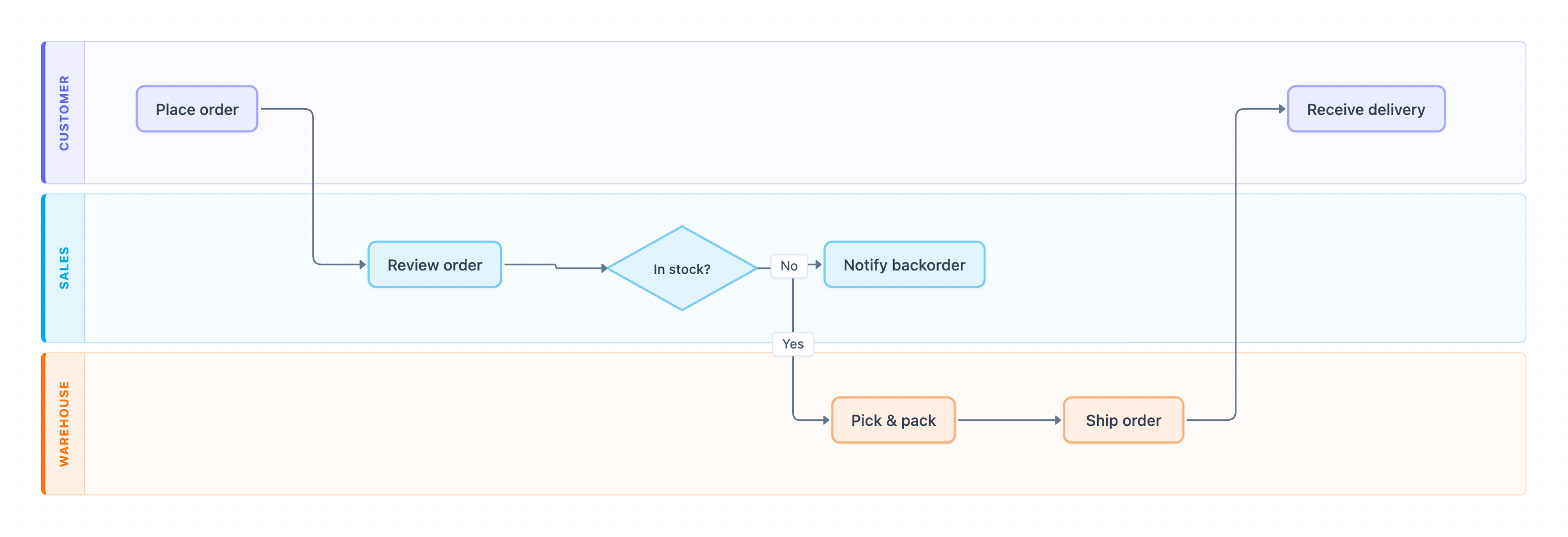
Example: Swimlane diagram for order fulfillment: click to open it in the editor and change it.
Lanes and owners
| Lane (owner) | Steps they own |
|---|---|
| Customer | Place order, Receive delivery |
| Sales | Review order, In stock? decision, Notify backorder |
| Warehouse | Pick & pack, Ship order |
Steps in order
- Customer: Place order. This is the first hand-off, from Customer to Sales.
- Sales: Review order to check the request before it moves on.
- Sales: In stock? is the only decision point in the process.
- If No, Sales runs Notify backorder. In this diagram the branch ends here and does not loop back.
- If Yes, the order goes to Warehouse for Pick & pack. This is the second hand-off, from Sales to Warehouse.
- Warehouse: Ship order. This is the third hand-off, from Warehouse back to the Customer.
- Customer: Receive delivery closes the process.
Where this process usually slows down
- Review order: when no SLA is set for Sales review, orders can sit in a queue before the stock check.
- In stock?: if Sales checks stock by hand rather than against live inventory, the decision gets delayed or made with wrong data.
- Notify backorder: this exception path has no next step, so backordered orders can be forgotten without a clear owner for follow-up.
- The Sales-to-Warehouse hand-off: Pick & pack waits until the order is released, so batching releases creates a backlog.
How to adapt it for your project
- Rename the lanes to match your real roles, such as Customer Service, Order Desk, 3PL or Finance.
- If your company needs credit checks or approvals above a set order value, add an approval decision after Review order in the lane that owns it.
- Extend Notify backorder with a restock step and a loop back to Pick & pack, or add a cancel or refund path.
- Add SLA targets to each hand-off so the step owner and its timing are both visible.
Tip: Every exception branch should end in an owned action. Use Notify backorder as a check: if a path stops without a next step or owner, add one before you publish the process.
Frequently asked questions
What are the main steps in an order fulfillment process flowchart?
In this diagram the steps are Place order, Review order, the In stock? decision, Pick & pack, Ship order and Receive delivery. Notify backorder covers the out-of-stock case.
Who is involved in the order fulfillment swimlane diagram?
There are three lanes: Customer, Sales and Warehouse. Sales owns the review and stock decision, and Warehouse owns picking, packing and shipping.
What happens when an item is out of stock in order fulfillment?
At the In stock? decision, a No answer sends the order to Notify backorder in the Sales lane. You can extend that branch with restock, cancellation or refund steps to fit your process.
Make your own swimlane diagram with AI →