IT incident management process flow (BPMN)
This BPMN diagram shows how an IT incident moves from a user's first report to resolution across three lanes: User, Service Desk and IT Support. It is for IT, support and operations managers and team leads who need to document hand-offs, decision points and SLA escalation in their incident process.
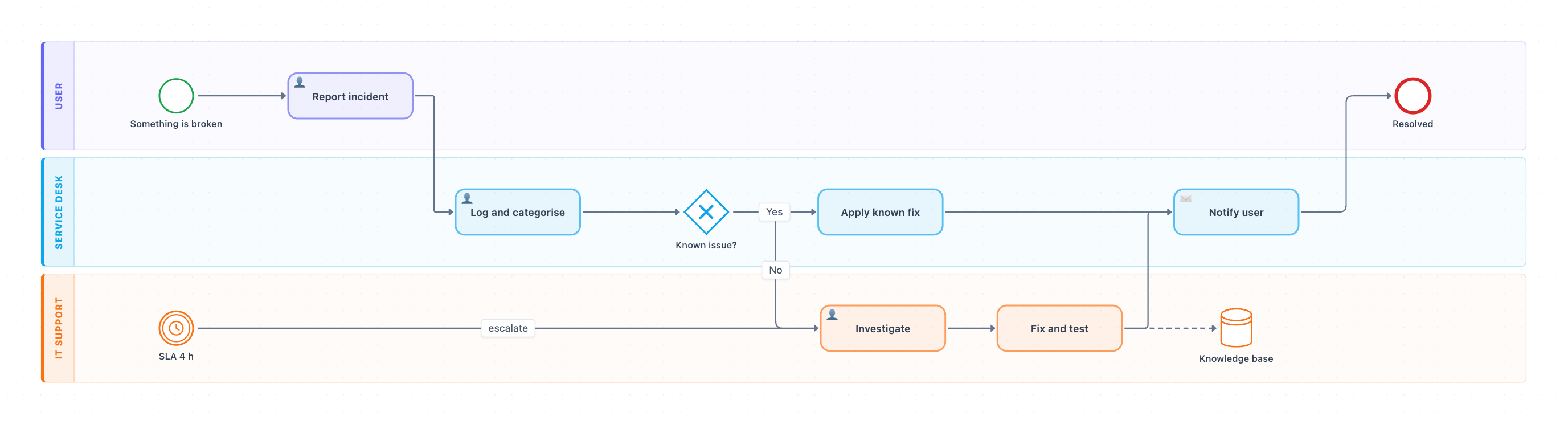
Example: BPMN diagram for IT incident management: click to open it in the editor and change it.
Lanes and roles
| Lane | Owns these steps |
|---|---|
| User | Something is broken (start), Report incident, Resolved (end) |
| Service Desk | Log and categorise, Known issue? gateway, Apply known fix, Notify user |
| IT Support | Investigate, SLA 4 h timer, Fix and test, Knowledge base |
Step-by-step flow
- Something is broken starts the process in the User lane. The user then completes Report incident.
- Hand-off to the Service Desk, which does Log and categorise.
- The exclusive gateway Known issue? decides the path. If the answer is Yes, the Service Desk does Apply known fix. If the answer is No, the ticket is handed off to IT Support.
- IT Support does Investigate. The SLA 4 h timer event triggers an escalate flow into Investigate when the time limit is reached.
- Fix and test follows Investigate. The fix is also recorded in the Knowledge base (dashed data association).
- Both paths meet at Notify user in the Service Desk lane. The process then ends at Resolved for the user.
Where this process usually slows down
- Log and categorise: a wrong category sends tickets down the wrong branch of Known issue?.
- The No hand-off to IT Support: tickets can sit in a queue before Investigate starts. That is why the SLA 4 h escalation exists.
- Fix and test: if the Knowledge base update is skipped, the same incident never becomes a known issue next time.
How to adapt it for your project
- Rename the lanes to match your own roles, for example Tier 1 / Tier 2, or add a Vendor lane for third-party fixes.
- Set the timer to your real SLA per priority, and name the owner who receives the escalation.
- Add an approval step if a fix needs change sign-off above a certain risk or cost limit.
- Add exception paths, such as the user rejecting the fix after Notify user.
Tip: Make the Knowledge base update a required part of Fix and test. Every fix you record raises the share of tickets that take the faster Yes path.
Frequently asked questions
What are the main steps in an incident management process flow?
In this diagram the steps are Report incident, Log and categorise, the Known issue? decision, then either Apply known fix or Investigate and Fix and test. Both paths end with Notify user and Resolved.
Who is involved in the IT incident management process?
Three roles are shown as lanes. The User reports the incident, the Service Desk logs it and handles known issues, and IT Support investigates and fixes new ones.
How does SLA escalation work in this BPMN diagram?
An intermediate timer event labeled SLA 4 h sits in the IT Support lane. When the time limit is reached, it triggers an escalate flow into the Investigate task.
Make your own BPMN diagram with AI →