Insurance claim process flowchart (BPMN)
This BPMN diagram maps insurance claim handling across three swimlanes. It starts with an accident and runs through assessment, damage and fraud checks, an approval decision, and a payout or rejection. It is built for operations, finance and support leads who need to document claim hand-offs, spot bottlenecks and agree on who owns each step.
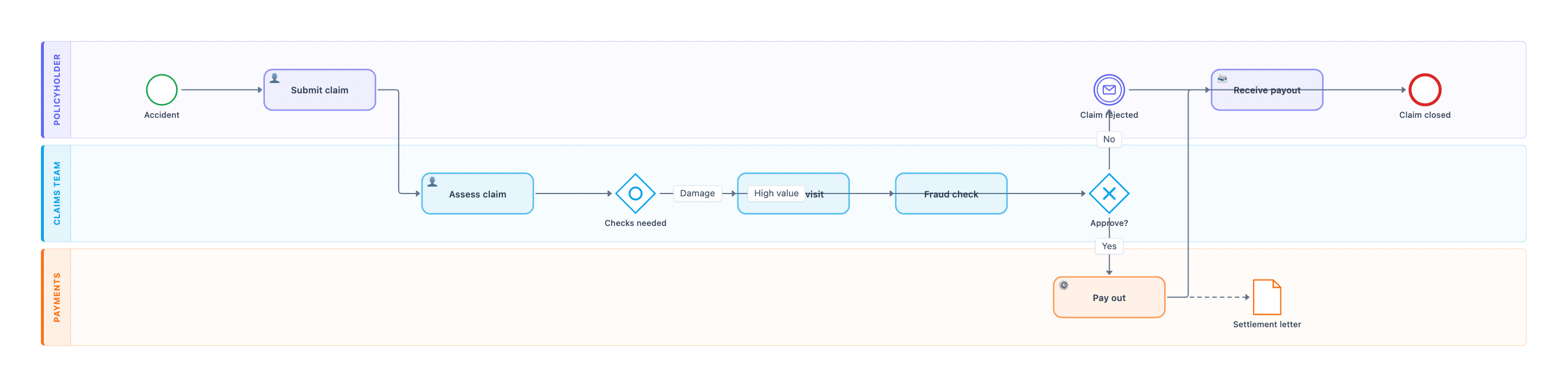
Example: BPMN diagram for insurance claim handling: click to open it in the editor and change it.
Lanes and roles
| Lane | Owner | Steps in this lane |
|---|---|---|
| Policyholder | Customer | Accident (start), Submit claim, Receive payout, Claim rejected, Claim closed (end) |
| Claims Team | Claims handler / adjuster | Assess claim, Checks needed, Surveyor visit, Fraud check, Approve? |
| Payments | Finance / payments | Pay out, Settlement letter |
Steps, hand-offs and decisions in order
- An Accident start event triggers the process. The Policyholder completes Submit claim, which is the first hand-off to the Claims Team.
- The Claims Team runs Assess claim.
- The inclusive gateway Checks needed can route to Surveyor visit (Damage), Fraud check (High value), or both at once.
- The completed checks feed the exclusive gateway Approve?. This is the key decision point.
- On Yes, the claim is handed off to Payments. Their Pay out service task runs and produces a Settlement letter data object.
- The Policyholder then completes Receive payout, and the process ends at Claim closed.
- On No, a Claim rejected message event goes to the Policyholder, and the process ends at Claim closed.
Where this process usually slows down
- Surveyor visit: scheduling a site inspection depends on outside availability and often breaks the SLA.
- Fraud check: high-value claims queue up when only a few specialists can clear them.
- Approve?: claims stall when the approver lacks authority for the amount and has to escalate.
- Submit claim to Assess claim: incomplete submissions cause rework that the diagram does not yet show.
How to adapt it for your project
- Rename the lanes to your real roles, for example a Claims Handler, Senior Adjuster and Finance Controller.
- Split Approve? by your approval limits, such as a handler approving up to $5,000 and a manager approving above that.
- Add a matching inclusive join before Approve? so it waits for both checks when both run.
- Add a default path from Checks needed for claims that need neither check.
- Attach timer events to Surveyor visit and Fraud check to make SLA breaches visible.
Tip: Give every task a named owner and a target time. Bottlenecks then show up as measurable gaps instead of opinions.
Frequently asked questions
What are the main steps in an insurance claim process?
In this diagram the steps are Submit claim, Assess claim, a Surveyor visit and/or Fraud check, an Approve? decision, then Pay out and Receive payout. If the claim is not approved, it ends with Claim rejected. Every path finishes at Claim closed.
Who is involved in insurance claim handling?
Three roles are shown as lanes. The Policyholder submits and receives outcomes, the Claims Team assesses, checks and approves, and Payments issues the payout and settlement letter.
Why does the diagram use an inclusive gateway for checks?
The Checks needed gateway lets a claim go to a Surveyor visit, a Fraud check, or both, depending on whether it involves damage or a high value. An exclusive gateway would force exactly one path.
Make your own BPMN diagram with AI →