Leave approval process flowchart
This swimlane diagram shows how a leave request moves between three roles: **Employee**, **Manager** and **HR**. It is for operations, HR and team leads who want a clear picture of who owns each step, where the hand-offs happen, and where a request can stall.
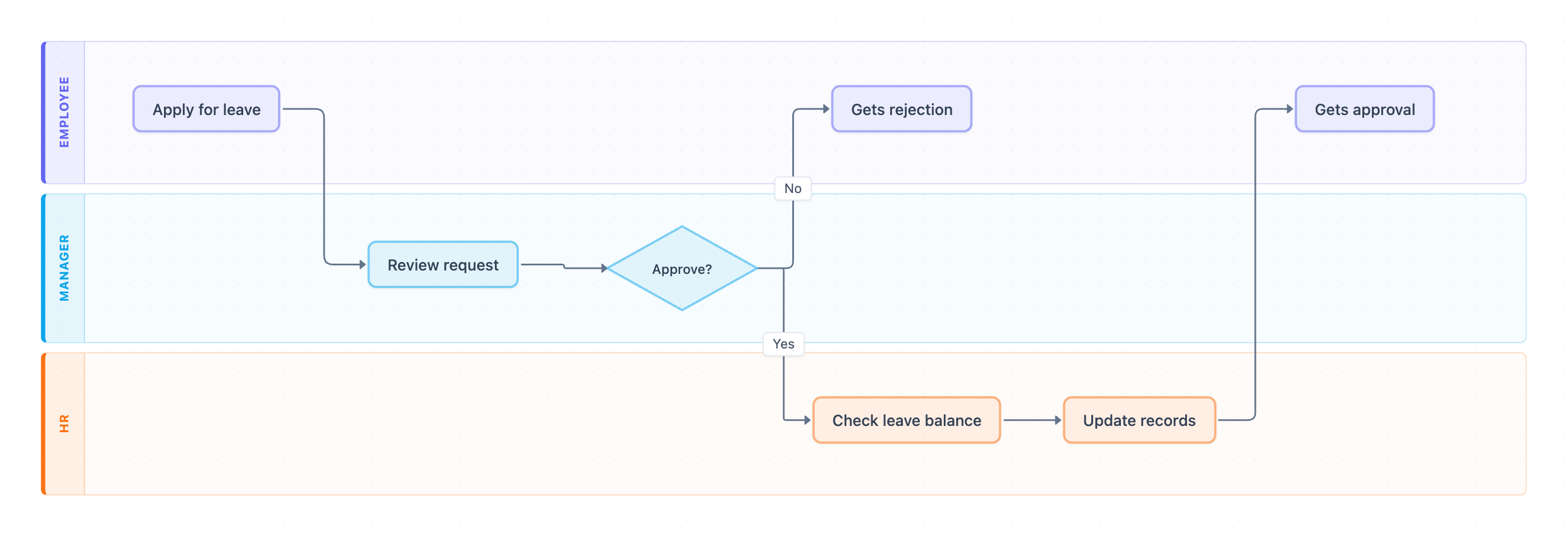
Example: Swimlane diagram for leave approval: click to open it in the editor and change it.
The lanes and their owners
| Lane | Steps owned |
|---|---|
| Employee | Apply for leave, Gets approval, Gets rejection |
| Manager | Review request, Approve? decision |
| HR | Check leave balance, Update records |
Step-by-step flow
- Employee starts the process with Apply for leave. This is the first hand-off, from Employee to Manager.
- Manager does Review request.
- Manager makes the Approve? decision.
- If the answer is No, the request goes straight back to the Employee lane as Gets rejection. HR is not involved on this path.
- If the answer is Yes, the request is handed off to HR, which does Check leave balance.
- HR then does Update records.
- The final hand-off returns to the Employee, who Gets approval.
There are three hand-offs on the approval path: Employee to Manager, Manager to HR, and HR back to Employee. The rejection path has only two: Employee to Manager, then Manager back to Employee.
Where this process usually slows down
- Review request depends on one manager. If that manager is away and there is no delegate, requests wait in the queue.
- The Manager-to-HR hand-off after Approve? can sit idle if there is no SLA for HR to pick it up.
- Check leave balance happens after the manager approves. The diagram has no branch for a low balance, so an approved request with too few days becomes an exception that is handled outside the flow.
How to adapt it for your project
- Rename the lanes to match your roles, such as Team Lead, Department Head or HR Business Partner.
- Add a second approval lane if longer leave goes over a manager's approval limit.
- Consider moving Check leave balance before Review request, or add a decision diamond after it for low balances.
- Add SLA notes, such as "Manager reviews within 2 business days", next to each hand-off.
Tip: Give every step a single owner. If a step seems to belong in two lanes, split it into two steps so the hand-off is visible.
Frequently asked questions
Who is involved in the leave approval process?
This diagram has three roles: the Employee who applies, the Manager who reviews the request and decides, and HR who checks the leave balance and updates records.
What happens when a leave request is rejected?
At the Approve? decision, a No goes straight back to the Employee as Gets rejection. The request never reaches HR.
Why does HR check the leave balance after the manager approves?
In this flow, HR confirms the balance and updates records only for approved requests. Many teams move the balance check earlier so managers don't approve leave the employee hasn't accrued.
Make your own swimlane diagram with AI →