E-commerce microservices architecture diagram
This e-commerce microservices architecture diagram shows how a web or mobile shop is divided into small services, with an edge layer in front and dedicated data stores behind. It is for students learning system design and developers sketching the backend of an online store.
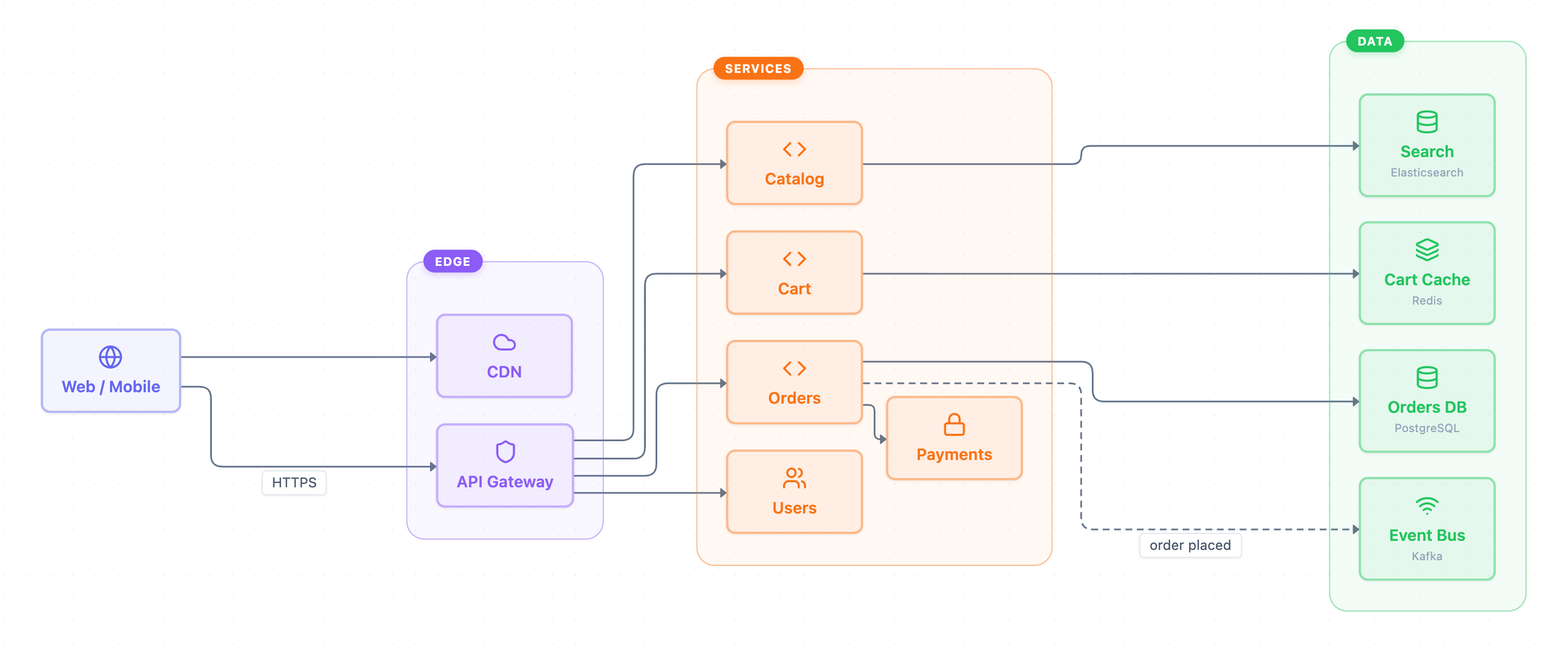
Example: Architecture diagram for e-commerce microservices: click to open it in the editor and change it.
The three layers
The diagram has one client, Web / Mobile, and three groups: Edge, Services and Data.
| Group | Component | Role |
|---|---|---|
| Edge | CDN | Delivers content directly to the client |
| Edge | API Gateway | Single HTTPS entry point that routes calls to services |
| Services | Catalog | Product listings, backed by Search |
| Services | Cart | Shopping cart, backed by Cart Cache |
| Services | Orders | Places orders, calls Payments, stores data, emits events |
| Services | Payments | Handles payment for an order |
| Services | Users | User accounts, reached through the gateway |
| Data | Orders DB | PostgreSQL database for orders |
| Data | Search | Elasticsearch index for the catalog |
| Data | Cart Cache | Redis store for carts |
| Data | Event Bus | Kafka topic for order events |
How a request flows
- Web / Mobile loads content from the CDN.
- API calls go over HTTPS to the API Gateway.
- The gateway routes to Catalog, Cart, Orders or Users.
- Catalog queries Search, and Cart reads and writes Cart Cache.
- Orders calls Payments, saves to Orders DB, then publishes an order placed event to the Event Bus. This dashed link is asynchronous.
Notice that Payments is not exposed through the gateway. Only Orders calls it, which keeps payment logic behind one service.
How to adapt it for your project
- Add services your shop needs, such as Inventory or Shipping, inside the Services group.
- Give each new service its own store in Data rather than sharing Orders DB.
- Add consumers of the Event Bus, for example an email or analytics service, if you react to order placed.
- Swap the subtitles (PostgreSQL, Elasticsearch, Redis, Kafka) for the tools you actually use.
- Open and edit it to rename nodes, change colors or relabel edges.
Tip: Use solid arrows for synchronous calls and dashed arrows for events, as the diagram does with order placed. This makes it clear at a glance which steps block the user and which happen in the background.
Frequently asked questions
What services are in an e-commerce microservices architecture?
This diagram uses five: Catalog, Cart, Orders, Payments and Users. The API Gateway routes to four of them, and Payments is called only by Orders.
Why does the e-commerce architecture use Kafka?
Orders publishes an "order placed" event to the Kafka Event Bus asynchronously. Other parts of the system can then react to new orders without Orders calling them directly.
What is the API Gateway for in this microservices diagram?
It is the single HTTPS entry point from Web / Mobile clients. It forwards each request to the right service: Catalog, Cart, Orders or Users.
Make your own architecture diagram with AI →