URL shortener system design diagram
This architecture diagram shows how a URL shortener creates short links and redirects users to the original URL. It splits the system into Edge, Services, Data and Analytics layers. It suits students preparing for system design interviews and developers planning a link service.
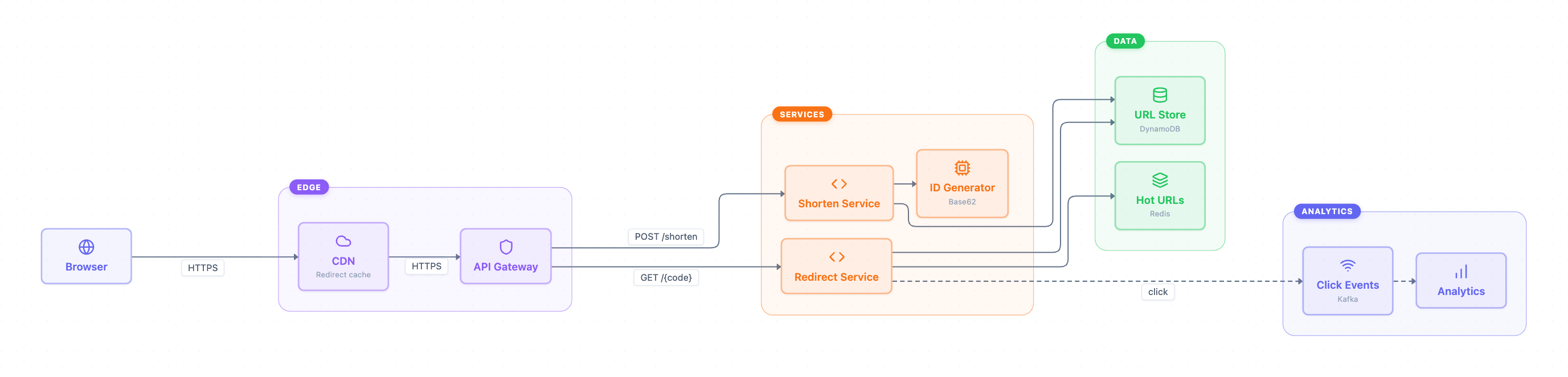
Example: Architecture diagram for a URL shortener: click to open it in the editor and change it.
Main parts of the architecture
| Group | Component | Role |
|---|---|---|
| Client | Browser | Sends HTTPS requests to create or open short links |
| Edge | CDN (Redirect cache) | Caches redirects close to users and forwards other requests |
| Edge | API Gateway | Routes requests to the correct service |
| Services | Shorten Service | Handles POST /shorten and stores new links |
| Services | Redirect Service | Handles GET /{code} and looks up the long URL |
| Services | ID Generator (Base62) | Produces the short code |
| Data | URL Store (DynamoDB) | Permanent store of code-to-URL mappings |
| Data | Hot URLs (Redis) | Fast cache for popular links |
| Analytics | Click Events (Kafka) | Queue of click events |
| Analytics | Analytics | Processes click events into statistics |
Request flows
- Browser connects to the CDN over HTTPS. The CDN forwards requests to the API Gateway over HTTPS.
- Write path: the gateway sends POST /shorten to the Shorten Service. It gets a Base62 code from the ID Generator and saves the mapping in the URL Store.
- Read path: the gateway sends GET /{code} to the Redirect Service. It reads from Hot URLs in Redis and from the URL Store in DynamoDB.
- Async path: the Redirect Service publishes a click to Click Events (Kafka), and Analytics consumes it. The dashed lines mark this as off the main request path.
Reads and writes use separate services. Redirects are usually far more frequent than new links, so each side can scale on its own.
How to adapt it for your project
- Swap DynamoDB or Redis for the database and cache you already run.
- Add a rate limiter or auth step at the API Gateway if users must log in to shorten links.
- Add a link expiry field in the URL Store if you need short links that expire.
- Remove the Analytics group for a simple prototype, then add it back later.
Tip: Keep the click event step dashed and asynchronous. Writing analytics on the redirect path would slow down every redirect.
Frequently asked questions
What are the main components of a URL shortener system design?
This diagram has a CDN and API Gateway at the edge, plus Shorten, Redirect and ID Generator services. The data layer has a DynamoDB URL Store and a Redis Hot URLs cache. Kafka and an Analytics service handle click tracking.
Why does a URL shortener use Base62 IDs?
Base62 uses digits, lowercase and uppercase letters. That packs a large ID into a short, URL-safe code, which is the job of the ID Generator here.
Why are clicks sent to Kafka instead of the database?
Publishing clicks to a queue lets the Redirect Service respond right away. The Analytics service processes the events separately, so tracking does not slow down redirects.
Make your own architecture diagram with AI →