Notification system design diagram
This architecture diagram shows how a notification system takes a send request from other services and delivers it by email, SMS or push. A Kafka queue sits between the API and the senders, and every send is recorded in a PostgreSQL log. It is a useful reference for students preparing for system design interviews and for developers planning their own notification service.
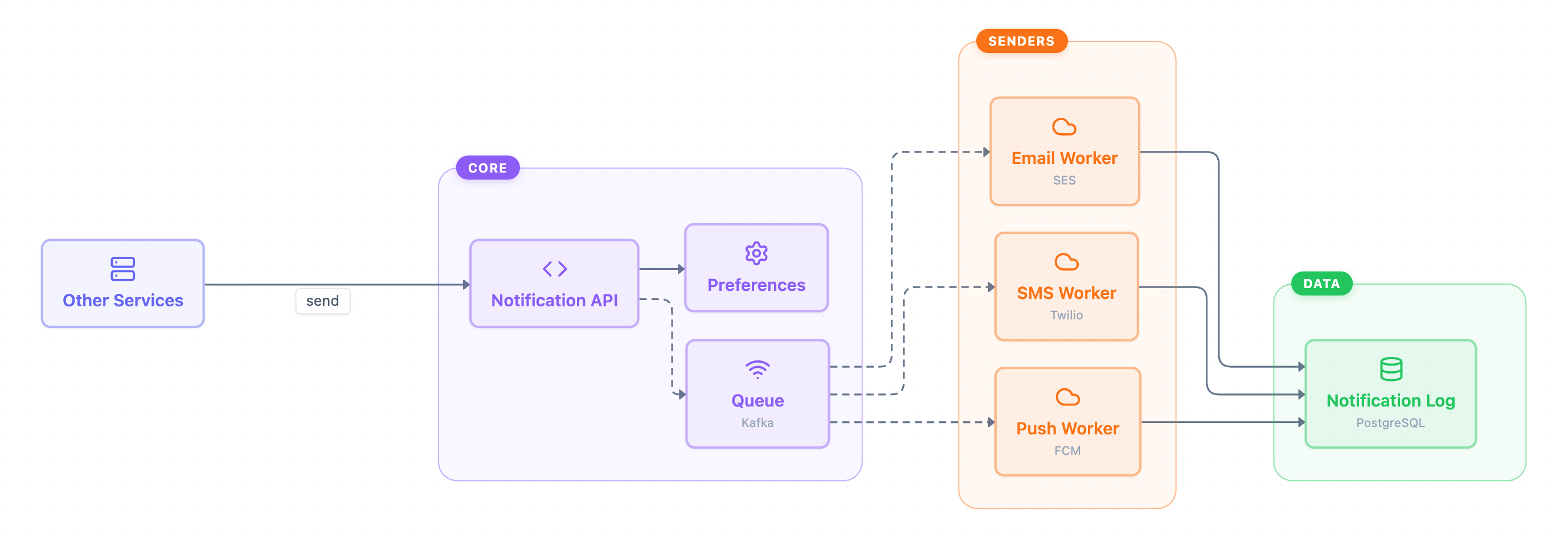
Example: Architecture diagram for a notification system: click to open it in the editor and change it.
Main parts of the architecture
The diagram has one outside caller and three groups: Core, Senders and Data.
| Group | Component | Technology | Role |
|---|---|---|---|
| (outside) | Other Services | — | Call the system to send a notification |
| Core | Notification API | — | Entry point that receives send requests |
| Core | Preferences | — | Checked by the API before a message is queued |
| Core | Queue | Kafka | Buffers messages for the workers |
| Senders | Email Worker | SES | Delivers email |
| Senders | SMS Worker | Twilio | Delivers text messages |
| Senders | Push Worker | FCM | Delivers mobile push notifications |
| Data | Notification Log | PostgreSQL | Stores a record of each send |
How a notification flows
- Other Services call the Notification API with a "send" request.
- The API checks Preferences, a direct call shown as a solid line.
- The API publishes the message to the Queue (Kafka). The dashed line marks an asynchronous step.
- The Email Worker, SMS Worker and Push Worker consume from the queue. These are also dashed, asynchronous links.
- Each worker writes to the Notification Log in PostgreSQL.
Because of the queue, the API can respond quickly while the workers deliver messages at their own pace. Each channel can also be scaled on its own.
How to adapt it for your project
- Swap the providers to match your stack, for example a different email service in place of SES.
- Add or remove sender workers if you need channels such as in-app messages, or don't need SMS.
- Rename Other Services to your real callers, such as an order service or an auth service.
- Add a separate store behind Preferences if you want to show where user settings are kept.
Tip: Keep dashed lines for asynchronous, queue-based links and solid lines for direct calls. Readers can then see at a glance which steps block the caller.
Frequently asked questions
What are the main components of a notification system design?
In this diagram they are the Notification API, a Preferences service, a Kafka queue, Email/SMS/Push workers (SES, Twilio, FCM) and a PostgreSQL notification log.
Why does a notification system use a message queue?
The Kafka queue separates the API from the senders. Requests are accepted quickly, and each channel's workers process messages independently and asynchronously.
Where are user notification preferences checked?
The Notification API calls the Preferences service before it places a message on the queue.
Make your own architecture diagram with AI →