MERN stack architecture diagram (Docker Compose)
This MERN stack architecture diagram shows a React, Express and MongoDB app running as Docker Compose services, with an admin UI and a persistent volume. It is for students and developers who want a clear picture of how the containers connect, which ports they use, and where the data is stored.
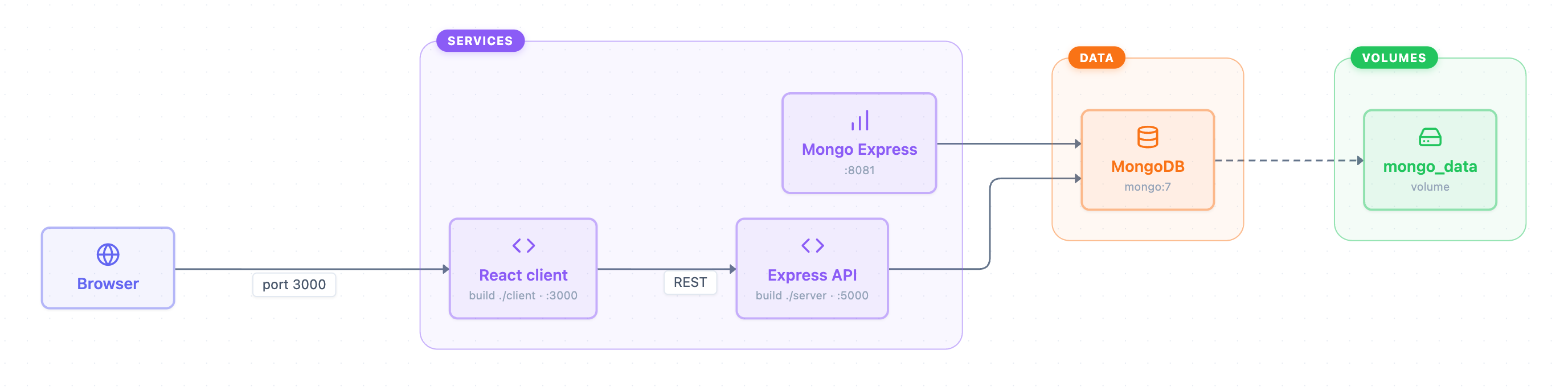
Example: Architecture diagram for a MERN stack app in Docker: click to open it in the editor and change it.
The main parts of the diagram
The diagram has one outside client and three groups: Services, Data and Volumes. Each box inside a group stands for one container or resource in a Docker Compose setup.
| Component | Group | Details |
|---|---|---|
| Browser | Outside Docker | The user's web browser |
| React client | Services | Built from ./client, exposed on port 3000 |
| Express API | Services | Built from ./server, exposed on port 5000 |
| Mongo Express | Services | Web admin UI for the database on port 8081 |
| MongoDB | Data | Uses the official mongo:7 image |
| mongo_data | Volumes | Named Docker volume that stores database files |
How data flows
- The Browser opens the React client on port 3000.
- The React client calls the Express API over REST (port 5000).
- The Express API reads and writes documents in MongoDB.
- Mongo Express also connects to MongoDB, so you can browse collections in a web page on port 8081.
- MongoDB saves its data to the mongo_data volume. The dashed line means storage, not network traffic.
Because mongo_data is a named volume, your data survives when you stop or rebuild the containers.
How to adapt it for your project
- Change the build paths (./client, ./server) and ports to match your own folder layout and config.
- Rename Express API to match your backend, and add more services (for example a second API) inside the Services group.
- Pin a different MongoDB version by editing the mongo:7 subtitle so the diagram matches your compose file.
- Remove Mongo Express if you don't want an admin UI in production, or keep it for local development only.
- Open and edit it to add new arrows if your setup routes traffic differently.
Tip: Keep the diagram in sync with your docker-compose.yml: every service name, port and volume in the file should appear as a box or label here. That makes the diagram a quick map for anyone joining the project.
Frequently asked questions
What are the components of a MERN stack architecture diagram?
This diagram has a Browser, a React client, an Express API, MongoDB, Mongo Express as an admin UI, and a mongo_data volume for storage. React, Express and Mongo Express sit in the Services group, MongoDB is in Data, and the volume is in Volumes.
Which ports does the MERN Docker setup use?
The React client runs on port 3000, the Express API on port 5000, and Mongo Express on port 8081. The diagram does not label a port for MongoDB itself.
Why does MongoDB need a volume in Docker?
Containers lose their files when they are removed, so MongoDB writes to the named volume mongo_data. That way your database keeps its data across restarts and rebuilds.
Make your own architecture diagram with AI →