Flowchart to find the largest of three numbers
This flowchart shows a short algorithm that reads three numbers, **a**, **b** and **c**, and uses nested selection to print the largest one. It suits GCSE, A-level and AP Computer Science Principles students learning to read decision symbols, write pseudocode and complete trace tables, and teachers who want a ready-made example to edit.
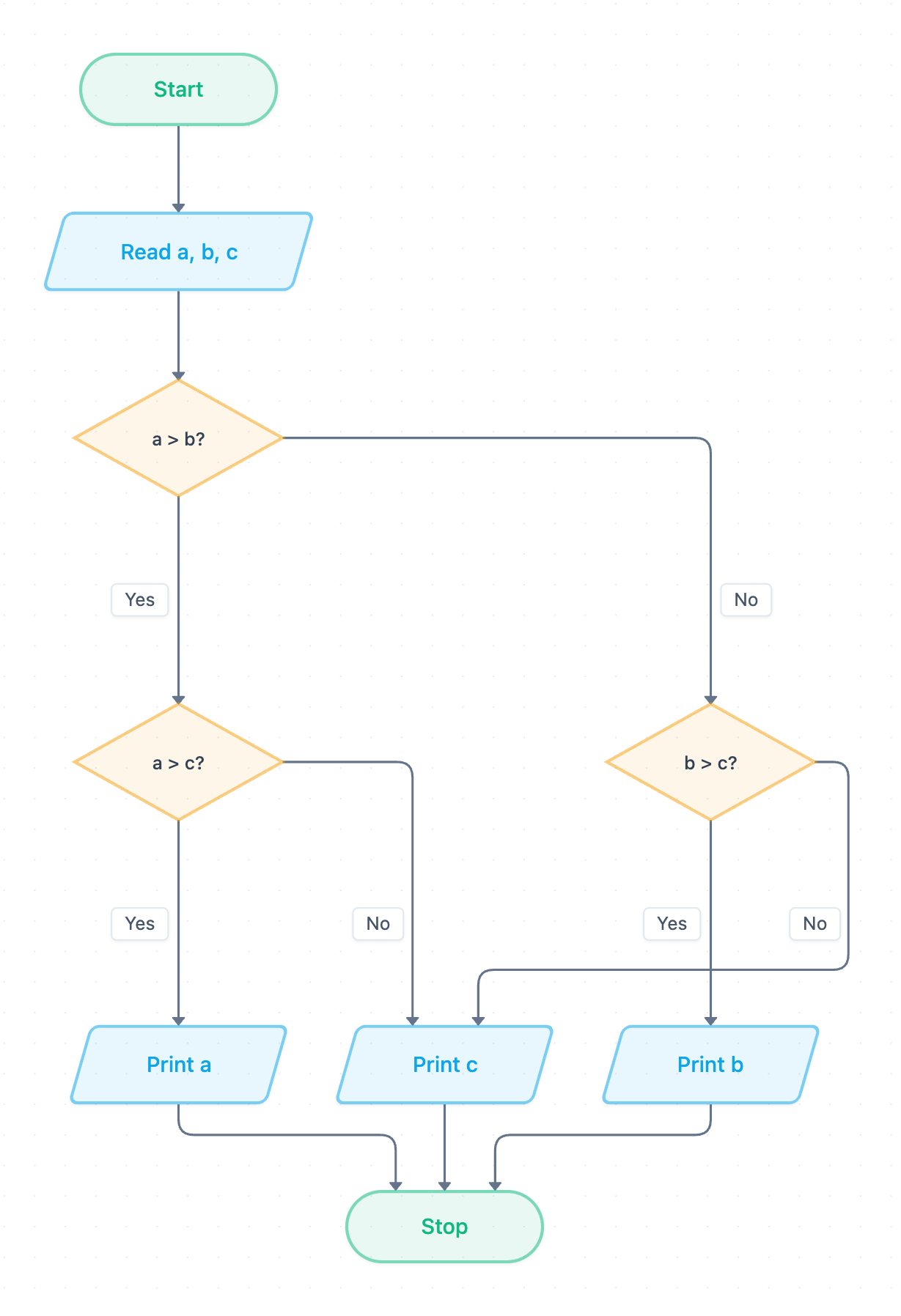
Example: Flowchart for finding the largest of three numbers: click to open it in the editor and change it.
How the flowchart works, step by step
- Start: the terminator (oval) marks the entry point.
- Read a, b, c: an input symbol (parallelogram) stores three values in variables.
- a > b?: the first decision. Yes goes to a > c?. No goes to b > c?.
- a > c?: we already know a beats b. Yes leads to Print a. No leads to Print c.
- b > c?: we know a does not beat b. Yes leads to Print b. No leads to Print c.
- Print a, Print b or Print c: exactly one output runs. Every path then reaches Stop.
There is no iteration here. The algorithm uses only sequence and selection, and it always makes exactly two comparisons. It also handles ties correctly. For example, with a = 5, b = 3 and c = 5, the path goes a > b? Yes, then a > c? No, then Print c, which outputs 5.
Pseudocode (OCR Exam Reference Language)
This pseudocode follows the flowchart decision for decision. No while loop is needed because the flowchart has no loop.
a = int(input("Enter a"))
b = int(input("Enter b"))
c = int(input("Enter c"))
if a > b then
    if a > c then
        print(a)
    else
        print(c)
    endif
else
    if b > c then
        print(b)
    else
        print(c)
    endif
endif
Trace table: a = 4, b = 9, c = 7
The algorithm runs only once, with no loop, so each row below is one step through the flowchart rather than one pass of a loop.
| Step | a | b | c | Condition | Result | Output |
|---|---|---|---|---|---|---|
| Read a, b, c | 4 | 9 | 7 | – | – | – |
| a > b? | 4 | 9 | 7 | 4 > 9 | False (No) | – |
| b > c? | 4 | 9 | 7 | 9 > 7 | True (Yes) | – |
| Print b | 4 | 9 | 7 | – | – | 9 |
How to adapt it for your project
- Change the decisions to a < b? and so on to find the smallest number instead.
- Add validation after Read a, b, c, such as a decision that rejects non-numeric input and loops back to the input step.
- For many numbers, replace the nested decisions with a loop that keeps a running largest variable and stops at a rogue value such as -1.
- Add an extra output that reports when two or more values are equal.
Tip: Common exam mistake: forgetting to convert input to integers. If a, b and c stay as strings, "9" > "10" is True because strings are compared character by character, so the wrong number is printed. Use int(input(...)). Also, do not stop after checking only a > b and b > c, because that skips cases where c is largest.
Frequently asked questions
How many decision boxes are in the flowchart to find the largest of three numbers?
There are three diamonds: **a > b?**, **a > c?** and **b > c?**. Any single run passes through exactly two of them before printing one value.
Does this flowchart use iteration?
No. It uses only sequence and selection, with nested if statements. You would need iteration only if you extended it to handle a list of numbers ended by a rogue value.
What happens if two of the numbers are equal?
It still prints a correct largest value. For example, a = 5, b = 5, c = 3 follows **a > b?** No, then **b > c?** Yes, and prints 5.
Make your own flowchart with AI →