Change management process flow (ITIL change request)
This change management process flow is a BPMN diagram of an ITIL-style change request. It shows how a proposed change to a production system is assessed, approved by the **Change Advisory Board (CAB)** when needed, implemented in a change window and reviewed. It has four lanes, **Requester**, **Change Manager**, **CAB** and **Implementer**. It is for IT operations, infrastructure and service management teams.
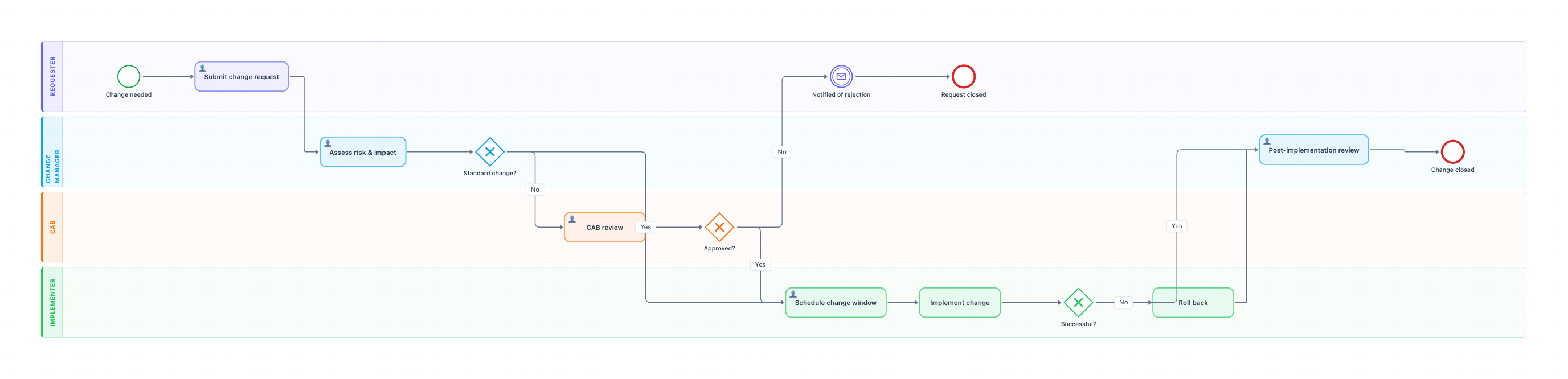
Example: BPMN diagram for ITIL change management: click to open it in the editor and change it.
Lanes and steps in order
- Change needed (Requester, start event): someone needs to change a system, such as a patch, a config change or a new release.
- Submit change request (Requester): the requester raises a request for change (RFC) with the reason, plan and rollback plan.
- Assess risk & impact (Change Manager): the change manager rates the risk and the services affected.
- Standard change? (gateway): Yes, a low-risk pre-approved change goes straight to scheduling. No goes to the CAB.
- CAB review (CAB): the board reviews the plan, timing and risks.
- Approved? (gateway): Yes goes to scheduling. No notifies the requester and ends at Request closed.
- Schedule change window (Implementer): the change is booked into an agreed window.
- Implement change (Implementer): the change is made and tested.
- Successful? (gateway): No triggers Roll back. Either way the change goes to review.
- Post-implementation review (Change Manager): the result is recorded, and the change closes.
Hand-offs and decision points
The three gateways match the three ITIL change types in practice. Standard changes skip the CAB, normal changes get CAB approval, and failed changes are rolled back. Every change, successful or not, ends in a review, so the record is complete.
Where this process usually slows down
- CAB review: weekly CAB meetings delay low-risk changes. Move more repeatable changes into the standard catalog.
- Submit change request: requests without a rollback plan get sent back.
- Schedule change window: too few windows create a backlog of approved changes.
How to adapt it for your company
- Add an Emergency change path with an emergency CAB (ECAB) for urgent fixes.
- Add automated checks, such as CI tests or a deployment pipeline, as service tasks before Implement change.
- Add a notification step to tell users about planned downtime.
- Link failed changes to your incident management process.
Tip: Make a rollback plan mandatory on the request form. It is the one field that saves you when a change fails.
Standard operating procedure
Purpose: Make changes to production systems safely, with the right approval and a way back if they fail.
Scope: Covers all changes to production services. Starts with a change request and ends with a post-implementation review.
Roles
- Requester: Submits the change request with plan and rollback.
- Change Manager: Assesses risk and runs the review.
- CAB: Approves normal changes.
- Implementer: Schedules, implements and rolls back if needed.
Procedure
- Requester: Submit a change request with the reason, plan, test plan and rollback plan.
- Change Manager: Assess risk and impact. Standard pre-approved changes go straight to step 4.
- CAB: Review normal changes at the next CAB meeting and approve or reject. The requester is told of rejections.
- Implementer: Schedule the change in an agreed change window and notify affected users.
- Implementer: Implement and test. If the change fails, roll back at once.
- Change Manager: Hold a post-implementation review and close the change.
Process owner: Change Manager
Turn this into a full SOP with AI →
Frequently asked questions
What are the steps in the ITIL change management process?
Submit a request for change, assess risk and impact, approve it (pre-approved for standard changes, CAB for normal ones), schedule, implement, roll back if it fails, and review.
What is a CAB?
The Change Advisory Board: a group of technical and business people who review and approve normal changes before they go ahead.
What is a standard change?
A low-risk, repeatable change with a tested procedure, such as a routine patch. It is pre-approved, so it does not go to the CAB each time.
Make your own BPMN diagram with AI →