Sequence diagram for a chat application
This sequence diagram shows how a single chat message travels from a Sender to a Receiver through a Chat Server and a Message Queue, including the familiar single-tick and double-tick confirmations. It suits students learning UML sequence diagrams and developers sketching the message flow of a real-time chat app.
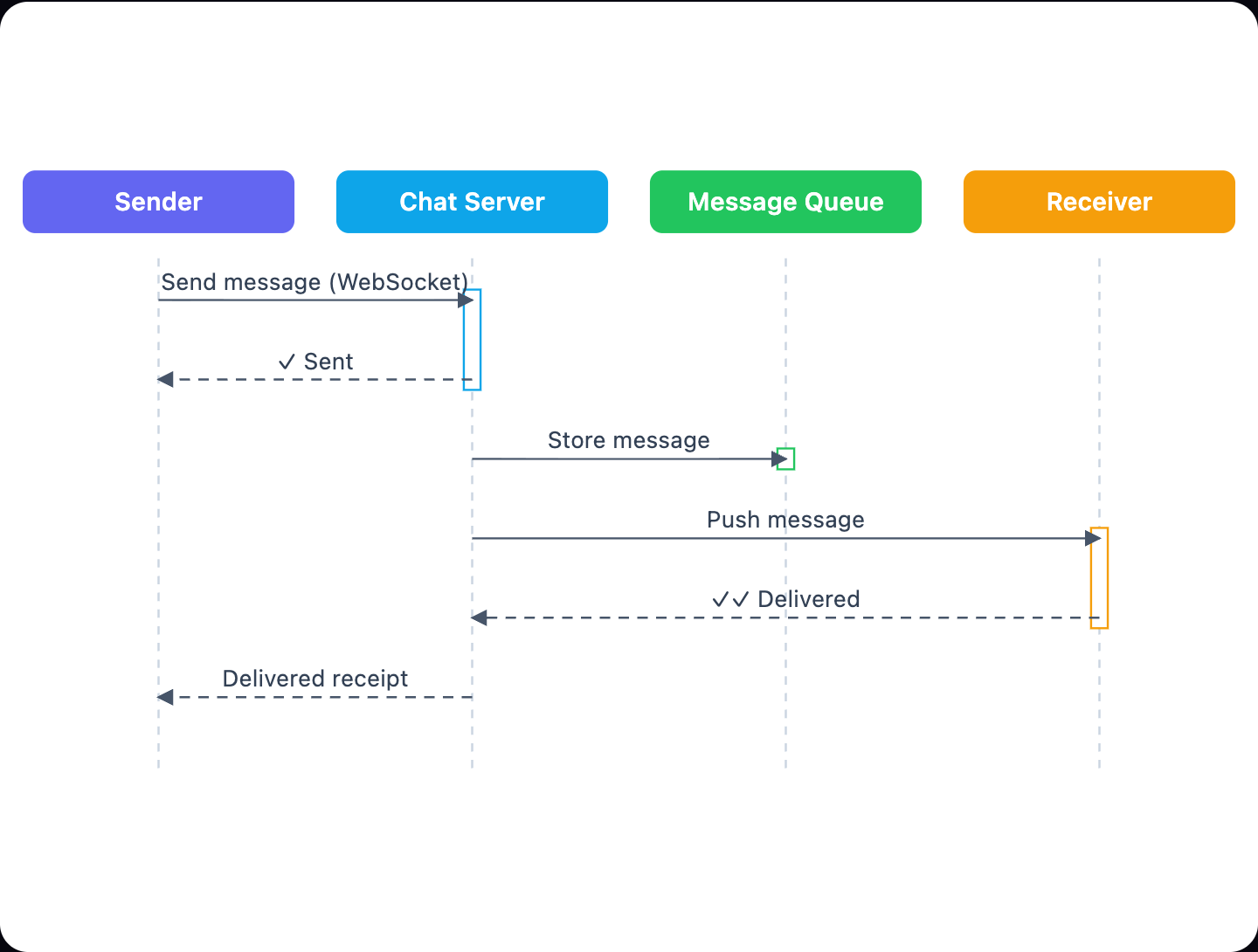
Example: Sequence diagram for chat message delivery: click to open it in the editor and change it.
Participants (lifelines)
| Participant | Role in the flow |
|---|---|
| Sender | The user who writes a message and sends it over a WebSocket connection. |
| Chat Server | The central coordinator. It confirms receipt, stores the message and pushes it to the recipient. |
| Message Queue | Holds the stored message so it is not lost. |
| Receiver | The user who gets the pushed message and confirms delivery. |
Message flow step by step
- Send message (WebSocket): the Sender sends the chat message to the Chat Server as a synchronous call.
- ✓ Sent: the Chat Server returns a single-tick confirmation to the Sender, meaning the server has the message.
- Store message: the Chat Server saves the message in the Message Queue.
- Push message: the Chat Server pushes the message to the Receiver.
- ✓✓ Delivered: the Receiver replies to the Chat Server with a double-tick delivery confirmation.
- Delivered receipt: the Chat Server passes the delivery receipt back to the Sender, who can now show the double tick.
Solid arrows are the synchronous requests (send, store, push). Dashed return arrows are the replies (✓ Sent, ✓✓ Delivered, Delivered receipt). The Chat Server sits in the middle of every exchange, so the Sender and Receiver never talk to each other directly.
How to adapt it for your project
- Rename the lifelines to match your stack, for example a specific broker in place of Message Queue.
- Add a Read receipt return message after ✓✓ Delivered if your app shows when a message has been seen.
- Add an alt fragment for an offline Receiver, where the message waits in the Message Queue until the user reconnects.
- Insert a database or authentication lifeline if your server checks tokens before accepting Send message.
Tip: Keep one sequence diagram per scenario. Draw the happy path first, as this diagram does, then make separate diagrams or alt fragments for failures like timeouts or lost connections.
Frequently asked questions
What are the participants in a sequence diagram for a chat application?
This diagram has four lifelines: Sender, Chat Server, Message Queue and Receiver. The Chat Server coordinates every message between the other three.
How is the 'delivered' tick shown in a chat sequence diagram?
The Receiver sends a ✓✓ Delivered return message to the Chat Server. The server then forwards a Delivered receipt to the Sender, who can display the double tick.
Why does the chat server store the message in a queue?
The Store message step saves the message in the Message Queue so it is not lost while the Chat Server pushes it to the Receiver. You can extend this to hold messages for offline users.
Make your own sequence diagram with AI →