Docker build and push pipeline (release on tag)
This flowchart shows a release pipeline that builds and pushes a Docker image when someone pushes a git tag starting with v. It covers testing, the build and push step, a Trivy vulnerability scan and the two places where the run can fail. It is useful for students learning CI/CD and for developers setting up tagged releases.
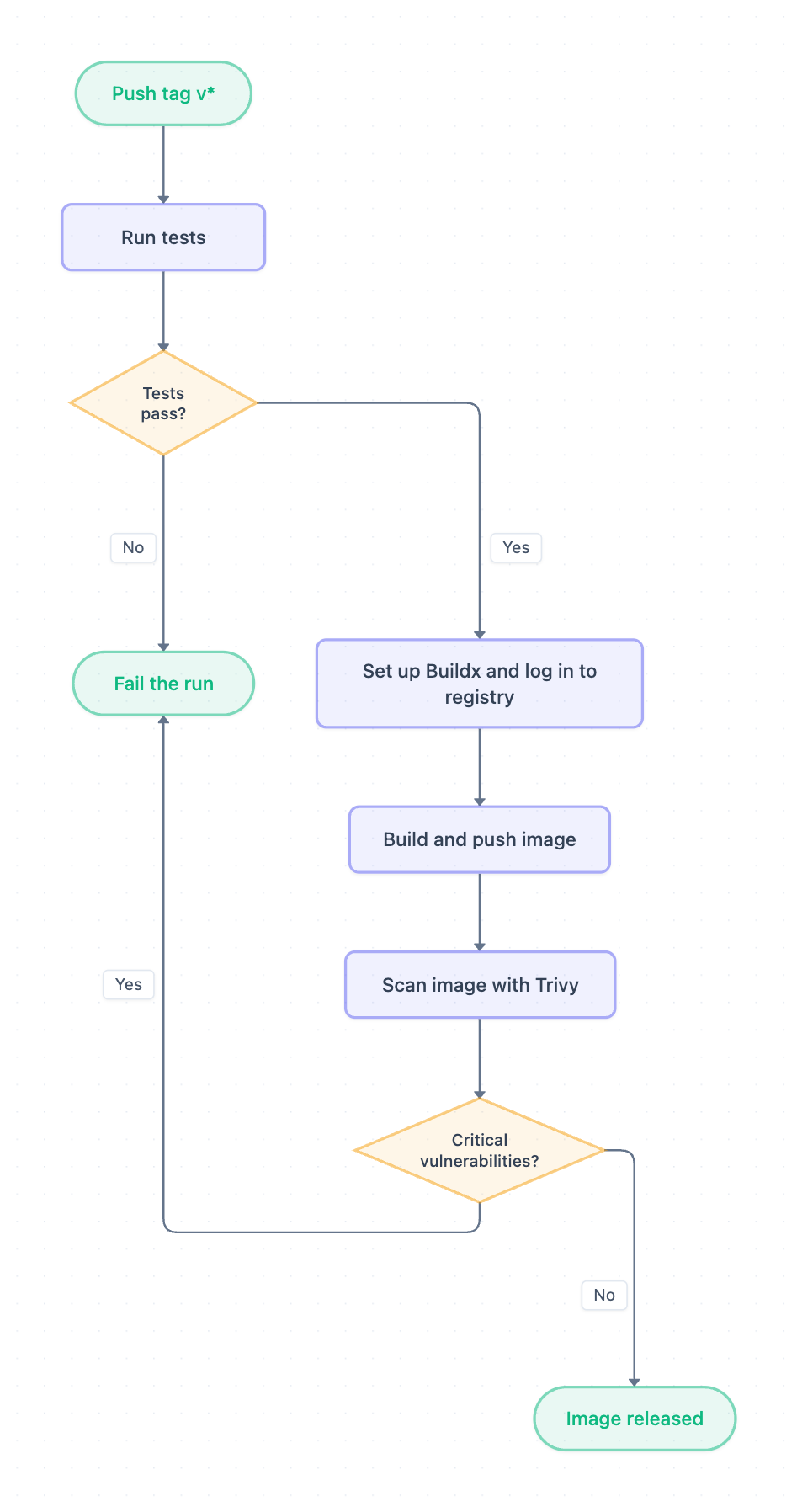
Example: Flowchart for building and pushing a Docker image on a git tag: click to open it in the editor and change it.
The pipeline step by step
- Push tag v* starts the pipeline. A tag such as v1.2.0 triggers the run, but ordinary commits do not.
- Run tests checks the code before any image is built.
- Tests pass? is the first decision. No leads to Fail the run. Yes continues to the build.
- Set up Buildx and log in to registry prepares the Docker build tool and signs in to the image registry so the push is allowed.
- Build and push image builds the image and uploads it to the registry.
- Scan image with Trivy checks the pushed image for known vulnerabilities.
- Critical vulnerabilities? is the second decision. Yes leads to Fail the run. No ends at Image released.
Start, end and decision points
| Node | Type | Role |
|---|---|---|
| Push tag v* | Start | Trigger for the whole pipeline |
| Tests pass? | Decision | Stops broken code before the build |
| Critical vulnerabilities? | Decision | Stops unsafe images from being marked as released |
| Fail the run | End | Shared failure exit for both decisions |
| Image released | End | Successful finish |
Both decisions point to the same Fail the run node. This keeps the chart simple: any failed check ends the pipeline in one place.
How to adapt it for your project
- Change the trigger in Push tag v* to match your own tag pattern or release branch.
- Replace Run tests with your real checks, such as linting, unit tests or integration tests.
- Name your registry in Set up Buildx and log in to registry, for example Docker Hub, GHCR or a private registry.
- Change the rule in Critical vulnerabilities? if your team also blocks releases on high-severity issues.
- Add steps after Image released if you need them, such as a deploy or a notification.
Tip: In this flow, the scan runs after Build and push image, so an image with critical vulnerabilities is already in the registry when the run fails. If that is a problem for you, build first, scan the image locally, and push only after the scan passes. You can open and edit the diagram to reorder these steps.
Frequently asked questions
What triggers this Docker build and push pipeline?
The pipeline starts when a git tag matching v* is pushed, such as v1.0.0. Regular commits without a matching tag do not start it.
Where does the Trivy scan happen in the pipeline?
Trivy scans the image right after the build and push step. If it finds critical vulnerabilities, the run fails. Otherwise the image is released.
How many ways can the pipeline fail?
There are two failure paths: tests not passing, and critical vulnerabilities found in the scan. Both lead to the same Fail the run end node.
Make your own flowchart with AI →