College admission process flowchart
This swimlane diagram maps the college admission process across three roles: **Student**, **Admission Office** and **Accounts**. It shows who owns each step, where work is handed off, and where the single eligibility decision sits. Use it as a starting template if you document, audit or improve intake and enrollment workflows.
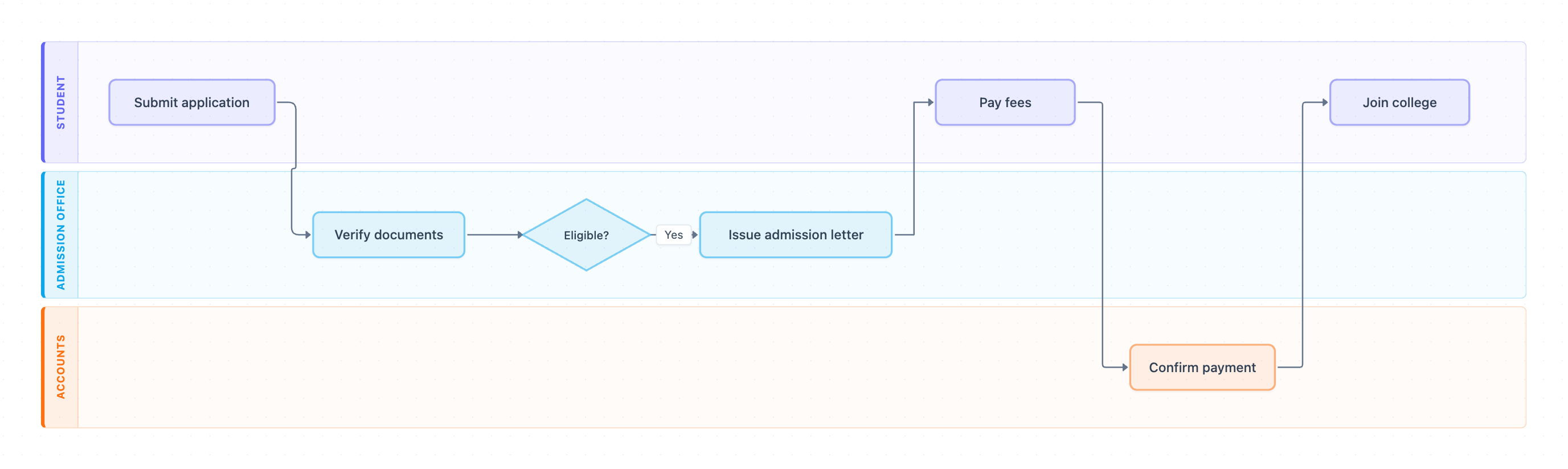
Example: Swimlane diagram for college admission: click to open it in the editor and change it.
Lanes and owners
| Lane (owner) | Steps they own |
|---|---|
| Student | Submit application, Pay fees, Join college |
| Admission Office | Verify documents, Eligible? (decision), Issue admission letter |
| Accounts | Confirm payment |
Step-by-step flow and hand-offs
- Student completes Submit application. Hand-off 1: Student to Admission Office.
- Admission Office runs Verify documents.
- Admission Office makes the Eligible? decision. Only the Yes path is drawn.
- On Yes, Admission Office completes Issue admission letter. Hand-off 2: Admission Office back to Student.
- Student completes Pay fees. Hand-off 3: Student to Accounts.
- Accounts completes Confirm payment. Hand-off 4: Accounts back to Student.
- Student completes Join college, which ends the process.
There are four hand-offs across three lanes and one decision point. The flow returns to the Student lane twice, so the applicant acts as the link between the Admission Office and Accounts.
Where this process usually slows down
- Verify documents: missing or unclear documents create rework. This is the most common bottleneck.
- Eligible?: the diagram has no No branch, so rejections and requests for more information are unhandled exceptions with no owner.
- Pay fees to Confirm payment: payment reconciliation delays can hold students at the Accounts hand-off.
- Two hand-offs back to the Student depend on applicant response time, which is outside your SLA control.
How to adapt it for your project
- Rename lanes to match your real roles, for example Admissions Officer, Registrar or Finance Ops.
- Add a No path from Eligible? to a rejection or resubmission step, and name an owner for it.
- Insert approval steps where your approval limits apply, such as fee waivers or scholarships that need a manager's sign-off.
- Note SLA targets on each hand-off arrow so you can measure cycle time.
Tip: Each time an arrow crosses a lane boundary, write down who is notified and how. Most delays hide in those hand-offs, not inside the steps.
Frequently asked questions
What are the steps in the college admission process flowchart?
Submit application, Verify documents, the Eligible? decision, Issue admission letter, Pay fees, Confirm payment, and Join college.
Who are the roles in this admission swimlane diagram?
There are three lanes. The Student applies, pays and joins. The Admission Office verifies documents, decides eligibility and issues the letter. Accounts confirms payment.
What happens if a student is not eligible?
The diagram only shows the Yes path from Eligible?, so the rejection route is not modeled. Add a No branch to a rejection or resubmission step when you adapt it.
Make your own swimlane diagram with AI →