Customer refund process flowchart
This customer refund process flowchart follows a refund request from the customer's first message to the money back on their card. It has four lanes, **Customer**, **Support**, **Warehouse** and **Finance**, and two decisions: whether the order is eligible, and whether the returned item is in acceptable condition. It is for support, e-commerce and finance managers who need one agreed refund policy that every agent follows.
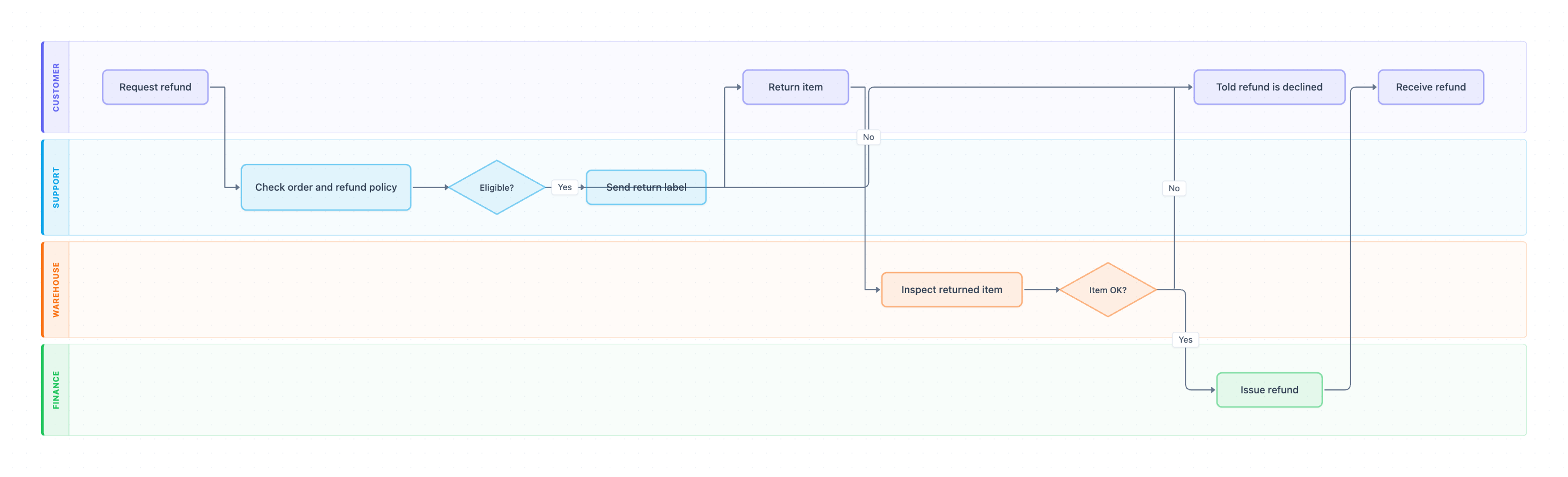
Example: Swimlane diagram for the customer refund process: click to open it in the editor and change it.
Lanes and steps in order
- Request refund (Customer): the customer asks for their money back through chat, email or the returns portal.
- Check order and refund policy (Support): the agent finds the order and checks the purchase date, item type and reason against the policy.
- Eligible? (Support, decision): Yes continues to the return label. No ends at Told refund is declined, with the reason.
- Send return label (Support): the agent emails a prepaid label and return instructions.
- Return item (Customer): the customer ships the item back.
- Inspect returned item (Warehouse): the warehouse checks the item against the order.
- Item OK? (Warehouse, decision): Yes goes to Finance. No ends at Told refund is declined.
- Issue refund (Finance): Finance refunds the original payment method.
- Receive refund (Customer): the customer sees the money back, and the case closes.
Hand-offs and decision points
The case crosses lanes five times: Customer → Support → Customer → Warehouse → Finance → Customer. Both decisions share one decline outcome, so the customer always hears back, whether the problem is the policy or the item's condition.
Where this process usually slows down
- Return item: customers forget to ship, and nobody follows up. Set a return window, for example 14 days, and send a reminder.
- Inspect returned item: returns pile up at the dock when the warehouse has no daily target for them.
- Issue refund: Finance batches refunds weekly, so customers chase Support. Agree a refund SLA, such as 3 business days after inspection.
How to adapt it for your company
- Add a Keep the item? branch for low-value orders, where shipping costs more than the item and you refund without a return.
- Add an approval step by a support lead for refunds above a set amount, for example $250.
- Add a partial-refund path from Item OK? for items that come back used or damaged.
- Rename lanes to your teams, such as Customer Success, Fulfillment or Accounts Receivable.
Tip: Write the refund window and the refund SLA right on the diagram. Most refund complaints are about waiting, not about the decision.
Standard operating procedure
Purpose: Give every customer a fair, fast refund decision under one published refund policy.
Scope: Starts when a customer requests a refund. Ends when the refund is received or the customer is told it is declined.
Roles
- Support: Checks eligibility and sends the return label.
- Warehouse: Inspects returned items.
- Finance: Issues refunds to the original payment method.
- Customer: Requests the refund and returns the item.
Procedure
- Support: Find the order and check it against the refund policy: purchase date, item type and reason.
- Support: If it is not eligible, tell the customer why, in writing. If eligible, go to step 3.
- Support: Email a prepaid return label and instructions, with a 14-day return window.
- Warehouse: Inspect the returned item within 2 business days of arrival.
- Warehouse: If the item is not in acceptable condition, tell Support so the customer is told the refund is declined.
- Finance: Refund the original payment method within 3 business days and confirm to the customer.
Process owner: Customer Support Manager
Turn this into a full SOP with AI →
Frequently asked questions
What are the steps in a customer refund process?
Request refund, check the order against the refund policy, send a return label, return the item, inspect it, issue the refund and confirm it to the customer. Two checks can decline it: eligibility and the item's condition.
Who approves a refund?
In this flowchart Support decides eligibility and the Warehouse confirms the item's condition. Many companies add a lead or manager approval for refunds above a set amount.
How long should a refund take?
Card refunds usually show up within 5 to 10 business days after you issue them. Set an internal target for the steps you control, such as inspection within 2 days and refund within 3.
Make your own swimlane diagram with AI →