Expense reimbursement process flowchart
This expense reimbursement process flowchart shows how an employee's out-of-pocket costs, such as travel, meals or software, are approved and paid back. It has three lanes, **Employee**, **Manager** and **Finance**, two decisions and a **Fix and resubmit** loop. It is for finance, HR and operations managers who want a clear, auditable expense process.
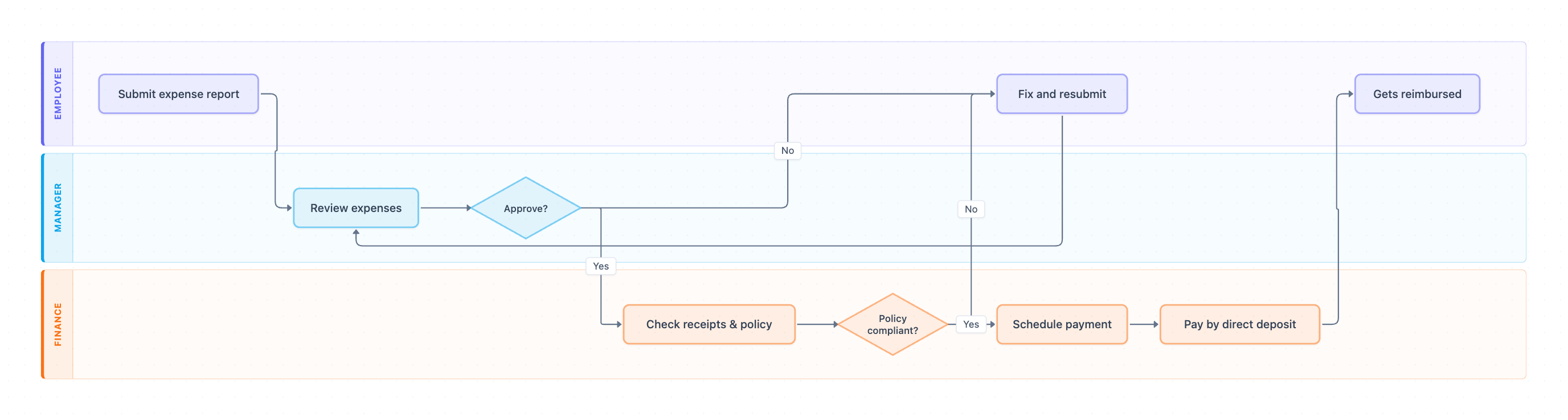
Example: Swimlane diagram for expense reimbursement: click to open it in the editor and change it.
Lanes and steps in order
- Submit expense report (Employee): the employee enters each expense with its receipt in the expense tool.
- Review expenses (Manager): the manager checks that each cost was for business and expected.
- Approve? (Manager, decision): Yes goes to Finance. No sends it back to the employee to Fix and resubmit.
- Check receipts & policy (Finance): Finance checks receipts, amounts, categories and policy limits such as meal caps.
- Policy compliant? (Finance, decision): Yes continues to payment. No sends it back to the employee.
- Schedule payment (Finance): the report joins the next reimbursement run.
- Pay by direct deposit (Finance): the money is paid to the employee's bank account.
- Gets reimbursed (Employee): the employee receives the payment, and the report closes.
Hand-offs and decision points
Both decisions can return the report to the employee, and Fix and resubmit always goes back to the manager. That keeps one rule simple: any change to a report is approved again.
Where this process usually slows down
- Review expenses: reports sit in a manager's queue at month end. Set a review SLA and a backup approver.
- Check receipts & policy: missing or unreadable receipts cause most rejections.
- Fix and resubmit: unclear rejection reasons send the same report around the loop twice.
How to adapt it for your company
- Add an auto-approve path for small reports under a set amount, for example $75.
- Add a director or CFO approval for reports above your approval limit.
- Add a corporate card branch where Finance reconciles instead of reimbursing.
- Add a payroll lane if reimbursements are paid with salary rather than by separate deposit.
Tip: Make every rejection say what to fix. A one-line reason, such as "hotel receipt missing for May 4", cuts resubmissions in half.
Standard operating procedure
Purpose: Pay back legitimate business expenses quickly while keeping spending within policy.
Scope: Starts when an employee submits an expense report. Ends when the employee is paid.
Roles
- Employee: Submits expenses with receipts and fixes rejected items.
- Manager: Approves the business need.
- Finance: Checks receipts and policy, and pays.
Procedure
- Employee: Submit an expense report within 30 days, with an itemized receipt for every expense.
- Manager: Review and approve within 3 business days. If you reject, say exactly what to fix.
- Finance: Check receipts, categories and policy limits.
- Finance: If anything breaks policy, return the report to the employee with the reason. Resubmitted reports go back to the manager.
- Finance: Schedule compliant reports into the next payment run.
- Finance: Pay by direct deposit and mark the report as paid.
Process owner: Finance Manager
Turn this into a full SOP with AI →
Frequently asked questions
What is the expense reimbursement process?
An employee submits expenses with receipts, a manager approves them, Finance checks them against policy, and the employee is paid back, usually by direct deposit.
Who approves expense reports?
The employee's manager approves the business need, then Finance checks receipts and policy. Larger reports often need a second approver.
What happens when an expense is rejected?
It goes back to the employee to fix and resubmit, and the corrected report is reviewed by the manager again.
Make your own swimlane diagram with AI →