Invoice approval process flowchart (accounts payable)
This invoice approval process flowchart is a BPMN diagram of a standard accounts payable workflow. It runs from a vendor's invoice to payment on the due date, across three lanes: **Vendor**, **Accounts Payable** and **Budget Owner**. It shows the **3-way match** of purchase order, goods receipt and invoice, and what happens when they don't match. It is for AP managers, controllers and finance operations teams.
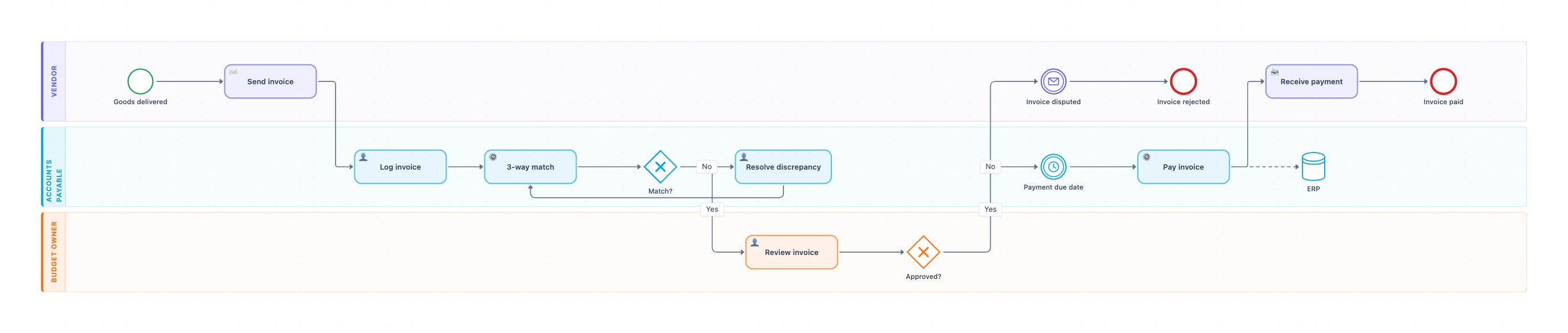
Example: BPMN diagram for invoice approval in accounts payable: click to open it in the editor and change it.
Lanes and steps in order
- Goods delivered (Vendor, start event): the vendor has delivered the order.
- Send invoice (Vendor, send task): the vendor sends the invoice to AP.
- Log invoice (Accounts Payable): AP records the invoice in the ERP or AP tool.
- 3-way match (Accounts Payable, service task): the system compares the PO, the goods receipt and the invoice.
- Match? (gateway): Yes goes to the budget owner. No goes to Resolve discrepancy, then back to the match.
- Review invoice (Budget Owner): the budget owner confirms the charge is correct.
- Approved? (gateway): Yes waits for the payment due date. No ends with Invoice disputed and Invoice rejected on the vendor side.
- Payment due date (timer event): payment waits until the due date, keeping cash in the business.
- Pay invoice (Accounts Payable): AP pays and updates the ERP data store.
- Receive payment and Invoice paid (Vendor): the vendor is paid, and the process ends.
Hand-offs and decision points
The two gateways split two different risks. Match? catches wrong quantities or prices. Approved? catches charges the business didn't expect. The timer shows that an approved invoice is not paid at once. It is paid on its terms, such as net 30.
Where this process usually slows down
- Resolve discrepancy: AP waits on receiving or purchasing to explain a price or quantity difference.
- Review invoice: budget owners approve from email and forget. Use reminders and an escalation after a set number of days.
- Missing goods receipts: if the warehouse doesn't record the delivery, every invoice fails the match.
How to adapt it for your company
- Add a non-PO invoice path, such as utilities or subscriptions, that skips the 3-way match.
- Add approval tiers by amount, for example controller sign-off above $10,000.
- Add an early-payment-discount check before the timer, for terms like 2/10 net 30.
- Add a duplicate-invoice check at Log invoice.
Tip: Set a match tolerance, such as 2% or $50, so tiny price differences don't send invoices into the discrepancy loop.
Standard operating procedure
Purpose: Pay only correct, approved invoices, and pay them on time.
Scope: Starts when a vendor sends an invoice for delivered goods. Ends when the invoice is paid or rejected.
Roles
- Accounts Payable: Logs and matches invoices, resolves discrepancies, and pays.
- Budget Owner: Approves the charge.
- Vendor: Sends invoices quoting the PO number.
Procedure
- Accounts Payable: Log each invoice within 1 business day and check it is not a duplicate.
- Accounts Payable: Run the 3-way match of PO, goods receipt and invoice.
- Accounts Payable: If they do not match, resolve the discrepancy with purchasing or the vendor, then match again.
- Budget Owner: Review and approve the invoice within 3 business days. If you reject it, AP tells the vendor why.
- Accounts Payable: Hold approved invoices until the payment due date, unless there is an early-payment discount.
- Accounts Payable: Pay the invoice and record the payment in the ERP.
Process owner: Accounts Payable Manager
Turn this into a full SOP with AI →
Frequently asked questions
What is the invoice approval process in accounts payable?
AP logs the invoice, matches it to the purchase order and goods receipt, the budget owner approves it, and AP pays it on the due date.
What is a 3-way match?
A check that the purchase order, the goods receipt and the vendor's invoice agree on items, quantities and prices before the invoice is paid.
Why is there a timer before payment?
Approved invoices are paid on their payment terms, not immediately. Paying on the due date, or early only for a discount, keeps cash in the business longer.
Make your own BPMN diagram with AI →