IT access request process flowchart
This IT access request process flowchart shows how an employee gets access to a system, app or shared folder, with the right approvals and an audit trail. It has four lanes, **Employee**, **Manager**, **System Owner** and **IT Service Desk**, and three decisions. It is for IT managers, security teams and service desk leads, and it supports common audit needs such as SOC 2 and ISO 27001.
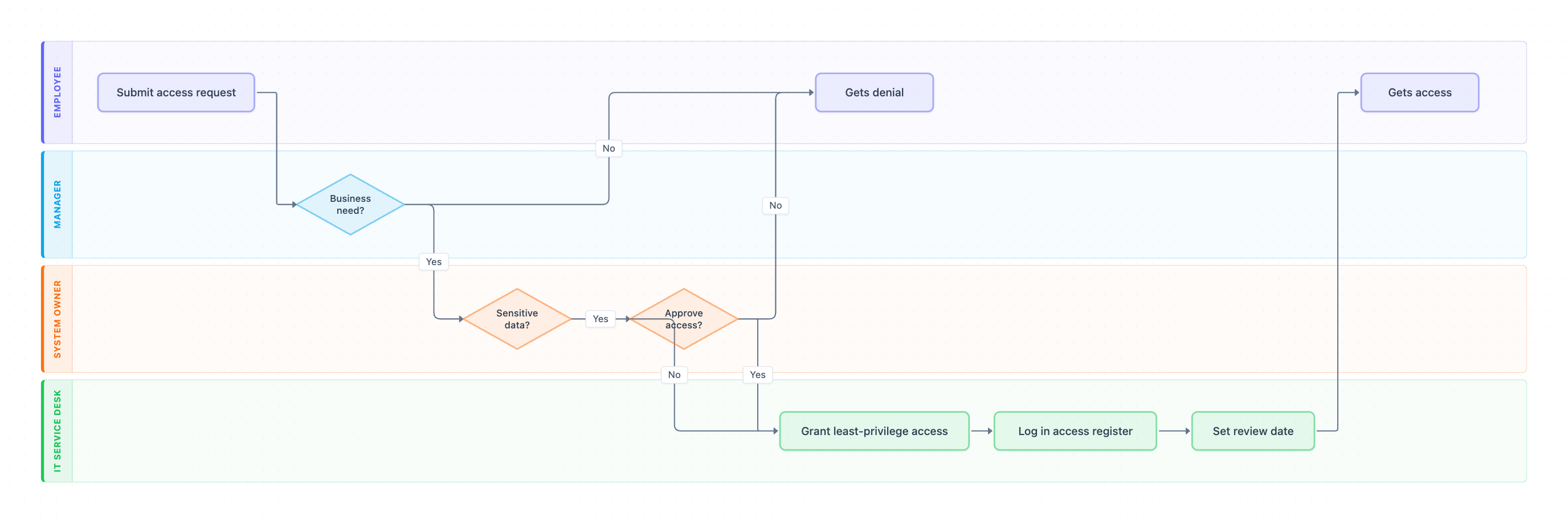
Example: Swimlane diagram for IT access requests: click to open it in the editor and change it.
Lanes and steps in order
- Submit access request (Employee): the employee requests access in the service portal, naming the system and the level they need.
- Business need? (Manager, decision): Yes passes it to the system owner. No ends at Gets denial.
- Sensitive data? (System Owner, decision): Yes needs the owner's approval. No goes straight to IT.
- Approve access? (System Owner, decision): Yes goes to IT. No ends at Gets denial.
- Grant least-privilege access (IT Service Desk): IT gives the lowest access level that does the job.
- Log in access register (IT Service Desk): IT records who approved what and when.
- Set review date (IT Service Desk): IT schedules the next access review, for example every 90 days.
- Gets access (Employee): the employee is told access is ready.
Hand-offs and decision points
The Sensitive data? decision keeps the process fast: everyday tools need only the manager, while systems holding customer, financial or HR data also need the system owner. Every path ends with the employee told the outcome.
Where this process usually slows down
- Approve access?: system owners are often unclear or unavailable. Name a backup owner for each system.
- Submit access request: vague requests ("access to Salesforce") need back-and-forth. Use a form with role-based options.
- Set review date: reviews are planned but never done, so access piles up over time.
How to adapt it for your company
- Add role-based bundles so new hires get standard access without individual requests.
- Add time-limited access with an automatic expiry for contractors and admin rights.
- Add a security team lane for privileged or production access.
- Link it to your offboarding process so access is removed when people leave.
Tip: Record the approver and the reason on every request. Auditors ask for exactly that evidence.
Standard operating procedure
Purpose: Grant only the access people need, with recorded approvals and regular reviews.
Scope: Covers requests for access to company systems, apps and data. Ends when access is granted or denied.
Roles
- Manager: Confirms the business need.
- System Owner: Approves access to sensitive systems.
- IT Service Desk: Grants, records and schedules review of access.
Procedure
- Employee: Submit an access request in the service portal, naming the system and access level.
- Manager: Confirm the business need. If there is none, deny the request with a reason.
- System Owner: For systems with sensitive data, approve or deny within 2 business days.
- IT Service Desk: Grant the lowest access level that does the job.
- IT Service Desk: Record the request, approver and date in the access register.
- IT Service Desk: Set the next access review date and tell the employee access is ready.
Process owner: IT Security Manager
Turn this into a full SOP with AI →
Frequently asked questions
What is an access request process?
A defined way for employees to ask for system access, have it approved by their manager and the system owner, and have IT grant and record it.
What is least-privilege access?
Giving each person only the access they need to do their job, and nothing more. It limits the damage if an account is misused.
How often should access be reviewed?
Commonly every 90 days for sensitive systems and once or twice a year for others, plus whenever someone changes role.
Make your own swimlane diagram with AI →