New employee IT setup process and SOP template
This new employee IT setup process shows how a new hire gets accounts, a laptop and the right access before their first day. It has five lanes, **HR**, **Hiring Manager**, **IT Service Desk**, **Vendor** and **New Hire**, and two decisions: whether a laptop is in stock, and whether every app works at first sign-in. Below the diagram is a short SOP you can copy. It is for IT service desk leads and HR teams who want new hires productive on day one.
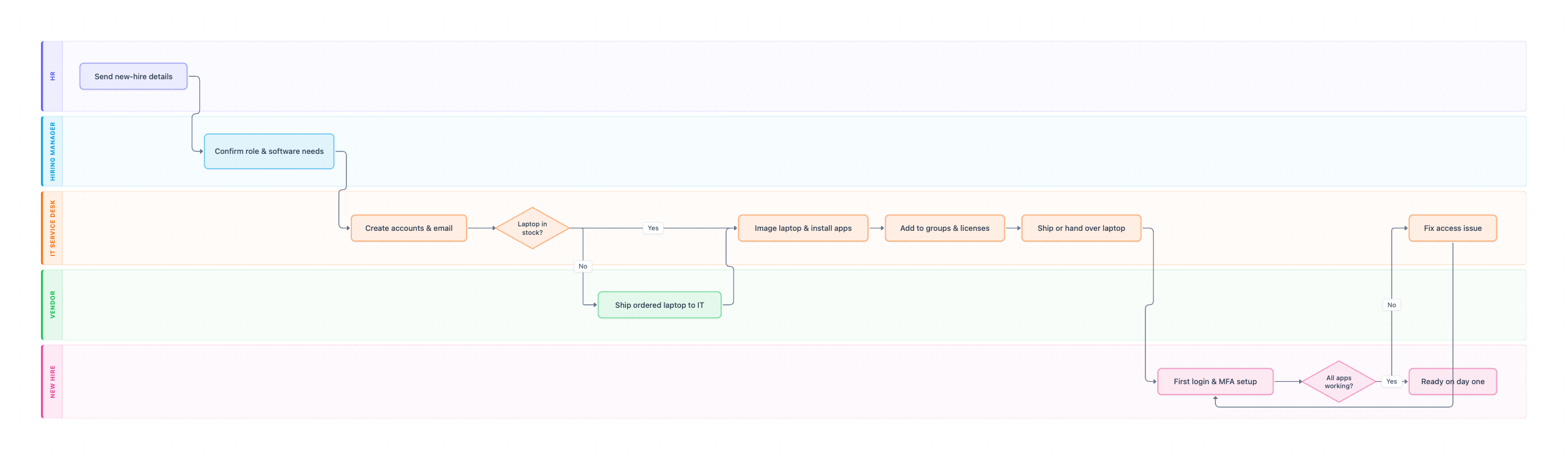
Example: Swimlane diagram for new employee IT setup: click to open it in the editor and change it.
Lanes and steps in order
- Send new-hire details (HR): HR sends the name, role, manager, start date and location.
- Confirm role & software needs (Hiring Manager): the manager confirms the apps, drives and access the role needs.
- Create accounts & email (IT Service Desk): IT creates the email account and core accounts.
- Laptop in stock? (IT Service Desk, decision): Yes goes to imaging. No means IT orders one, and the Vendor ships it (Ship ordered laptop to IT) before imaging.
- Image laptop & install apps (IT Service Desk): the standard image, apps and disk encryption go on.
- Add to groups & licenses (IT Service Desk): the user joins the right groups and gets software licenses.
- Ship or hand over laptop (IT Service Desk): the laptop reaches the new hire before day one.
- First login & MFA setup (New Hire): the new hire signs in, sets a password and sets up MFA.
- All apps working? (New Hire, decision): Yes ends at Ready on day one. No goes to Fix access issue, then back to sign-in.
Hand-offs and decision points
The two early hand-offs, HR to the manager and the manager to IT, decide whether day one goes well. If IT learns about a new hire late, or without the role's software list, the laptop and access will not be ready. The Fix access issue loop keeps the ticket open until the new hire confirms everything works.
Where this process usually slows down
- Send new-hire details: HR tells IT two days before the start date. Agree a minimum notice, such as 5 business days.
- Ship ordered laptop to IT: vendor shipping can take a week. Keep a small stock of standard laptops.
- Confirm role & software needs: managers forget specialist apps. Keep a standard access list per role.
How to adapt it for your company
- Add a Security lane for roles that need privileged or production access.
- Split the flow for remote and office hires: shipping and a video setup call, or a desk handover.
- Link it to your IT access request process for anything outside the standard role list.
- Link it to your employee offboarding process, so access added here is removed when people leave.
Tip: Send the new hire a one-page "first morning" guide with how to sign in and who to call. Record yourself doing the first sign-in once and share the step guide.
Standard operating procedure
Purpose: Give every new hire working accounts, a ready laptop and the right access before their first morning.
Scope: Starts when HR sends the new-hire details. Ends when the new hire has signed in to every app they need.
Roles
- HR: Sends the name, role, start date and location.
- Hiring Manager: Confirms the software and access the role needs.
- IT Service Desk: Creates accounts, prepares the laptop and fixes access issues.
- Vendor: Ships laptops that IT orders when none is in stock.
- New Hire: Signs in, sets up MFA and reports anything that does not work.
Procedure
- HR: Send the new hire's name, role, manager, start date and work location to IT at least 5 business days before the start date.
- Hiring Manager: Confirm the apps, shared drives and access levels the role needs, using the role's standard list where one exists.
- IT Service Desk: Create the email account and core accounts (SSO, chat, HR system) with a temporary password.
- IT Service Desk: Assign a laptop from stock. If none is available, order one from the vendor the same day.
- IT Service Desk: Image the laptop, install the standard apps and turn on disk encryption.
- IT Service Desk: Add the user to the right groups and software licenses, then ship or hand over the laptop so it arrives before day one.
- New Hire: Sign in, set a new password and set up MFA. Check every app on the list.
- IT Service Desk: Fix any app or access that does not work and confirm with the new hire before closing the ticket.
Process owner: IT Service Desk Manager
Turn this into a full SOP with AI →
Frequently asked questions
What should a new hire IT setup checklist include?
Email and core accounts, a prepared laptop with encryption, group memberships and software licenses, MFA setup, and a check that every app works at first sign-in.
How early should IT start setting up a new employee?
Most teams ask for 5 business days’ notice, so there is time to order a laptop if none is in stock and to ship it to remote hires.
Who owns new employee IT setup?
The IT service desk owns the setup, HR owns telling IT in time, and the hiring manager owns the list of apps and access the role needs.
Make your own swimlane diagram with AI →