Sequence diagram for online shopping (checkout)
This sequence diagram shows how an online shopping checkout works, from the moment a **Customer** places an order until they see a confirmation. It traces eight messages between five participants. It is useful for students learning UML sequence diagrams and for developers planning a checkout flow.
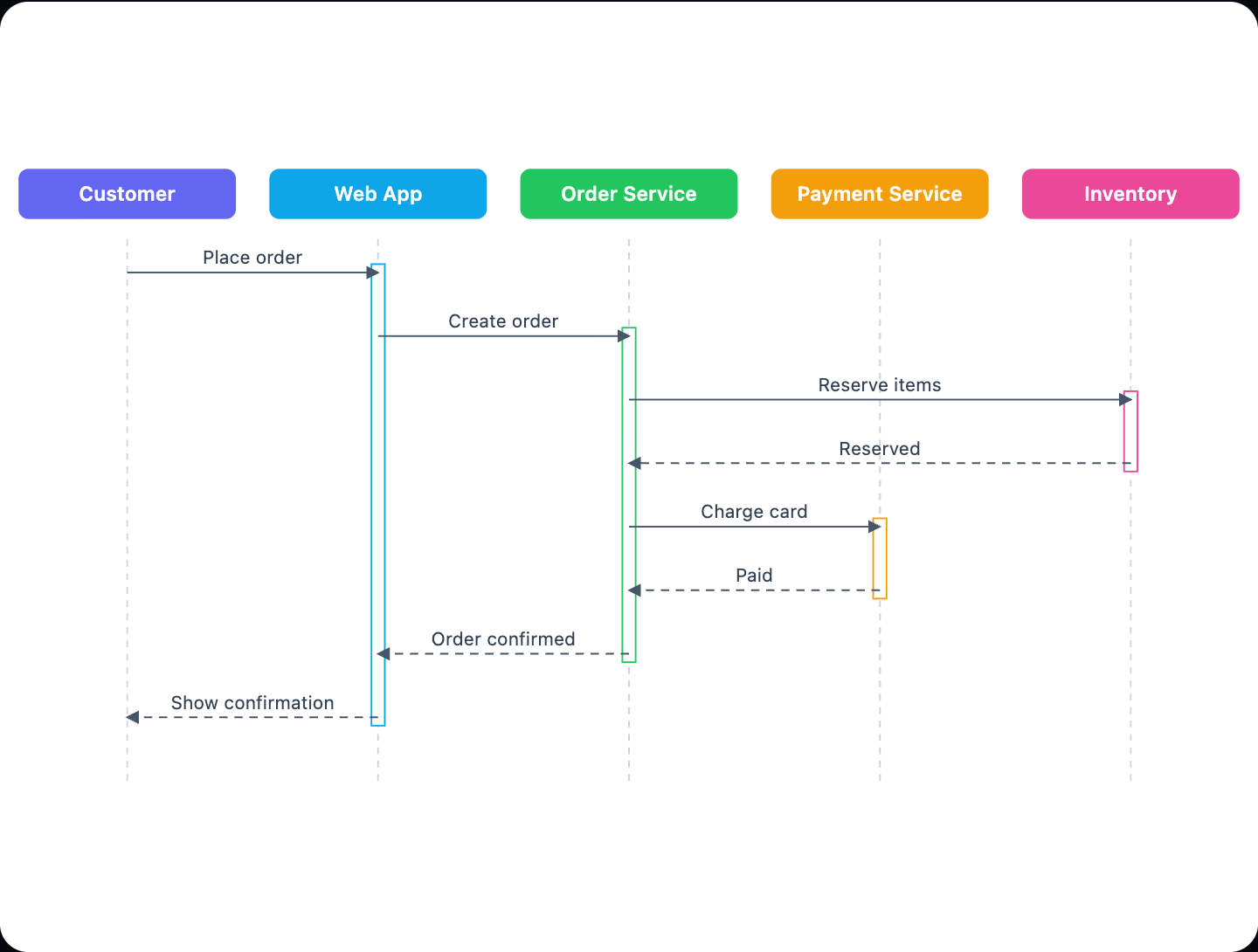
Example: Sequence diagram for online shopping checkout: click to open it in the editor and change it.
Participants (lifelines)
| Participant | Role in checkout |
|---|---|
| Customer | Starts the checkout and receives the result |
| Web App | Front end that takes the request and shows the confirmation |
| Order Service | Coordinates the order and calls the other services |
| Inventory | Reserves the items being bought |
| Payment Service | Charges the customer's card |
Message flow in order
- Customer → Web App: Place order (sync)
- Web App → Order Service: Create order (sync)
- Order Service → Inventory: Reserve items (sync)
- Inventory → Order Service: Reserved (return)
- Order Service → Payment Service: Charge card (sync)
- Payment Service → Order Service: Paid (return)
- Order Service → Web App: Order confirmed (return)
- Web App → Customer: Show confirmation (return)
Synchronous messages mean the sender waits for a reply. Return messages carry that reply back. The Order Service acts as the coordinator. It reserves stock in Inventory first, then charges the card through the Payment Service. This order means a customer is not charged for items that are out of stock. Once both steps succeed, the confirmation travels back through the Web App to the Customer.
How to adapt it for your project
- Rename participants to match your system, such as "Stripe" instead of Payment Service.
- Add failure paths. For example, use an alt fragment for when Inventory cannot reserve items or the card charge is declined.
- Insert extra services if you need them, such as a shipping or notification service after Paid.
- Add an async message for sending a confirmation email, so the Customer does not wait on it.
Tip: Keep the coordinator pattern. Letting one service (here the Order Service) talk to Inventory and Payment Service keeps the diagram readable and makes failure handling easier to show.
Frequently asked questions
What are the participants in a sequence diagram for online shopping?
This diagram has five participants: **Customer**, **Web App**, **Order Service**, **Payment Service** and **Inventory**. The **Order Service** coordinates the checkout between them.
Why are items reserved before the card is charged?
Reserving stock first makes sure the items are available before any money is taken. This avoids charging a customer for an order that cannot be fulfilled.
What is the difference between sync and return messages here?
Sync messages, such as "Charge card", are requests where the sender waits for an answer. Return messages, such as "Paid", are the replies sent back to the caller.
Make your own sequence diagram with AI →