Password reset and account lockout SOP template
This password reset and account lockout process shows how a service desk gets a locked-out user working again without resetting an account for the wrong person. It has three lanes, **User**, **Service Desk** and **Security**, and two decisions: whether the caller's identity is verified, and whether there are signs the account was compromised. Below the diagram is a short SOP you can copy. It is for IT support and help desk teams.
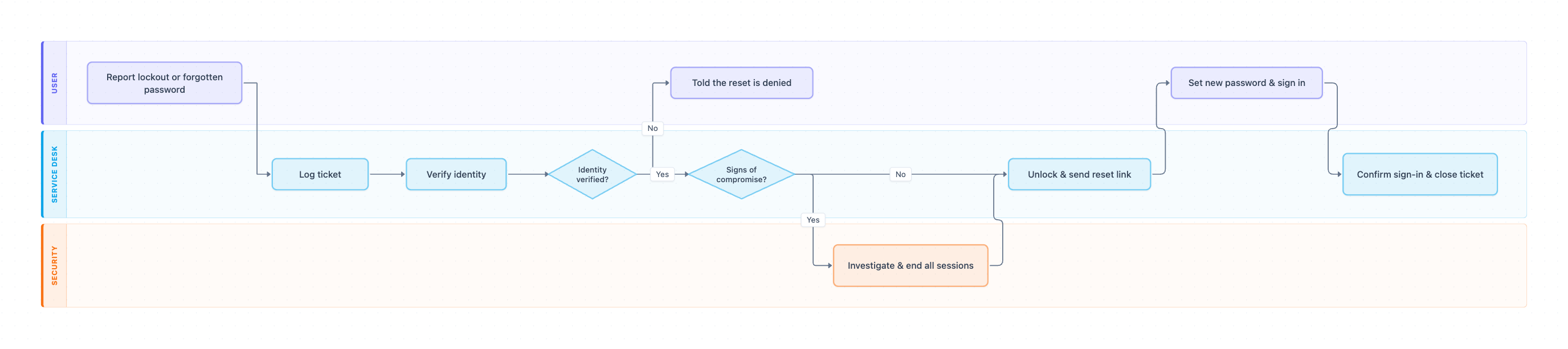
Example: Swimlane diagram for password reset and account lockout support: click to open it in the editor and change it.
Lanes and steps in order
- Report lockout or forgotten password (User): the user contacts the service desk.
- Log ticket (Service Desk): the agent records the username, the system and the contact channel.
- Verify identity (Service Desk): the agent uses the approved method, such as a call-back to the number on file.
- Identity verified? (Service Desk, decision): No means the agent denies the reset and logs the attempt, and the user is Told the reset is denied. Yes continues.
- Signs of compromise? (Service Desk, decision): Yes goes to Security first. No goes straight to the unlock.
- Investigate & end all sessions (Security): Security checks sign-in logs, ends active sessions and resets MFA if needed.
- Unlock & send reset link (Service Desk): the agent unlocks the account and sends a one-time reset link.
- Set new password & sign in (User): the user sets a new password.
- Confirm sign-in & close ticket (Service Desk): the agent confirms it worked and closes the ticket.
Hand-offs and decision points
Identity verified? is the step that matters most. Attackers often call help desks pretending to be a locked-out employee, so the SOP should name the exact verification methods agents may use. The Signs of compromise? decision sends real attacks to Security before the account is reopened.
Where this process usually slows down
- Verify identity: call-backs to users who are not at their desk. Allow a second method, such as manager confirmation.
- Investigate & end all sessions: Security is not on call out of hours. Agree a fallback for nights and weekends.
- Log ticket: repeat lockouts from the same user point to a saved old password on a phone or laptop.
How to adapt it for your company
- Add a self-service reset path for users who already enrolled in MFA, so only exceptions reach the desk.
- Add a separate path for privileged and admin accounts, with stricter verification.
- Add a step to notify the user's manager when an account was compromised.
- Track lockouts per user and per system to spot password policy problems.
Tip: Never read a password out over the phone or type it into chat. Send a one-time reset link to an address the user already has.
Standard operating procedure
Purpose: Get locked-out users working again quickly, without resetting an account for someone who is not its owner.
Scope: Covers forgotten passwords and locked accounts reported to the service desk. Ends when the user signs in or the request is denied.
Roles
- User: Reports the problem and sets the new password.
- Service Desk: Logs the ticket, verifies identity, unlocks and resets.
- Security: Investigates possible account compromise.
Procedure
- User: Report the lockout or forgotten password through the portal, chat or phone.
- Service Desk: Log a ticket with the username, the system and how the user contacted you.
- Service Desk: Verify identity using your approved method, such as a call-back to the number on file or a manager confirmation. Never use details the caller can read from email.
- Service Desk: If identity cannot be verified, deny the reset, log the attempt and tell Security if it looks suspicious.
- Service Desk: Check for signs of compromise: many failed sign-ins, sign-ins from unusual places, or MFA prompts the user did not start. If there are any, hand the ticket to Security first.
- Security: Investigate, end all active sessions and reset MFA if needed, then return the ticket to the Service Desk.
- Service Desk: Unlock the account and send a one-time reset link. Do not read passwords out over the phone or chat.
- Service Desk: Confirm the user can sign in, then close the ticket with the verification method used.
Process owner: IT Service Desk Manager
Turn this into a full SOP with AI →
Frequently asked questions
What is an account lockout procedure?
The agreed steps the service desk follows when a user is locked out: log the request, verify identity, check for compromise, unlock the account and confirm the user can sign in.
How should the help desk verify identity for a password reset?
Use a method the caller cannot fake from public information or a stolen inbox, such as a call-back to the number in the HR system, manager confirmation, or a verified MFA prompt.
When should a password reset go to the security team?
When there are signs of compromise: many failed sign-ins, sign-ins from unusual locations, MFA prompts the user did not start, or a caller who fails identity checks.
Make your own swimlane diagram with AI →