Purchase approval process (BPMN)
This BPMN diagram maps a purchase order approval across three lanes: Requester, Manager and Finance. It shows who owns each step, where requests are handed off, the two approval decisions, and what happens when a request is rejected or stalls. It is a starting point for operations, finance and IT leads who document or improve procurement workflows.
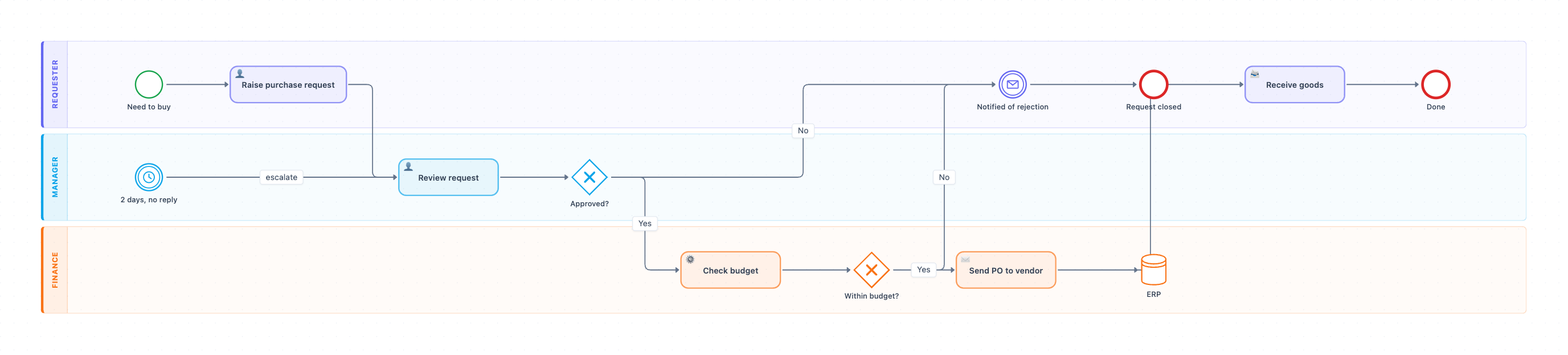
Example: BPMN diagram for purchase order approval: click to open it in the editor and change it.
Roles and steps, in order
- Requester: the Need to buy start event triggers Raise purchase request (user task). Hand-off to the Manager.
- Manager: Review request (user task), then the Approved? exclusive gateway. If the answer is No, the flow goes to the Requester. If it is Yes, it is handed off to Finance.
- Manager: a 2 days, no reply timer event points back to Review request with an *escalate* flow. This acts as the SLA reminder for the approval.
- Finance: Check budget is a service task, meaning it is automated. It leads to the Within budget? gateway.
- Finance: if Yes, Send PO to vendor (send task) runs and the PO is recorded in the ERP data store.
- Requester: Receive goods (receive task), then the Done end event.
Decision points and the rejection path
The two gateways, Approved? and Within budget?, both route a No to the same message event, Notified of rejection, in the Requester lane. That flow ends at Request closed. A rejection from either the Manager or Finance therefore produces one consistent outcome for the requester.
Where this process usually slows down
- Review request is the most likely bottleneck. It depends on a person, which is why the diagram includes the 2-day escalation timer.
- The Manager-to-Finance hand-off can stall if Check budget relies on ERP data that is out of date.
- Between Send PO to vendor and Receive goods, the timing depends on the vendor. The diagram has no timer or exception path for late deliveries.
How to adapt it for your project
- Rename the lanes to match your org chart. For example, use Department Head or Procurement instead of Manager.
- Add an approval-limit gateway, such as *Amount over $5,000?*, that sends larger purchases to a second approver.
- Set the timer to your real approval SLA and name who receives the escalation.
- Replace ERP with your actual system of record, and add a data input to Check budget if it reads from that system.
Tip: Give every lane a named owner and every gateway a clear yes/no question. This makes hand-offs and SLA breaches easy to discuss in process reviews.
Frequently asked questions
What are the lanes in a purchase approval BPMN diagram?
This diagram has three lanes: Requester, Manager and Finance. The Requester raises the request and receives the goods. The Manager reviews and approves it. Finance checks the budget and sends the PO to the vendor.
How do you show an approval escalation in BPMN?
Here it is shown with a timer intermediate event labeled "2 days, no reply" that links back to Review request with an "escalate" flow. In your own model, you can attach it as a boundary timer on the review task and route it to a named escalation owner.
What happens if a purchase request is rejected?
A No at either the Approved? or the Within budget? gateway leads to the "Notified of rejection" message event in the Requester lane. The process then ends at Request closed.
Make your own BPMN diagram with AI →